• Hello MLAers! We've re-enabled auto-approval for accounts. If you are still waiting on account approval, please check this thread for more information.

What are the standard/default dimensions for a compact's CRT?

I know that the compacts have a 9-inch diagonal screen and I know the resolution and aspect ratio, however I am struggling to find any information on what the correctly calibrated dimensions of the the image onscreen should be. Does anyone have a line on this information or know it off the top of their head?

 
I know that the compacts have a 9-inch diagonal screen and I know the resolution and aspect ratio, however I am struggling to find any information on what the correctly calibrated dimensions of the the image onscreen should be. Does anyone have a line on this information or know it off the top of their head?
Anecdotally, wasn't the image supposed to be square pixels at 72 dpi, so that if you printed stuff out, fonts on paper would be the same size as on the screen? I remember doing this with an early classic Mac (probably a Mac 512) and an ImageWriter II; comparing a MacPaint image with the screen version. It wasn't quite the same, but it was fairly close.

This means the screen dimensions would be about: 4.75" x 7.1.." or 8.55" on the diagonal.

Yes, so that's why Apple eschewed multi-scan monitors for quite a long time. it's also why.. I think... the first Mac II monitors, displaying 640x 480 were 12" monitors, because 640x480 square pixels at 72 dpi is 11.1111" along the diagonal. But that also doesn't quite make sense, because the original LC had a 12" monitor, but by default a 512x384 display. It's pixels would have been bigger than 72dpi.. well of course, that makes sense, because if 512x342 needs 8.55" on the diagonal, then 512x384 is 8.88...." on the diagonal. So, yes, LC pixels were too big.
 
I have a 4.75" x 7.11" rectangle that I printed on plain paper and cut out with scissors. I found that it sticks pretty well to a running CRT via static electricity, which makes screen adjustments easier :)

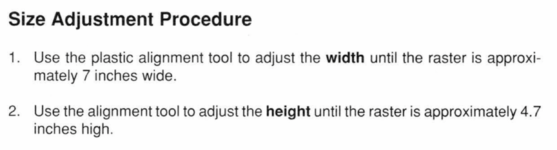
As noted above, I found that 4.75" x 7.11" is correct for 512x342 pixels at 72 dpi. 512/72 = 7.11(repeating) and 342/72 = 4.75.

That's 180.6 mm x 120.6 mm for the metric folks.
 
If you look at the different backgounds in the control panel there is one that is all squares if you set it you can easily adjust the screen until all the squares look correct and the screen size is as mentioned above
 
Thank you very much everyone - I should have thought to check the flipping service guide! Now to see how far off my eyeball estimations have been...
 
I have a 4.75" x 7.11" rectangle that I printed on plain paper and cut out with scissors. I found that it sticks pretty well to a running CRT via static electricity, which makes screen adjustments easier :)

As noted above, I found that 4.75" x 7.11" is correct for 512x342 pixels at 72 dpi. 512/72 = 7.11(repeating) and 342/72 = 4.75.

That's 180.6 mm x 120.6 mm for the metric folks.
Thank you very much everyone - I should have thought to check the flipping service guide! Now to see how far off my eyeball estimations have been...
512x384 is certainly the most odd-resolution, even though it makes sense. I guess that's because only the Mac LC of all computers and platforms in the 80s and 90s supported it & when the LC supported it, the pixels were oddly 25% too big; while colour screens on System 7 look oddly cramped, yet cute.

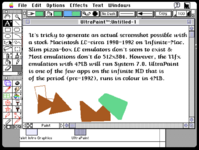
1728564041884.png
Note: If @joevt or another emulation expert picks this up I'll probably be informed that QEMU or MAME properly supports LC emulation, so I hereby offer my preemptive apologies :) !
 
Note: If @joevt or another emulation expert picks this up I'll probably be informed that QEMU or MAME properly supports LC emulation, so I hereby offer my preemptive apologies :) !
I'm not familiar with all the features of modern 68K Mac emulators.
Most of the Power Macs can connect a 12" RGB screen to get 512x384.
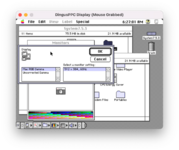
InfiniteMac needs to add a monitor selection pop-up menu for DingusPPC emulated Macs but DingusPPC is still a work in progress so far.
The smallest resolution you can get is 256x192 from the video output of a Power Mac 8500/8600. It also has a 320x240.
Power Mac 6100 512x384.png
 
I'm not familiar with all the features of modern 68K Mac emulators.
Most of the Power Macs can connect a 12" RGB screen to get 512x384.
InfiniteMac needs to add a monitor selection pop-up menu for DingusPPC emulated Macs but DingusPPC is still a work in progress so far.
The smallest resolution you can get is 256x192 from the video output of a Power Mac 8500/8600. It also has a 320x240.
View attachment 79455
Cool! I didn't know that!
 
I acquired a LC I recently just for this purpose -- it's such an odd, compromised screen resolution, albeit one that looks physically fantastic with the original 12" monitor. LC I's are interesting due to their ability to run System 6, and present a 68020. This makes them a much smaller proxy for the original Macintosh II, if you want to get a sense of what circa-1989-1990 color software for the Mac was like before System 7.

The obvious problem here is the fact that most early Mac II software assumes 640x480. I recall there being a bunch of patches to make software (mainly games and educational) work on the much smaller screen size that the LC introduced. But I'm willing to believe advanced color software that didn't run on classic Macs (PixelPaint, etc) never was patched.

The ultimate LC I setup for this purpose is probably a 14" Macintosh Color Display (same tube as the original 13", but matching the curve of the LC), hooked up to a PDS video card with enough VRAM for 256 colors.
 
An Apple //e PDS card can be installed in the Mac LC. It can output non-square pixels 560x384 to the 12" RGB display.

An Apple //e has composite video output. Usually composite video is 30 interlaced frames per second. A frame is drawn even field first (even numbered lines) followed by an odd field (odd numbered lines). The Apple II outputs the same info for both fields which makes it 560x192 60Hz. That's why the 12" RGB display has 384 lines instead of the original 342 lines of the compact Macs. Or at least that's one reason.

Another reason is that 512x384 has a 4:3 ratio like 640x480. I don't know why Compact Macs used 342 lines.

A third reason is that 512x384 is small enough to support thousands of colors (5 bpc) which makes it better for showing images than a 13" display at 640x480 that can only display 256 colors.
 
<snip> just for this purpose <snip> looks physically fantastic with the original 12" monitor.
Yes, I imagine so, even more so than the CC.

LC I's are interesting due to their ability to run System 6, and present a 68020.
The LC II / Performa 400 can run System 6.0.8; I've run it on my Performa 400.

<snip>I'm willing to believe advanced color software that didn't run on classic Macs (PixelPaint, etc) never was patched.
I think the philosophy was to keep 72dpi until multiscan monitors forced the issue. Therefore the size of a monitor led directly to the resolution of the screen.

to a PDS video card with enough VRAM for 256 colors.
My Performa 400 has 512kB of VRAM, so it was always able to handle 256 colours x 640x480 (leaving 217kB free, I wonder if that could be used?).
<snip> I don't know why Compact Macs used 342 lines.
Yes, I guess a lot of us wonder that, especially as it's a unique resolution even for computers of that period. According to this folklore article, the first Burrell Smith Mac prototype had a resolution of 384 x 256.
 
Back
Top