


My Wallstreet, 266mhz, 14" screen, has developed screen artifacts that I would like to ask the wisdom of the group about. I have some spare parts here, but don't want just to go swapping random parts in and out, as these machines would be tedious to work on in that way.
I am looking for the likely cause of the following pattern of behaviour.
On startup, I get this (in this case, I restarted and got the disk utility, but it is the same however you boot):
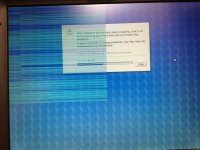
That pattern would ordinarily make me think that a screen cable was pinched or the like. However, what happens if I begin to use applications is that the screen artifacts move around with the windows. The following images show this behaviour, within a minute or two of the first image (these pics were all just taken in rapid sequence).
Here we have BBEdit open in its initial location on screen, and obviously unusable:
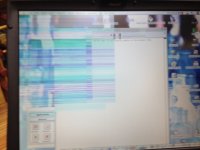
Then this happens if the BBEdit window is dragged a couple of inches to the right of the screen, which also makes the artifacts extend a couple of inches to the right:
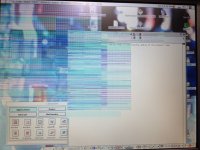
And similarly, when the window is dragged down to the bottom of the screen, the artifacts move down and are again extended:
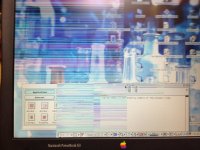
I am inclined to think that the likely culprit is VRAM or perhaps the graphics card, because of this behaviour. That would mean that the logic board needs replaced.
Would that be a sensible working hypothesis? The implication would be that I could leave software, screen, and video cables alone and concentrate on replacing the logic board only.
Your $0.02 would be valued!
I am looking for the likely cause of the following pattern of behaviour.
On startup, I get this (in this case, I restarted and got the disk utility, but it is the same however you boot):
That pattern would ordinarily make me think that a screen cable was pinched or the like. However, what happens if I begin to use applications is that the screen artifacts move around with the windows. The following images show this behaviour, within a minute or two of the first image (these pics were all just taken in rapid sequence).
Here we have BBEdit open in its initial location on screen, and obviously unusable:
Then this happens if the BBEdit window is dragged a couple of inches to the right of the screen, which also makes the artifacts extend a couple of inches to the right:
And similarly, when the window is dragged down to the bottom of the screen, the artifacts move down and are again extended:
I am inclined to think that the likely culprit is VRAM or perhaps the graphics card, because of this behaviour. That would mean that the logic board needs replaced.
Would that be a sensible working hypothesis? The implication would be that I could leave software, screen, and video cables alone and concentrate on replacing the logic board only.
Your $0.02 would be valued!
Last edited by a moderator:


