• Hello MLAers! We've re-enabled auto-approval for accounts. If you are still waiting on account approval, please check this thread for more information.

Using Modern Hard Drives on Old Macs?

This looks very promising.
Indeed!
I plan on getting one of these and putting it in an external enclosure so that I can lug it around, sort of like a super giant JAZ disk (but more reliable in the long term; I've read (albeit very little) that JAZ disks don't wear extremely well compared to other kinds of disks).

Next up is to figure out a way to cheaply and reliably interface a modern SATA drive to 50 pin SCSI.

c

 
these little 10k drives do make some heat! they are hot to the touch...
Not positive about this, but like their 3.5" SCA brethren they're probably meant to be used in well ventilated, hot swappable arrays for servers. A cooling fan may be necessary for long term use in the marginally ventilated cubbyholes of these ancient Macs. Beige and Platinum may be beautiful, but the power and cooling budgets always left a lot to be desired.

 
Thinking about cooling - the Mac stock approach to cooling would be to ensure a good thermal bond to some heat-sinking structural element. In Uni's Quadra, that unit is sitting on a pretty substantial metal case element. Maybe as well as his beloved "goop" the drive could sit on some of that heat-conductive pad that you find in G* series, located at hotspots that are at GND potential. Stock ventilation might then be enough. Just guessing. :-/

Rick

 
:O I initialized one of these puppies with HDT under 7.1 in the IIsi and the info box said HDT 2 GB would be ready to use in a few minutes . . .

. . . I pulled the plug because it wouldn't finish and looked like it was caught in a loop . . .

. . . it was, I had to rename all those volumes HDT 2.00 GB thru HDT 2.11 GB when I restarted.

They're scattered all over the friggin' desktop! :lol:

 
LOL at least on that machine you have a little more screen real estate to have them scattered all over the desktop haha

 
Some hard disk drivers (Silverling comes to mind) will let you set a volume to not appear automatically, but only when you say so via a special DA.

 
That's cool, never tried that one, I've always used HDT, IDK if I've ever used Apple's formatting tools . . .

. . . of course I've never actually had a need to cut down on volume clutter before this! :lol:

 
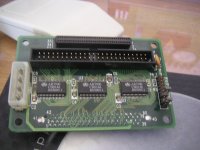
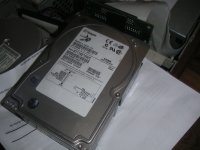
I have got one of those myself, a Seagate 18 Gb coming from a server, including the small board, never got it working until today.

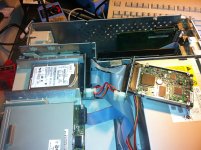
I connected the HD to my Powermac 7600, used Disk Setup to format and partition the drive and nothing else...

pict0241.jpg

pict0237.jpg

pict0238.jpg

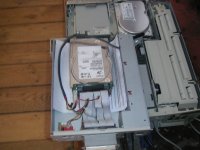
The HD was then put in a spare enclosure, for a test...working great but running hot !! }:)

pict0239.jpg

 
but is there a limit to how many partitions the Mac will "see"?
good question, so far with this 73 gig hd i am using, all partitions for all the space show up.

another question is mac os 6.0.8?, or Mac Portable? :) using the same drive, still waiting on my (10)

SCA to 50 pin adaptors from china.

 
Some hard disk drivers (Silverling comes to mind) will let you set a volume to not appear automatically, but only when you say so via a special DA.
Alliance Power Tools from APS Technologies (was once quite a fine seller of external hard drives to the Mac community) also has that feature. It will also allow one to password protect a volume. So you can have volumes which mount automatically, volumes which try to mount automatically, but ask you for a password before mounting, volumes which will only mount when you use a utility to manually mount them and volumes which require manual mounting and will ask you for a password when you try to mount them.

 
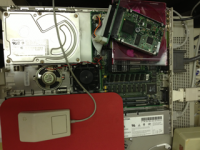
Snagged one of Uni's tiny/giant drives. He partitioned it for me, and I moved an OS 8.1 sys folder over from a Zip drive. Boots up nicely and I can see the 2, 4, and 8 GB partitions on the drive. Works great. Moving my whole library onto it for safe keeping. It'll wind up in an ancient zero footprint SCSI external enclosure as a file vault/emergency boot disk. The ZFP case has a fan, which is good, because it gets warm. Not dangerously warm, but needs-a-fan warm.

It's been accidentally on with my Q605 for 72 hours now, and is functioning smoovly.

lilSCSI.png

 
One of these would not fit in the tight confines of a Duo, presumably, but what about the more generous proportions of a 180 or 540c? Obviously some way to supply power would also be needed. Possible?

 
The standard PB HDD SCSI Cable already supplies power. ;)

But don't forget these come out of server arrays with active cooling, Dunno if the drive would bork before it melted the wrist rest or add some interesting texture to the PB's plastics first?

 
James, if a Chinese Mfr. could be persuaded to make up flex cables with SCA on one end and Apple's internal SCSI connector on the other, would there be room for these drives in PowerBooks?
Crap, I probably just single-handedly quadrupled the price of these things, I guess I should have bought a few more for myself first :)

I've never had to replace a Powerbook drive so I don't know. As someone else mentioned, the length may be an issue although with enough determination one could probably remove the connector and solder on a cable directly. Power consumption might be an issue too. They are low power relative to server drives, and about on par with the old 3.5" SCSI drives most of us are looking to replace, but likely a bit high compared to laptop drives.

 
Crap, I probably just single-handedly quadrupled the price of these things
That's ok your still the man. :-)

I think the users of this forum underestimate just how much traffic 68kmla gets.

More will get posted, the price will stay low on these trust me, There is thousands and thousands of these little guys out there just waiting to be posted on ebay and sold.

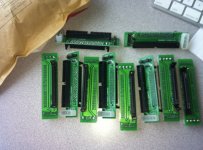
my adaptors came in today.

Screen shot 2013-04-24 at 1.13.46 PM.jpg

 
My bag of SCSI jewelry arrived from China today as well, very quick service, that. I'm looking forward to installing the little space heating [}:)] ]'> in the IIsi correctly. [;)] ]'>

 
Back
Top