• Hello MLAers! We've re-enabled auto-approval for accounts. If you are still waiting on account approval, please check this thread for more information.

Using Disks Between My Macintosh Classic and 575

So I was trying to transfer some games from my LC 575 to my Macintosh Classic (internal drive is busted, so I had to use an external drive) and it doesn't seem as though they use a compatible file structure? Does that sound correct or is something amiss here?

The external drive is a M0131. Thanks!

 
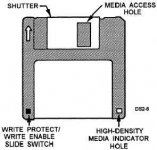
If your external drive has the original floppy mechanism inside, it will not read or write HD (high density) 1.4MB floppies. The M0131 is an 800k external drive. This means you'll need some DD (double density) floppies. If they're IBM/DOS preformatted, they'll often say 720KB on the box. They'll also be missing the HD index hole, only having the write protect slider/index.

If your external drive has had the mechanism replaced with a 1.4MB unit, then it should read and write both DD and HD disks. Make sure your disks have been initialised in a Mac using the Mac OS Standard format. If disks are in MS-DOS format, your files' resource forks (crucial to applications and games) cannot be stored on disk, and the PC File Exchange extension is required to access the disk at all.


 
For a quick sneaker-net between two machines in the same room, I think formatting HD 1.44MB media as 800K is probably fine. Then both systems should be able to read and write the disks. But I wouldn't trust it for long-term or even medium-term data retention.

 
Once I've gotten them formatted I've had "OK", luck with using 1.44MB floppies with 400/800k drives but getting used disks to format can be a problem. I've kind of been keeping my eyes open for one of those old tape/disk bulk-erasers but lacking that I've found that taking a good powerful rare-earth magnet and spinning it around the circumference of the disk for a minute or two *seems* to help break things up enough that the weaker write current of the low density drives has a better chance to make its mark.

Remember, if you want to try this you'll have to put a piece of tape over the density select hole, otherwise the high-density drive in the 575 will stubbornly refuse to treat the disk as low-density even if you format it in the M0131. (Which won't care.)

 
Would opening the M0131 to determine if the drive inside is original or upgraded be a good idea? I haven't done so before, so I don't know if it's made out of "self destruct" plastics.

 
So, if I'm understanding correctly, the Classic can't create floppies that will work on a 575 and vise verse? I got a replacement drive for the classic (no more external drive) and I still can't interchange disks.

 
The Macintosh Classic's internal floppy drive is a high density/1.4MB unit. If you've replaced it with the same, it should be able to read and write the same disks as your 575, provided you've initialised/erased the disks in Mac OS format. If the disks are in MS-DOS format, both machines will need the PC File Exchange extension installed. To erase a disk in System 7, select its icon on the desktop and choose Erase Disk from the Special menu. If this doesn't do it, then there's something wrong with hardware.

 
Last edited by a moderator:
Hmmm. Odd. I just don't get it. The disks interchange between all my other 575s abd 6115CDs without issue, and the classic and Plus interchange without issue, but interchanging the disks between those two groups doesn't work at all.

 
14091_262_1.jpg

Do the disks you're using in the Plus have the high density hole? If so, you need to tape over the hole, otherwise high density drives will treat them as such, not 800k as you've formatted them. 800k drives can't tell the difference between HD and DD media, so they treat HD disks as DD. DD formatted HD disks cannot be read or written in HD drives unless that hole is covered.

 
Back
Top