


Can anyone help me here? I wanted to play around with a bit of Swift and SwiftUI (because that's what Apple are promoting). I've read quite a bit in the documentation and watched a few videos, but frankly there's something I'm not getting about declarative UIs.
Here's some code that illustrates the problem:
TestApp.swift:
ContentView.swift:
The App creates a dynamic array of buttons. The iTitle of which is always "Woo", so the first button initially appears as: "Woo". The array can be extended by tapping on the first button, called "Append". Pressing a button prepends: "Hello" to the title, so multiple presses change the title to: "HelloWoo", "HelloHelloWoo" etc. That's fine, that works.
What doesn't work is if you tap the button "Goodbye". Although it's meant to invoke the "Goodbye" method of iButtons[0], in fact it doesn't, because iButtons[0] in that part of the code isn't iButtons[0] in the ForEach. It's a different object. And this happens even if you don't add any buttons by pressing "Append": iButtons[0] in the "Goodbye" section of the code always was a different iButtons[0] to the one in the ForEach, even though iButtons[] in the "Append" section is the same iButtons[] in the ForEach.
Now, I sort of get the concept of a declarative UI. It's more like a hardware description language than a procedural or object-oriented UI. The VStack and ForEach work like HTML user-interface elements rather than a sequence of steps, but also the preference is for them to be immutable, because somehow in the deluded minds of Gen Z programmers, creating zillions more objects every time you need to do something to them is safer and quicker.
Still, in the real world, Swift provides @state annotations that allow UI elements to contain mutable data: changes to their data trigger an update in the UI elements themselves.
It seems to me though that I can't get two methods to operate on a single, dynamically created, button and yet surely this kind of functionality is critical for pretty much every app? And yet the documentation I've seen doesn't seem to cover this. Yes, they cover dynamic allocation (with seemingly a single method) or static allocation with multiple methods. But not both.
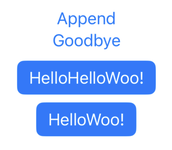
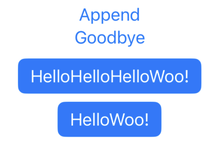
Sequence: Append, tap, tap, Append, tap (on the second one), Goodbye, tap (on the first one). Goodbye didn't modify iButtons[0] text.
So, there's 2 questions:
Here's some code that illustrates the problem:
TestApp.swift:
Swift:
import SwiftUI

@main
struct TestAppApp: App {
    var body: some Scene {
        WindowGroup {
            ContentView()
        }
    }
}
ContentView.swift:
Swift:
import SwiftUI

struct TitleButton: View {
    @State var iTitle:String
    var body: some View {
        Button(action: theAction) {
            Text(iTitle)
        }.buttonStyle(.borderedProminent)
    }
    init(aTitle:String) {
        iTitle=aTitle
    }
    func theAction() { iTitle="Hello"+iTitle }
    func goodbye() {  iTitle="Goodbye"; print("Goodbye") }
}

struct ContentView: View {
    @State private var iTitles: [String] = ["Woo!"]
    @State private var iButtons: [TitleButton]=[] // = [TitleButton(aTitle:self.iTitles[0])]
    var body: some View {
        VStack {
            Button("Append", action: {
                iTitles.append("Woo!")
                iButtons.append(TitleButton(aTitle:iTitles[iTitles.count-1]))
            })
            Button("Goodbye", action: {
                if iButtons.count > 0 { iButtons[0].goodbye() }
            })
            ForEach(0..<iButtons.count, id:\.self) {id in
                iButtons[id]
            }
        }
    }
}
The App creates a dynamic array of buttons. The iTitle of which is always "Woo", so the first button initially appears as: "Woo". The array can be extended by tapping on the first button, called "Append". Pressing a button prepends: "Hello" to the title, so multiple presses change the title to: "HelloWoo", "HelloHelloWoo" etc. That's fine, that works.
What doesn't work is if you tap the button "Goodbye". Although it's meant to invoke the "Goodbye" method of iButtons[0], in fact it doesn't, because iButtons[0] in that part of the code isn't iButtons[0] in the ForEach. It's a different object. And this happens even if you don't add any buttons by pressing "Append": iButtons[0] in the "Goodbye" section of the code always was a different iButtons[0] to the one in the ForEach, even though iButtons[] in the "Append" section is the same iButtons[] in the ForEach.
Now, I sort of get the concept of a declarative UI. It's more like a hardware description language than a procedural or object-oriented UI. The VStack and ForEach work like HTML user-interface elements rather than a sequence of steps, but also the preference is for them to be immutable, because somehow in the deluded minds of Gen Z programmers, creating zillions more objects every time you need to do something to them is safer and quicker.
Still, in the real world, Swift provides @state annotations that allow UI elements to contain mutable data: changes to their data trigger an update in the UI elements themselves.
It seems to me though that I can't get two methods to operate on a single, dynamically created, button and yet surely this kind of functionality is critical for pretty much every app? And yet the documentation I've seen doesn't seem to cover this. Yes, they cover dynamic allocation (with seemingly a single method) or static allocation with multiple methods. But not both.
Sequence: Append, tap, tap, Append, tap (on the second one), Goodbye, tap (on the first one). Goodbye didn't modify iButtons[0] text.
So, there's 2 questions:
- What am I not getting?
- How would I fix it so that the Goodbye button actually does change the first button's text to "Goodbye", update it on the screen and then subsequent presses of the button would change it to: "HelloGoodbye", "HelloHelloGoodbye".

