


• Hello MLAers! We've re-enabled auto-approval for accounts. If you are still waiting on account approval, please check this thread for more information.

Strange USB Behavior

Looking for some thoughts/input/ideas as I try and troubleshoot this problem.

I have a cheap CompuCable A/B/C/D USB switch box I use to share a keyboard and mouse between computers exactly like this one:
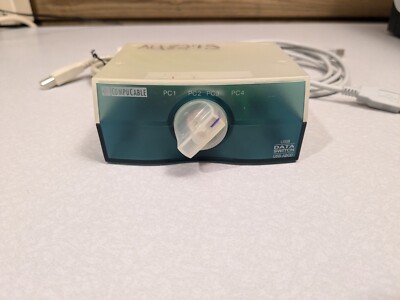

Works fine with a G4 450 Dual (Gigabit), G4 800 Dual (Quicksilver), G5 2.7 Dual

Connect the G5 2.0 Dual up to it and it doesn't recognize the keyboard or the mouse.

Have tried swapping the G5 2.0 to different cables and connecting into different ports on the switchbox itself.

NADA ...

In fact, I actually have 2 of these switchboxes and have tried both ... same deal ... NADA with the G5 2.0.

Connect the keyboard and mouse directly the G5 2.0 and they both work fine.

Any thoughts on what might be going on here ?
 
try to cross-test the hub on a similar era pc first, maybe its a driver thing, maybe the procols/drivers work better on a pc.
 
try to cross-test the hub on a similar era pc first, maybe its a driver thing, maybe the procols/drivers work better on a pc.

Appreciate the response.

Don't currently have a PC up and running to test with.

And as far as it being "a driver thing" this is a simple mechanical switch.

The switch itself has no drivers ...

The drivers for the USB devices (Keyboard and Mouse) connected through the switch are supplied by whatever USB support is built into Mac OS 10.4.11 by Apple.

Neither require any special (additional) software to operate.

All the machines I mentioned previously are (literally) running the same System Software ... in that the OS installs on each machine are a clone (via CCC) of the System Software that was originally installed on the G4 800.

Keyboard and mouse seem to be recognized and work fine on 3 machines when connected through the A/B/C/D switch ... but nothing with the 4th machine.
 
If you install Developer Tools there is a USB Prober application that will likely give a lot more info....

(y)

Installed off the 10.4 Install DVD.

Didn't see anything on any of the .pkg names that seemed specific to USB ... will need to do further digging.

Tried connecting the iMac G5 through the switch box yesterday and found it also suffers from the same issue as the G5 2.0: keyboard and mouse not being seen.

Tried different cables, no change.

Connect mouse directly (because it's easiest cable-wise) iMac G5 sees it fine.

Have seen some other reports out there of similar behavior of various machines.

Was going to try hanging one (of 3) the little Asante 4 USB hubs off the iMac thinking maybe signal attenuation but I could only find one of the wall warts. Plugged all 3 hubs in to power and get no power light on the hub (these were flakey back in the day... which is why I stopped using them)

Pulled out the multimeter and checked the voltage ... it read over 9.5 volts. They're only supposed to output 6 volts.

Not sure what to think about all this at this point.
 
Last edited:
USB Prober.app might be part of "Xcode" or "Hardware IO Tools".

You can sign up for a free developer account, go to https://developer.apple.com/download/all

"IOUSBFamily Log release for Mac OS X 10.4.11(PPC) Build 8S165" also contains USB Prober.app.

USB Prober.app v2.0 is for PPC. I don't know if there's a later version for PPC. There is source code available for each macOS version in the IOUSBFamily project. It can be found in Apple Developer DVD April 2004 Tools and Sample Code.

There's also USB Prober for classic Mac OS in the USB DDK 1.5.9f1
 
USB Prober.app might be part of "Xcode" or "Hardware IO Tools".

You can sign up for a free developer account, go to https://developer.apple.com/download/all

"IOUSBFamily Log release for Mac OS X 10.4.11(PPC) Build 8S165" also contains USB Prober.app.

USB Prober.app v2.0 is for PPC. I don't know if there's a later version for PPC. There is source code available for each macOS version in the IOUSBFamily project. It can be found in Apple Developer DVD April 2004 Tools and Sample Code.

There's also USB Prober for classic Mac OS in the USB DDK 1.5.9f1

Thanks ... (y)
 
So I decided to dig out my 2nd A/B/C/D USB switch box (which is identitical to the first one mentioned previously) and hook it up to the iMac G5 and the G5 2.0 Dual - neither of which worked with the other switch box (and longer cable) - using the Apple Pro Keyboard and Pro Mouse ... using shorter cables and see if there was any difference.

Both devices were recognized and seem to function fine.

So, as I was beginning to suspect, it appears that maybe this is a signal attenuation/cable length issue.

Not really knowing much about USB (or how the switch boxes I'm using are wired) I think the questions at this point are:

Is the long cable I was using on these 2 machines the problem ?

Or is the switch box wired in such a manner where some lines are wired in common between the ports, such that there is a total length problem that is hit between multiple cables ?

Will need to go through my cables here and see if I have shorter cables that will work and swap things out to shorten the total length of the cables connected to the switch box.

I did run across "active" USB cables in my internet diggings, which apparently contain a signal amplifier/booster.

I also ordered an 8 port USB switch from a seller on Amazon over a month ago ... but it was shipped from China.

USPS has had it for the last 2 weeks and after it bouncing around at various facilities here for a week, they decided to ship it out Phoenix, AZ ... where it has sat since 2/7 with no updates in the status/tracking info.
 
I looked at the eBay listing for the 4 port USB switch, which has a clear cover and it appears to contain a mechanical switch. I suspect this switch only works at USB 1 speed 1.5 Mbit/s. I believe the Apple keyboard and mouse you mentioned are USB 1 devices. USB 2 and USB 3 switches require an USB 2 or USB IC to switch at these higher speeds AFAIK.
 
I looked at the eBay listing for the 4 port USB switch, which has a clear cover and it appears to contain a mechanical switch.

That is correct.

I suspect this switch only works at USB 1 speed 1.5 Mbit/s.

Likely true, given it's vintage.

I believe the Apple keyboard and mouse you mentioned are USB 1 devices.

Probably correct.

USB 2 and USB 3 switches require an USB 2 or USB IC to switch at these higher speeds AFAIK.

Interesting, hadn't considered that aspect.

The keyboard is definitely USB 3.0 and has a USB 3.0 hub built into it.

The mouse (MacAlly ERGOPALM) - which is plugged into the hub on the keyboard - is USB 2.0 (per OWC)

The other device plugged into that hub is a Contour Designs Shuttle Pro ... given its vintage, I'd guess that it's USB 1. Kinda hard to quickly check, as it appears Contour Design deleted the info for the original version of the Shuttle Pro off the their website. I probably have the manual for it here somewhere.

Interesting that it seems to work on 3 of the machines pretty much without fail but not the 4th.
 
Ok ... pulled all the cables connected to the switch box and the machines.

Went through my inventory here and came up with a couple of shorter ones which I swapped in, removing a pair of 10' cables from the mix.

That got the keyboard and mouse recognized by the G5 2.0 ... once ... I had to pull the cable at the G5 2.0 and reinsert it to get it to see it at all.

And like I said above that only worked one time: when I switched away to the next machine the G5 2.0 won't recognize the keyboard or mouse again.

The G4 450 which has no problem recognizing the keyboard and mouse and it is using an identical cable.

So some progress but still not terminatedly handled.
 
FYI all Powermac G4 had USB 1 ports. You could buy USB 2 cards for PowerMac G4 machines, though they would only function at USB 2 speeds under OSX.

All PowerMac G5 had USB 2 ports. iBook G4 had USB 2 ports.

The behavior you are experiencing might be due to the different USB port speeds.
 
FYI all Powermac G4 had USB 1 ports. You could buy USB 2 cards for PowerMac G4 machines, though they would only function at USB 2 speeds under OSX.

All PowerMac G5 had USB 2 ports. iBook G4 had USB 2 ports.

Right.

The behavior you are experiencing might be due to the different USB port speeds.

Plausible somehow I guess ...

But the interesting thing in that regard is that one of the G5's - the 2.7Ghz - seems to work fine with this USB switch box.

And it is the G5 which is adjacent to, and gets switched from, one of the G4 machines:

Position 1 Position 2 Position 3 Position 4

G5 2.0 ----> G5 2.7 ----> G4 800 ----> G4 450

The G5 2.0 is never switched directly from one of the machines with USB 1.1.
 
A little update on this issue.

Here's what Console is reporting while the keyboard (with built-in hub with mouse and Contour Shuttle Pro attached) are connected:

Feb 27 21:52:51 Power-Mac-G5-2-0 kernel[0]: USBF: 189.456 [0x4c63900] The IOUSBFamily was not able to enumerate a device.
Feb 27 21:52:52 Power-Mac-G5-2-0 kernel[0]: USBF: 190.311 [0x4c63900] The IOUSBFamily is having trouble enumerating a USB device that has been plugged in. It will keep retrying. (Port 4 of hub @ location: 0x4b000000)
Feb 27 21:53:12 Power-Mac-G5-2-0 kernel[0]: USBF: 210.875 [0x4c63900] The IOUSBFamily was not able to enumerate a device.
Feb 27 21:53:13 Power-Mac-G5-2-0 kernel[0]: USBF: 211.749 [0x4c63900] The IOUSBFamily is having trouble enumerating a USB device that has been plugged in. It will keep retrying. (Port 4 of hub @ location: 0x4b000000)
Feb 27 21:53:35 Power-Mac-G5-2-0 kernel[0]: USBF: 233.513 [0x4c63900] The IOUSBFamily was not able to enumerate a device.
Feb 27 21:53:36 Power-Mac-G5-2-0 kernel[0]: USBF: 234.368 [0x4c63900] The IOUSBFamily is having trouble enumerating a USB device that has been plugged in. It will keep retrying. (Port 4 of hub @ location: 0x4b000000)

Starts out (right after boot) with a fairly short time interval of maybe 10 seconds and continues on ad infinitum.

The interval does get longer over time though.

And I have confirmed that it is the keyboard that the G5 2.0 is having trouble with:

Plug the mouse or Contour Shuttle Pro into the switchbox and switch it to the G5 2.0 and they are instantly recognized, reported in System Profiler, and no messages are generated in the Console. And the mouse works, didn't try the Shuttle though.

Plug the keyboard directly into the G5 2.0 with the mouse and Shuttle plugged into its hub and all 3 are recognized with keyboard and mouse functional (again, didn't try the Shuttle), no errors reported in the Console.

Just did an Archive and Install of 10.4 and then updated to 10.4.11 thinking that might resolve it ... nope.

Given that, it has me thinking it might be hardware related ? (as in the G5's hardware)

This is apparently an issue ... with all sorts of devices ... over multiple versions of Mac OS X (10.4 to 10.8 ?) ... on many different computers.

As is easily seen by searching the phrase: "The IOUSBFamily is having trouble enumerating"

Doesn't seem there is a one-size-fits-all definitive solution either.

I'm going to order a short "active" USB extension cable and see if that does anything.
 
The "active" USB 3.0 cable extensions came in yesterday.

Tried plugging in one into one of the G5 2.0's native usb ports and it made no difference.

Figured since I had a pair of them I'd go ahead and try two: one on the G5's native usb port and one where the keyboard plugs into the switchbox. Same result.

So at that point I decided that I would go ahead and pull the Adaptec 4 port USB 2.0 card - which I had originally put in the G5 2.0 - out of the 9600 where I had moved it to, and reinstall it in the G5 2.0. (I had tried this card in the G5 2.0 previously and it worked once, with the keyboard being recognized ... and then stopped working)

Tried that with only one "active" USB 3.0 cable extension in the chain at the switchbox, where the keyboard plugs in.

That got us partial success:

All three devices (das Professional keyboard for Mac, MacAlly ERGOPALM mouse, and the Contour Shuttle Pro) are seen and recogized by System Profiler ... and the mouse actually works !

Unclear on the Shuttle Pro, as it complained that the driver wasn't installed when I opened the app. So I installed the latest driver I have for it but I haven't tested it.

The das keyboard is still problematic. It originally worked for a few keystrokes and then stopped responding. It is still seen in System Profiler though.

Tried running the keyboard identification procedure in System Preferences ... and it fails after timing out on the first step (press key next to the left Shift key)

The messages in Console this time around I believe are quite a bit different than what I previously posted.

I did see one report where this issue "solved" itself ... simply by leaving the keyboard (or whatever device it was) plugged in for a long period of time. I meant to do that (leave computer on with keyboard connected) before I went to bed last night but forgot.

Time to fire up the unit and see what today brings.
 
Still no real joy on this but I did have the keyboard be recognized and function randomly a few times on the G5 2.0.

No real rhyme or reason that I can see, other than the fact that it occurs fairly soon after the keyboard is switched to the G5 2.0.

And it always loses the connection in a fairly short time (few minutes) shortly after that.

Have had a bunch of new messages logged that I had never seen before in the Console.

Opened up USB Prober on the G5 2.7 (which doesn't have issues) just to get a look at it and familiarize. Need to see if it is installed on the G5 2.0.

Did a search on one reported error that I have seen repeatedly - USB error 0x000002ed - and ran across a tech support response from a company on their USB trackpads which I thought was interesting (attached in a PDF)

Basically, what they were saying was cabling generally ... and timing, possibly due to cable length.

The DAS keyboard has a pretty long (5' to 6') permanently attached cable ... then add the cable from the switchbox to G5 2.0 which is at least another 5'.
 
Back
Top
