• Hello MLAers! We've re-enabled auto-approval for accounts. If you are still waiting on account approval, please check this thread for more information.

Sound loss on custom Performa 637

RTFM! ::)

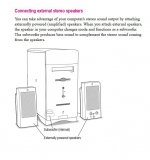
Woofer-Stereo setup..JPG

edit: now to find the Q630 board and see if it works with the 6400 Audio/Monitor Subassembly amp/sub setup! [:D]

 
Last edited by a moderator:
I am about to shoot this thing and start over. I got the Quadra 630 board in the mail....and the exact...same...thing...happens. So what does that mean? Is there outside interference? Is the power supply somehow bad? Is the wiring kaput? I have no idea what is wrong or how to fix it. I swear, it's all going in the trash if I can't figure out what the heck is wrong.

 
Slow down, we'll get it worked out! First thing I think I'd do is try the two 6xx boards in your 6500 drawer. I'm thinking along the lines of a damaged harness or a blown amp IC or some such on the Audio/Monitor Subassembly.

 
The weird thing is that it happens even if I disconnect the audio/monitor board, and if I disconnect the front jack box. I plug in the external speakers to the motherboard sound out port directly, and the same thing happens as with the external speakers. I am afraid sticking the 630 board in the 6400, as hooking the 6400 board to the wiring harness im working on doesn't work...dont want the 630 board to mess up a good 6400 somehow.

 
Well, thanks to you, my friend, I can confirm that the Performa 630 board DOES keep sound going within the 6400 chassis! I can keep restarting it, etc, and the sound keeps coming. That at least makes me feel better that I do not have two fried motherboards on my hands. However, it leaves me with a few conclusions:

One: The problem is not directly with the front sound box or the monitor/sound rear board. With both of these disconnected, the problem still exists with a speaker connected to the motherboard sound out port directly.

Two: The only things then still directly connected with the problem occurring are: 1. the power supply, 2. the SCSI2SD board, 3. the floppy drive (I have confirmed the problem exists with it disconnected as well), 4. the ADB chain.

Three: I have not ruled out that the issue could be from some kind of short within the main logic board connector itself, causing an issue.

Four: I suspect the power supply somehow is involved, because the issue occurs only after a few seconds of the machine being powered up, and because it is only correctable with the power supply unplugged for a few seconds.

Five: It does not involve the main motherboard itself, as two motherboards create the same symptoms.

Man, I hope we can nail this thing down...

 
Here is more food for thought: I hooked up my multimeter to the speaker jack (disconnecting the speaker). I started up the Mac, and got a reading of 23.4 mV. Around when the pop sound occurs, that dropped to 8.6 mV. I then connected the external speakers I have to the front jack. Starting the machine then, the voltage was a steady 8.6 mV the entire time (even while the startup sound played). Perhaps one can infer that with an external source connected to a jack, the voltage normally drops to 8.6 mV. Further extrapolating, perhaps then, what is happening, is that something is somehow grounding out the circuit after a few seconds after startup. What in the world that might be, I don't know. Is it something within the monitor/sound card? Uncertain, because this occurs even with that card disconnected. Is it within the motherboard connector wiring itself? It keeps looking more and more likely to me.

 
Sorry, had to run right back to work. Glad things were moving in a positive direction while I was busy. [:)]

6500 (Gazelle architecture) logic board will run in your harness off your PSU as it rolls its own 3.3V for PCI onboard. There have been what I consider unsubstantiated reports of (Alchemy architecture) 6360/6400 boards working in the 6xx box without functional PCI slots. But I have grave doubts about the prospect being workable and will not test that myself, no point to it, nothing to gain but borkage on that path.

Don't base any conclusions on hooking the built-in speaker up to the stereo jacks. That shouldn't work in any case. Use powered speakers or headphones. IIRC the stereo/microphone jacks are at line level in and out. Headphones work at that level, speakers with the built-in's output generally don't, if ever. The internal speaker is an 8Ω load that's driven at up to 1.1W by the amp IC on the Audio/Monitor Connection Subassembly PCB of the desktop boxen.

Again, that's how I remember/understand things, not an expert by any means, others will need to confirm or correct that info.

The Audio/Monitor Connection Subassembly won't work alone. Its function is deeply  intertwined with the Front Panel Control Board and the backplane stereo speaker jack. I'll test my functional rig at the speaker jack sans both subsystems to see what happens  .  .   .

.  .  .  absolutamente nada, that's what happens!

1) with both Audio/Monitor Connection Subassembly and the Front Panel Control Board modules unplugged from the harness:

-  -  -  -  No sound out the speaker jack on the back

2) with the Front Panel Control Board module plugged into the harness and the Audio/Monitor Connection Subassembly left unplugged:

-  -  -  -  No boot chimes, but alert sounds work from the headphone/speaker jack on the back from the "Set your Clock, Dumbass" alert on.

-  -  -  -  Same result when speakers are jacked into the Front Panel Control Board

3) with Audio/Monitor Connection Subassembly back in harness along with the Front Panel Control Board:

-  -  -  Same results as above with speakers jacked into either module.

4) Unplug the speaker jack and the BOOT CHIME IS BACK!!! [:D]

Time to look around for the Quadra 630 board for shiggles and gits, but the 6290 board in hand should behave the same. I wish I could find the 5260(?) Front Panel Control Board to mess around with.

Go through the motions systematically, maybe nothing is wrong at all? Maybe it's just that you've been testing with an 8Ω impedance speaker from a line level jack? Sound might have been there all along, but at an inaudible level.  :huh:

edit: from your last post, it seems you've been using a set of powered speakers all along? For some reason I got the impression you were hooking the internal speaker up to the stereo jack.

 
Last edited by a moderator:
You posted while I was testing/writing that last. I'm tired.

I guess it's not the 6290 board I've been using, TattleTech says 6200/6300/42, but the monitor settings are all wrong. Only recommended settings are 640x480 and 800x600 at a max of 256 colors? It could be the 6290 as the only thing that makes any sense is that TattleTech under OS9 has no clue as to what's going on because I'm might as well have been booting up on a turnip. :blink:

 
Yes, I have been using powered speakers on the external jacks. I can confirm that, for at least the 630, the startup sound will play from the motherboard sound jack even with both the front box and the audio/monitor card unplugged from the harness. No matter what combination of box/card plugged/unplugged I use, the end result is always the same. The problem I have is that I wish I had a spare bare wire harness to test, but I do not. Is there anything in there except just straight wires? I can't find anything in the connector that looks like it is shorting out, at least to the naked eye. I do think that the drop in voltage at the internal speaker jack after the pop to the level that is consistently there with an external speaker connected confirms that something is shorting along the line that at least makes the machine "think" that there is something external connected, leading to a drop in internal speaker voltage. That would be appropriate, as i'm sure the voltage is intended to drop to cut the internal speaker off when an external one is connected. Where that drop is, and why, however...

 
Yeah, figures, you know a lot more about this electronics stuff than I do. I remembered you saying "when I plug the speaker into  .  .  ." and that made me think you'd hacked the internal to a speaker jack. My bad.

#3 in the test procedure documentation for last nights quick session appears to be in error. I think I meant to say the Front Panel Control Board was unplugged, when both are in battery everything output is fully functional outside the wonkiness of the missing startup chime. If I wake up today I'll retest and correct the truth table.

I was mulling this over while more than half asleep in bed and came up with the a mental image of the two jacks and speaker wiring set up like a two or three way light switch circuit on the harness. Probably a silly oversimplification, but there are a LOTTA wires on the harness connectors for those two subsystems. Drop out video on one side and IR on the other and the schematic development for testing is greatly simplified. I'll dig up the "frogeye" diagram from the PowerCC docs, that will make a common template for breaking the connections down to the pin level and give me some AI playtime.

The Front Panel Control Board requirement for sound output makes a bit of sense to me now, you have the two momentary switches for volume control complicating things on that board. Too bad that PCB is soldered to the RFI can making visual inspection of the solder side a bit too complicated a procedure for now.

You might want to cycle those switches to make sure your short isn't located there? The drop in voltage probably explains the "THUMP thump" output and volume differential I get on the speaker or sub when I'm testing with one or the other in circuit.

Dunno, coffee's up, I'll see if this post makes any sense later. :blink:

 
Another clue: the microphone jack doesn't work on the main board, either. That is odd as well since it appears to be an issue with sound in general.

 
More info: i took my Performa 6300 out of the closet and used the 630 motherboard in there. Damn thing starts right up from my 6300's internal HD, plays sound no no problem. I even hooked the SCSI2SD to it just in case there was some funky voodoo there that was causing issues. Nothing wrong at all.

So, as a result of that test, I have determined that either: 1. the power supply is causing some crazy interference (or funky voltage) that is messing with the sound. 2. the main harness is messed up somehow. There are not other alternate logical explanations that I can think of. Either that or the power supply is really giving off some sort of EM.

 
HOLY CRAP....I just figured it out. The front volume/audio out box has to be GROUNDED! It's the simplest thing ever: I literally put it up against the power supply (grounding it), and, BAM, sound! You could totally make that happen with just a wire and alligator clip or something, it would work perfect.

 
Last edited by a moderator:
Holy crap! The most simple of thing can bite you right inna ass! Gotta see if that changes my 6290 test results table.

Just tried it with that box grounded and ungrounded on the 6500 board in the 6400 BenchMac setup. I see no difference, works fine either way. :huh:

At any rate, congrats!

 
Thank you! Now, I would like to understand your problem a little bit better. I'll admit, I was a little confused by your diagram. Can you explain it a bit more?

 
Sure, that's not surprising as it's visual shorthand for the way I think, tables of words are harder for me to use.

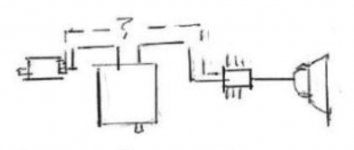
6xx-6xxx-sound-diagram-detail.JPG

Baseline hardware state: functioning normally

Center - CPU with speaker jack at bottom - represents sound system on mobo

Left - Audio/Monitor Connection Subassembly on w/speaker jack on left

Right: Amp circuit/IC on  Audio/Monitor Connection Subassembly

Far Right:  internal speaker plugged into amp circuit header

Solid lines: FoxConn harness connections between logic board connector and subassemblies

Dotted Lines: represent my theoretical "Three Way Switch" line level wiring connections.

I'm thinking about buzzing the bare harness connectors for the modules for continuity within the FoxConn harness. There might be simple wiring connections between the two modules on it but they're probably made on the logic board if not. I figure they're probably simple traces on the logic board I might find with a continuity tester. If not I'm guessing I may find them made to a simple gate IC near the logic board connector that's connected to the sound system at the rear.

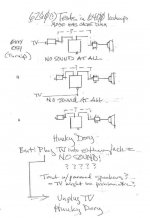
The top two diagrams on the page above show the stereo connector of the VGA->HDMI converter for my HDTV plugged into the Front Panel Control Board and rear speaker jacks. Both those machine states appear to break sound on my 6290(?) logic board, but seem to work fine on the 6500 board. I cleaned up the baseline diagram and made copies of the pasteup to use in a binder for testing all my boards in those three states as I go along doing related projects.

The MedusaMessMac testbed I've been building in the DigitalSTARION chassis is a Poor Man's TAM setup using a 6400 FoxConn harness, PSU and various bits. for testing PCI card function in 6400/Alchemy and 6500/TAM/Gazelle environments. The overall form factor of the setup was designed to allow for use of a right angle rackmount riser for lowrider two, three and four slot riser development playtime.  It's getting there. [:)]

Now if I could just find a knob to plug into the Subwoofer balance control I'll be all set for TAM sound system emulation playtime.

 
Last edited by a moderator:
After poking all manner of flat bladed screwdrivers close to 2.5mm into the hole for a best fit adjustment solution, an H2 Allen wrench bit pokes firmly into the hole and stays there. I works very nicely for knob deprived balance control adjustment  .  .  .  now to find any one of several video input boards. [}:)]

 
Yay! The Poor Man's TAM has a fully functional sound system at last! I've got the Sub balanced to work with the HDTV's stereo speakers and it sounds FABULOUS. Much better than the TV speakers alone when the Jewel CD in the drive automagically plays after boot. The rig may not be Bose, but who really needs those?

Subwoofer does boot chime duty nicely on its own until the sound system comes online. Headphone jack on the Front Panel Control Board works as should be, cutting out the other speakers. That's where having the panel's can well grounded really comes into play. Sound on the phones is crackly/scratchy/noisy when the can's ungrounded and rock solid when it is.

Best of all, the MaxiTAM has a gorgeous 34.5" diagonal 800x600 "LCD" display. I can run it at 16bit like the small screen version but it's not limited to the 18bit max of the 3400 screen. 24bit looks fab! [:D]

Kicking it into the 1024x768x16bit output the real deal can't do ain't too bad either.  [}:)] Found the Tuner/TV/Video Systems to hook up an HDMI deprived DVD player via S-Video and the VCR for playtime on my day off tomorrow!

 
Last edited by a moderator:
Back
Top