• Hello MLAers! We've re-enabled auto-approval for accounts. If you are still waiting on account approval, please check this thread for more information.

Sound loss on custom Performa 637

LaPorta

68LC040
Thanks for the earlier IDE suggestions, I appreciate it.

So, I got myself an LCD and hooked it up...it works!

Now I am having another issue. Sound has worked no problem on this thing. Now for some reason, it refuses to output sound. Let me rephrase that: if I start the machine up from cold, the internal speaker plays the appropriate startup sound. Once on, however, no sound is audible. Plug in headphones to either jack: nothing. The "Built-in" option is seen for output in the sound control panel. TO make it more interesting, if I restart the machine, then no startup sound is played. However, if I shut it down, then turn it on, a startup sound is played...but only that time.

Odd?

 
Addendum: I think I have some hardware problem, because now I am getting no sound at all, even with the cold startup. Maybe something is shorting out? I have the entire machine laid bare; im not seeing anything that is shorting however.

It does appear now that it works from a shutdown depending on if I have left the machine off for a while. It plays the startup sound well, then after the startup sound there is a pop, like the current being turned off. When I connect headphones, I can hear a low level hum (likely because everything is open) and when i try and change sounds in the Sound control panel, the hum disappears for a second, like the sound is trying to be played. Maybe something is shorting the sound circuit, I don't know. Or, maybe a cap i recently changed went bad. Any suggestions would be helpful.

 
Last edited by a moderator:
I know no one has gotten back yet, but I have found out some more info. I don't have schematics of the 637 MB, but due to the proximity to the headphone jack, I figured a few caps in the area would have to do with sound output. Curiously, I found that if I tested C7 with the machine on, it would temporarily restore the sound for about 6-7 seconds before crackling into oblivion again. Thinking I might have ruined the cap and I was reconnecting the circuit with the meter, I replaced it with another, only to have the issue re-occur. So perhaps it is something before or after the capacitor that isn't working properly?

 
I am no expert and can only repeat what others on the board have told me, but find schematics (if possible - if not then just go with what your eye can see) and test any traces leading to or away from C7.  (Diode setting on the multimeter, listen for a beep if the trace is good - experts, did I get that right?) Also clean the area very thoroughly with alcohol - try to get some underneath any components you can reach, the goo likes to get in there. Some people report success cleaning the board in a dishwasher (remove RAM/ROM/battery, no soap, light wash setting, no heat dry) and drying it in an oven for several hours at a very low setting (175 F if I remember correctly, but check that).

I expect I may have to go through a similar procedure with my sound-challenged IIsi's (all three of them!) but I haven't replaced the caps yet, so that is step one. 

 
Last edited by a moderator:
I can report having almost exactly the same issues with my 6400 and 6500 boards, I'll have to test the Q630 board.

1 - when I hook up the big sub, I do hear a very faint blip/thump at startup chime time. Both boards started out fine, then the sound died.

2 - What really vexes me is that there is no option available for choosing external sound output.

Just tested the 6290, same thing, surprised it booted into 9.0!!!!  :lol: Could it be related to a problem with the edge connection/cable monster? Three boards tested in the same setup, using a 6400 PSU/Harness with the 3.3V hookup.

No external sound choice setup under 8.1, 9.0 and I think I tried 6.5 as well.

edit: forgot to mention I've been using both 6400/6500 (Subwoofer Amplified?) Video boards and 630/6360 bpard/speaker combos. :/

Timely topic, sorry I didn't have time to chime in sooner.

 
Last edited by a moderator:
Here is a video of what I mean. Also, to make clear, this was NOT happening after I re-capped the machine. I think I accidentally touched something to something in the left-rear area where the sound components are. If I jump over between one of the capacitors (C7), the sound temporarily works before fading out. It's like something either charges (or discharges), allowing for sound. The issue is, I can't figure out what it is. I replaced all the caps in the area with new ones, in case I blew one out. Maybe I fried a resistor or something, but I cant be sure. This is a tough one.


View attachment 24511
 
At this point, I think I just plum F-ed the thing up...unless someone is a straight-up electronics expert to help me figure out what went wrong...I'm going to need a new Performa/Quadra 63x board from somewhere. Anyone possibly have one on hand?

 
I can live without the internal speaker, nice as it is in those machines, but I want stereo output from the speaker jack and I don't see any way to get the  OS on these drives to give me that option. Time to setu up a new drive. What's the max partition size on 630 thru 6500?

 
I'm setting up partitions for a few OS versions on an adapted PCIe SSD ATM. I'll report back later.

Because I've tested three different logic boards in the bench chassis, I'm inclined to think it's not the boards. Sounds like you're the one to go this route, try testing your Video/Sound Out Board to see if it might be one of the components on that got fried on that before you place all the blame on your logic board work.

Finding a blown fuse/resistor/whatever on that end of the harness would be a good thing! :approve:

 
Well that was a bust, but I found my empty 2.5" 6GB "SuperDuo" drive and created partitions for 7.5.5, 8.0, 8.5, 9.0, 9.1 and 9.2.2. Fresh installs of 9.0 and 7.5.5 will be up and running ere long. We'll see what happens to internal/external sound.

 
Make that 8.1, the CD in the retail box says 8.0. But neither it nor 9.0 will let me set sound output for anything but "Built-In" so that sent me right back to hardware degubbing.

Hadn't plugged in the the front panel box for the Medusa Series BenchMac setup yet, so went ahead and did that. Still no startup chimes, but alerts/sounds are now coming out loud and clear in stereo from the BIG 1080p screen I'm running as a second display using an HDMI VGA converter with its headphone jack plugged into the IR Controller box. Love these Rage128/DVD boards I've been collecting.

Low level, pre-boot, startup sound is still jacked up at the speaker headers on the Video Out board, but sound's not borked in general. Give that a try, it made me very happy. [:)]

Anybody know how to set Sound Out as External instead of Built-In? I've never looked into it.

 
Have you had any luck with sound? I still miss the boot chimes but it's reassuring when I hear the Wild Eep from across the room letting me know the system will be shutting down shortly.

 
Hopefully it'll be a spare. Just confirmed the source of my problem:

Front Panel-Audio Monitor-Sub.JPG

Removing the ribbon cable from Front Panel Control Board kills low level boot chime sound output almost deader'n a doornail.

Tried several of the Audio/Monitor boards I pulled out of storage before realizing I had the HDTV VGA converter's jack plugged into the front panel box. Both that state and having it plugged into the sound output jack on the back reduces low level sound startup chime to a repeatable "THUMP-thump" output in the sub/double-decker Speaker-Audio/Monitor Board state.

Switching to the 630/6x00/6360 Audio.Monitor Subassembly and speaker exhibits exactly the same behavior, but the "THUMP" is reduced to a more quiet "thump" level and output for the Sub's second "thump" is faint, but clearly audible in that state.

I wonder if adding the double-decker 6400/6500 Audio/Monitor Sub-Assembly will drive the 6x00 Sub from the Quadra 630 and P6290 boards? I don't see why not, but I'll have to locate the Q630 board before bothering with the P6290. Looks to me like amplification level is either hardware boosted or added on at that point. Haven't taken the boards apart to read the ICs, I'll have to read the IC spec. on the desktop output boards and look up its function when I get a chance. WAG would be that it's the system speaker amp.

It doesn't really matter though. The sub's quiet when the system sound is hijacked to external speakers and a stereo jack present state. I can live without a startup chime to have stereo output on the HDTV as my baseline 1024x768 PCI (non-video) Card testing setup.

All testing done so far with the PM6500 board as the control.

 
Last edited by a moderator:
I'm really curious, was your recase hack missing the front panel board at this point of the project? If so, did your sound problems go away when you hooked it up? Have you had the time to give that a try?

There is some very strange stuff going on in the medusa mess. It seems like a logic board of its own with system components hanging here and there withing the boxes plugged into it.. Do the 5xx, MacTV and CC have the same interlinking of required system components strewn about randomly within the cases going on?

 
Curiosity satisfied! Boomer Series: 1.1W Audio Amplifier with Shutdown Mode

The LM4861 is a bridge-connected audio power amplifier capable of delivering 1.1W of continuous average power to an 8Ω load with 1% THD+N using a 5V power supply.


I'll not take the sandwiched 6x00 Audio/Monitor Connection Subassembly apart to ID the ICs on that board. It seems safe enough to assume it's a Subwoofer driver circuit with a tad more oomph than the Q630/P6360 desktop variant's 1.1W speaker output.

I did tear docs apart trying to figure out the 5x00's stereo speaker connections because there was no analog to the Audio/Monitor Connection Subassembly of the Desktops/Towers to be found in the exploded diagram of the ServiceSource. It wasn't clear to me where the stereo speakers plugged into the system from the exploded diagram. Oddly enough, they plug into the Analog Board (which explains the cable length in the illustration) which has no analog in the Desktop/Tower versions, they don't have the AIO's CRT to drive. Go figure.

 
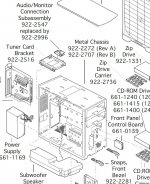
I have a Performa 6400 as well, with the tower setup and sub...I'll have to look at it. For the 63x series, two points that the sound could also be influenced at, in theory, is the monitor out board (which, strangely, also holds the internal speaker jack), or the front panel, with headphone out and volume controls. I had tried connecting/disconnecting both of these, neither with any impact on the sound. The issue must be on the main board.

 
.  .  .  the monitor out board (which, strangely, also holds the internal speaker jack) , or the front panel, with headphone out and volume controls.
That's the answer to the speaker jack location and rather elegant bit of engineering. The only PCBs connected to the medusa mess of the stock Quadra 630 sire of the series are locked up tight within the RFI shielding can of the Front Panel Control Board which is interconnected with the Audio/Monitor Connection Subassembly which is easily accessed for testing/servicing. The internal speaker jack and its amp mounted on the latter is easily accessed by case lid removal making it a no-brainer design choice for the Q630.

This turned out rather well over the long run of the extended series. The Performas 6360 desktop and 6400 tower were designed/introduced together. The more powerful amp (best guess) and Subwoofer Balance Control potentiometer board of the 6400 was easily added to the baseline Quadra 630 with only minor 3.3V related changes to PSU and Medusa mess of the Wiring Harness necessary for the PCI upgrade.

I don't mean to be pedantic here. Our troubleshooting sessions just worked as what might be a useful system documentation tangent so I've been trying to flesh that out as we go. If your board swap is a quick fix, debugging your borken board, might be an interesting long term schematic development project for the audio subsystem of of 630 logic board.

Buzzing out the WIRING Harness and deciphering the goings on of the two PCBs involved might lead to an interesting system mod for our re-case hacks. I've conserved the cubic set aside in my original Digital STARION/6400 hack for the Subwoofer in the process of BenchMac chassis conversion. I'm most curious about the Quadra 630 board's interaction with its amp circuit.

I'd love to figure out how to set the sound system up with an internal speaker/headphone jack/sub output hybrid board to add the Sub into the mix at the sound input jack of my VGA to HDMI converter for the big screen TV speakers. the soundtrack of my VHS collection might be improved enough with hacked Sub output played through the RetroMac than DVD soundtrack output through the HDTV speakers alone. Dunno, seems worth looking into at some point.

Never really played with sound on the 6x00 towers, is there software/hardware provision for using the sub in conjunction with stereo speaker output already in place? I have a sneaking suspicion that's the case, which explains the Subwoofer Balance Control on the Tower version of the Audio/Monitor Connection Subassembly. If so, using one of those system boards for VHS player digital conversion would be a no-brainer in my case. <grin> 6xx series research would then be relegated to a most interesting 6xx external sub encasement replacement for the stock internal speaker.


 
Last edited by a moderator:
Back
Top