• Hello MLAers! We've re-enabled auto-approval for accounts. If you are still waiting on account approval, please check this thread for more information.

Some G5s unstable running Leopard?

I have a dual 1.8 GHz G5 tower that is very unstable running X.5, but that seems perfectly fine running X.4.

Has anyone else seen this odd behaviour in the G5s?

 
Yup. The machine shortly failed thereafter. It was a quad, but manifested exactly the same systems: massive instability in Leopard, but Tiger was fine, and then two months later it would not pass POST.

I'd start looking for an impending failure.

 
Never had any problems with Leopard on my G5 systems. It has brought to light problems with some other flaky systems though. I can't run Leopard on my 867MHz TiBook at all, but Tiger runs just fine.

 
I have X.5 running fine on a dual 2.0GHz G5 at work, but the dual 1.8 GHz machine that I have just started to use at home (which came to me bashed and which I had to disassemble & rehabilitate much more fundamentally at the level of the processors, heatsinks, etc. before it would boot at all) will tell me to 'shut down or else' about once an hour under X.5.

Hope it's not going to keel over completely in a month or so. That would be a bitter blow. But it is comforting to know that the behaviour can be seen in other G5 machines/ PPC hardware.

 
Whenever a system becomes inconsistent, I try to use a clean install on a separate hard drive. If it's still problematic, I swap ALL the memory. If problems continue, I tear down the system, dust everything, take the heat sinks off, clean everything with alcohol, put new compound on, and reassemble. I check that all of the fans run while the system is on.

Many, many G4s with the paper-like stuff between the processor and the heat sink become flaky because the CPU card warps a little bit over time. The G5s aren't immune to the problem, though the compound they start with is usually better.

If you don't want to risk permanent damage, don't wait to replace the compound on the processors.

 
I'd second re-applying thermal compund to the processors, it made a huge difference with my dual 1.8. Go buy some Arctic silver, and a Giottos Rocket Air blower to dust the machine (you could use compressed air, unless you're cheap like me). When reassembling the unit, do not over tighten the screws, since the processor die will crack.

 
Thanks for the advice.

It is running X.4 fine, I like X.4, and so I am happy for the present. If it starts to crash, I will indeed take it apart and do some additional work. However, I had already done much of what has been mentioned in order to get it going in the first place (which would have sometime over the past autumn/winter, and so within the past 6-8 months). Posted about it way back.

I do recall that fresh heatsink compound made a huge difference to the machine, with CPU temperatures dropping about 10ºC immediately. I think I am going to do apply it to the dual 2GHz machine in the office, in fact, as its CPU temperatures are regularly hitting 55-62ºC, whereas the dual 1.8 CPUs tend to hover around 40ºC. The 2GHz machine, however, is very stable running X.5.

 
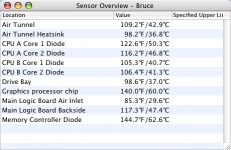
Interesting. Here's the temps on my quad (10.4.11). However, I'm usually running in Reduced mode, which saves a not inconsequential amount of power, reduces heat and probably extends the life of the unit:

Temperature MonitorScreenSnapz001.png

 
OK, so my dual 2GHz machine may be running too hot.

What are the tolerances/ "specified upper limits" on the G5 chips?

 
Did a little digging, based on the image above. Evidently it comes from the free utility Temperature Monitor, which, now downloaded, gives me the answer to my question: 65ºC.

I also see in my own case that there is a discrepancy between the numbers reported by iStat Pro and Temperature Monitor. E.g., on the dual 1.8 from which I am presently posting, iStat Pro reports CPUs A and B at 42º and 37º respectively, whereas Temperature Monitor simultaneously reports 38º and 37º. By mathematical necessity, both utilities cannot be right.

The 55ºC reported on the other G5 was in iStat Pro, so when back in the office, I will try Temperature Monitor instead.

But which to believe...?

 
To follow up on my last post, Temperature Monitor and iStat Pro report the same values on the dual 2.0GHz G5, unlike what happens with the dual 1.8. And new heatsink compound, which has now been applied to the dual 2.0 GHz machine (it only takes about 45 mins. to take apart, do the deed, and reassemble) makes no difference to the CPU temperatures, which still hover in the high 50s/ low 60s Celcius.

On the upside, the fans are not roaring and the machine seems perfectly content. I guess I'll leave it be.

 
weird, i've actually found the opposite. my 1.8DP G5 was terribly unreliable while running 10.4, but seems to have no issues at all running 10.5.

then again it was 10.4 server, i might as well make a partition for 10.4 and try it out.

 
Overall CPU temperature isn't always an indication of proper heat conduction. If heat sink compound starts to dry up and cracks develop, the overall temperature can still be inside safe ranges but tiny areas of the CPU can heat up more than surrounding areas which can cause all sorts of issues.

The most common problems I've seen with G4s come from when the CPU card warps a little and one corner or edge of the CPU no longer makes direct contact. The CPU itself doesn't overheat, but one part heats up more than the other, more quickly than the other, and the expansion and contraction over time can eventually damage the CPU permanently. This is why it's always good to reapply good paste to any older machine which hasn't had it replaced regardless of what the sensors say.

 
Recalibration using the Apple Service Diagnostics 2.5.8 brought the dual 2GHz machine's CPU temperatures (after new heatsink compound was applied) down considerably. Presently operating at about 48-53ºC (CPU A) and 42-44ºC (CPU B) . That is pretty good.

The machine HAD been previously calibrated with the old heatsink compound in there. I had not thought another calibration was necessary, as I hadn't swapped the processors. Evidently it is necessary with any change. One learns a little every day....

 
Back
Top