• Hello MLAers! We've re-enabled auto-approval for accounts. If you are still waiting on account approval, please check this thread for more information.

Simple ResEdit PB Keyboard Hack . . .

Trash80toHP_Mini

NIGHT STALKER
68040
. . . from waaaaay back in the day! My PB100 was my main Bookkeeping/Quicken/Spreadsheet WorkStation until I was forced, kicking and screaming, into upgrading BabyPB to a Duo 230 due to ever increasing OS/PROC requirements.

FEH! :p

If you know Quicken, SpreadSheet or DataBase KBDing conventions/requirements, you'll recognize the handiness of this CapsLock KCHR replacement right off the bat! [;)] ]'>

63523658.jpg.071f396bcd83aa28ea5f1aeb6e883f5f.jpg


BTW, the Duo's alternate Num/Nav/TabPad™ stickers looked a LOT more professional. :o)

 
Ergo, I did a poor job of explaining this simple firmware hack! :I

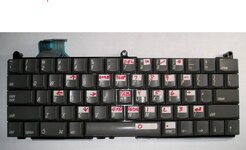
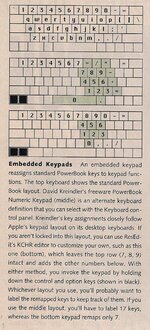
If you use ResEdit to remap the keys in the "Caps Lock" KCHR resource, you can make up just about any keyboard mapping you want. It's a really great idea to replace the, relatively useless and oft-times infuriating, Caps Lock function. After remapping, just make the "alternate character stickers" for your new Caps Lock function and apply!

On BabyPB, and all the Duos who followed in her Bookkeeping duties, this KCHR Hack and a new rev of the stickers followed along and even improved a just a bit over time.

Back in the day, there were several ShareWare versions of the "Embedded Numeric KeyPad" Caps Lock Key Map available. For a change, I took the idea a fair bit over the top and created the most perfect Keyboard layout I could imagine for running Quicken and the ClarisWorks Spreadsheet I used to run my business.

AFAIK, no KBD mfr. has EVER put a TAB key where it BELONGS, next to the "home row" of the Numeric Keypad where it's exceedingly handy for Tabbing & Shift-Tabbing amongst the fields in Quicken, Spreadsheet and Database Apps.

Now you know why I snagged one of those vintage keyboards! }:)

 
I dug out the tidbit from the late, great Cary Lu's "PowerBook Notes" column that inspired this simple hack.

numpadkchrhack.jpg.68f6e43c81793f1935a4d4c48434986e.jpg


I didn't want to bother with using reassigning the Keyboard Map, so I changed the Caps Lock Key Mapping. I HATE Caps Lock, so this made it very useful to me, press that evil button and presto!

The PowerBook KBD (and Desktop KBD for my main machine) became very useful tools for doing spreadsheets annd especially for running my business with Quicken! [:D] ]'>

 
From the Peripherals Scan Dump thread:

Somebody almost got it right, if anyone is an accountant/number cruncher, could you explain why the PageNav keys up/dosn/home/end are on the right side of the Numeric keypad? It looks like the designer must have been left handed to me.

pluswarenumpadc.jpg


I had a OS X keyboard (dunno the make) that had TAB where Numlock is on PC keyboards.

Sometimes useful. Had Tab where Capslock is and moved Capslock to where the Windows key is on PC keyboards. Hated that.

 
I'm setting up my better Wallstreet to do my checkbook in Quicken (2001 Deluxe?) under OS9.x again, so I'll be doing this KCHR hack on the fourth of my series of bookkeeping PowerBooks.

PB100 (pictured) - > Duo 230 -> Duo 2300c -> Wallstreet PDQ

I've got this layout, sans cursor keys, ready to go to the PCB/Mechanical Switch/Universal Controller Stage, ComPaq Portable II Project.

00chassiskbdcasestand.jpg.45d045a7e5b2bd73889f060fdba16890.jpg


It's still on the WIP list ATM, AKA: CpqP2Hack™ }:)

edit: OOPSIE! The up cursor is in the wrong place and the PageNav keys aren't ordered correctly in that pic, I'll replace it with an accurate one!

BTW, two Dell Clickety-Clacks will be the donors, with a complimentary two tone beige color scheme. [:D] ]'>

 
Standard, country specific KBD layout resources came up in another thread, so I dredged this one up again for PowerBook and NumPad/NavPad deprived desktop KBD playtime. Tab sitting next to the home row of the NumPad is priceless for Quicken/Spreadsheet/Database input.

Long lost pics from upthread:
PB100-Num-Nav-Pad.jpg

KCHR-Resource-Edit.jpg
 
Back
Top