


• Hello MLAers! We've re-enabled auto-approval for accounts. If you are still waiting on account approval, please check this thread for more information.

Simple Color Classic Mod Complete

SpinEcho

6502
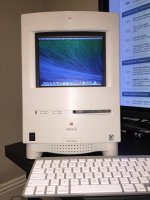
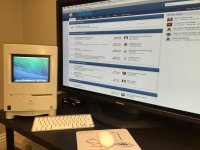
Just a post to show the completion of my Mac CC trilogy. The three CCs are now complete, one with a Presto Plus dual booting 7.6 and 8.1, a second with an LC520 logic board, and now a third (pictured here) that I can use every day for 21st century applications. The die hard collectors on this forum will not approve, I'm sure. But I've had this empty CC case for over ten years and originally intended to mod it with a mini-ITX board running Win XP (truly blaspehmous, I know). I even bought an ADB to USB adapter back then, which I've since lost.  Hence the newer keyboard and mighty mouse in the pics.  After applying Salon Care 40 Volume Creme to get the case back to its platinum beige appearance, the thing looks great!
IMG_0832.JPG

IMG_0838.JPG

 
Last edited by a moderator:
Hi,

Was just an empty case, and you have already some original units working, so it's fine to me.

Was is in the inside ?

 
Inside is a late 2012 Mac Mini running a clean install of Mavericks with dual monitor set up. The screen is an 8" Century USB 800 x 600 SVGA that fits without need for any disassembly. Nothing else. I have no time to do a true mod to get a CD-ROM to fit in there, and this was a lot easier than the mini-ITX idea I had years ago. Glad you approve!

 
To be honest a CD-Rom is no longer required, most of new Macs are supplied without, and probably USB will be more usable in the front slot.

 
My thinking exactly. A CD-ROM would have been a lot of work for very little value. I'll probably get a USB hub at some point in the future.

 
If it was an empty case, then I approve. LOL!

Where did you get the LCD Screen and how much was it? I'm looking to make a cigar box laptop with an R-Pi or something similar and need a screen like that.

 
You can search for this on ebay. Cost was $137.99 and shipping took much longer than advertised. If you are going to use Yosemite, download the updated driver from the DisplayLink website. A link to the site is included on the CD that comes with the unit, but the included driver will work only on 10.9 or earlier. Good luck on your project!

CENTURY LCD-8000U2 Black SVGA 800*600 PLUS ONE 8 inches USB 499g 3.2*21*15.1cm

 
I have an empty SE/30 case that I've toyed with painting (case is too ugly for retrobright) and installing some sort of modern system inside of. Probably a Mac Mini of some sort, and a small-ish display. Just haven't had the time/motivation.

c

 
Last edited by a moderator:
I often think no one has as little time as I do for such projects, but let me tell you, this was as simple as it gets. The painting sounds like it could be a drag, though, and I suspect you would need a bigger LCD display than the one I used.  Best of luck!

 
Well, Call me a nitpicker, but the LCD just doesnt look good. it would have looked better if there was something to sorta "fit" it in. Maybe make a vacuum forming plastic mold over the original CRT face? hmm not sure. 

 
Your critique is well taken.  How have others dealt with putting in a flat LCD screen that doesn't lay flush against the curved front surface of the CC casing? Based on my pics, I should probably move the screen up just slightly, which would be easy to accomplish, but as for the other stuff, it would be hard to find the time unless there's a quick fix that looks good.

 
Last edited by a moderator:
I am thinking tinted lexan, that is vacuum-formed to the face. That way you cant really "see" through it, but the LCD shines through. 

The other thing is to warm up the lexan to make it soft and pliable, and just fold/bend it over the face of the original CRT, or even the CRT hole. 

 
Last edited by a moderator:
Techknight, I'm simply lost in your expertise. Have no idea how to accomplish that. Guess I'll stick to the plain vanilla mod I've got now.  It works for me. Thanks! :)

 
Back
Top


