



Hi, I recently purchased a Shappire Radeon 7000 PCI PC version. My intention was to use it on a G3 B&W. Since I don't have a PC, I first installed it in a secondary slot on the G3 and from the system profile it indicated that there was an ATI graphics card, but the screen was black.
I purchased 128kb EPROMS and with a TL866 I flashed the complete 128kb Apple 208 ROM. I replaced the chip and when I installed it, I have an image on the screen.
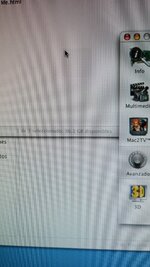
But as you can see in the images, it seems that something is wrong with the 3D acceleration. In OS9.2.2 I have tried several drivers for 7000, and even official ATI drivers for all their graphics cards, and always the same, it seems that something is not working. In the system profile it does not indicate that it is a Radeon 7000, only the data.
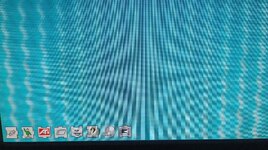
In 10.4.11, when booting, some jailbars appear while the apple logo is displayed, which then disappear, but in the system profile, it also does not show Radeon 7000, only ATI VGA. Also, a square shadow appears that follows the cursor.
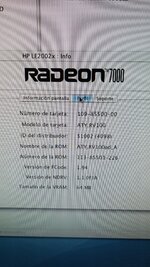
To verify that everything is correct, I have applied the ATI ROM Updater from 208 to 226, and it runs correctly, and is shown in the photo, but the defects persist.
Does anyone have an idea what is happening? The Radeon 7000 does not require moving any resistors, according to what I have read. It does not seem to be a memory failure, they do not seem to be glitches, rather that there is no 3D acceleration.
The only thing that occurs to me is to try cleaning the PCI socket pins, although I do not think that is the problem.
edit: i have replaced all capacitors and the defects persist.

I purchased 128kb EPROMS and with a TL866 I flashed the complete 128kb Apple 208 ROM. I replaced the chip and when I installed it, I have an image on the screen.
But as you can see in the images, it seems that something is wrong with the 3D acceleration. In OS9.2.2 I have tried several drivers for 7000, and even official ATI drivers for all their graphics cards, and always the same, it seems that something is not working. In the system profile it does not indicate that it is a Radeon 7000, only the data.
In 10.4.11, when booting, some jailbars appear while the apple logo is displayed, which then disappear, but in the system profile, it also does not show Radeon 7000, only ATI VGA. Also, a square shadow appears that follows the cursor.
To verify that everything is correct, I have applied the ATI ROM Updater from 208 to 226, and it runs correctly, and is shown in the photo, but the defects persist.
Does anyone have an idea what is happening? The Radeon 7000 does not require moving any resistors, according to what I have read. It does not seem to be a memory failure, they do not seem to be glitches, rather that there is no 3D acceleration.
The only thing that occurs to me is to try cleaning the PCI socket pins, although I do not think that is the problem.
edit: i have replaced all capacitors and the defects persist.





