Hi everybody,
I just made it to acquire the holy Grail of 16 years old me, the Applied Engineering (AE) PC Transporter card for PC compatibility on Apple IIe / IIGS.
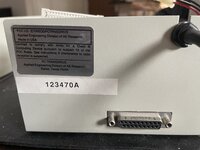
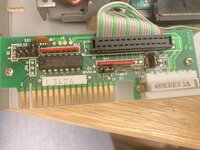
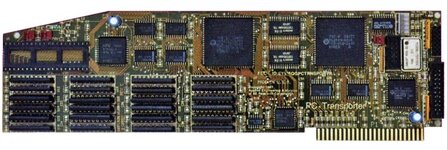
The card I got seems to be a rev. D, looking like this:
I am setting it up in a ROM03 IIGS, and it's a learning process that I either want to share here, and look for some hint about. The card is basically an IBM PC/XT clone, heavily relying on existing hardware of the host machine for input/output activities, meaning that screen, speakers, disks will be the ones of my IIGS.
The same concept is the one behind Mac x86 cards, which have their own thread ongoing forever on the forum and recovered here after the Big Crash: https://68kmla.org/bb/index.php?threads/x86-card-revival-thread.38368/
First of all, there is a lot of documentation about the PCT (PC Transporter), so you don't start in the dark; I found this site as a great starting point:
 ae.applearchives.com
but more docs and software disk images are available on Internet Archive and in many other places online.
ae.applearchives.com
but more docs and software disk images are available on Internet Archive and in many other places online.
My first discovery, that made me worry as hell when I started setting up everything: if drive and video cables are not plugged in, the card seems not to work and to be recognized by the system. Once the cables are in, and the slot is mapped as "My card" in the IIGS control panel, then the PC Transporter software will recognize the card and tell you in which slot it is. I am talking about cables in plugs 4 (disk) and 6 (video out for daughter card "ColorSwitch") :
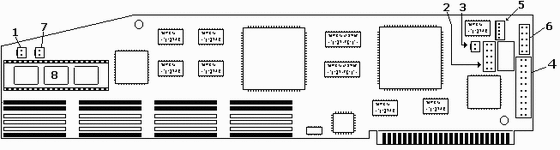
You can also use plugs 1 and 7 to connect to speakers (sound in and out);
plugs 2 and 5 are respectively for connecting the IIe keyboard, and to connect an external PC keyboard (with a din adapter which I did not get) .
Plug 3 is for composite video out (in case you don't have the ColorSwitch daugher card), while plug 8 can host an optional 8087-2 FPU chip, which I am currently waiting to get shipped to me - even if I got reports of it getting real hot and drawing a lot of power from the psu.
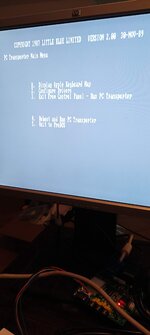
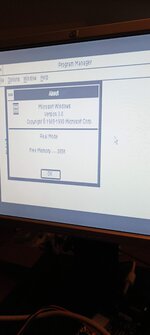
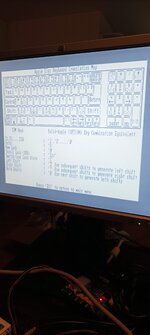
There seem to be many releases of the software: 1.3, 2.0.4, 2.0.5... I tried the 2.04 and the diagnostics I tried so far, allowed me to check the RAM on the card (I was lucky enough to score a card with the maximum amount of RAM, which is 768k) , and the card checksum (don't know the use for this yet).
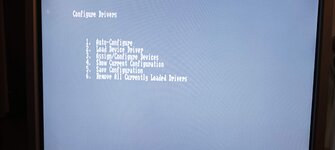
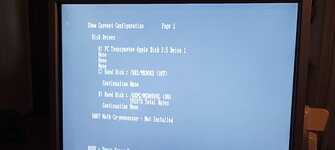
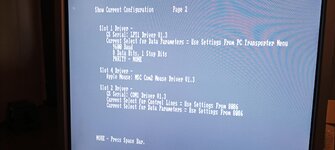
On the software disk there is a program to map ProDOS drivers called PCINSTALL, and there I can setup the card memory as a ProDOS RAM disk, or map an Apple 3.5" disk (not a white Unidisk, only the platinum 800k drives which came with the IIGS).
As long as I understood so far, the drive mapping is one of the complicated parts of the setup; you can either plug in an Apple 3.5" drive (which I am going to do later today to test the outcomes) or even an Apple 5.25" drive (again, only the platinum ones with the DB19 plug, not the original Disk II drives with the stripe cable...) - you would need an ms-dos startup disk in there anyway, so I need to find a way to produce one... maybe a modern usb floppy drive would do, this is another test that needs to be done. I tried to put an ms-dos disk image on a FloppyEmu, but the device tells me that the disk image format is not right when it goes to read it... maybe here too, more testing is in order.
AE produced another daughter card for connecting third parts drives (including their own model), called TransDrive - a clone of this daughter card is still being produced (I found it for sale in Japan) and it seems to allow connecting the card with modern PC drive replacements, such as the GoTek devices which are massively diffused in the retro community, because they work on PC hardware and on Amiga too. GoTek basically will allow you to emulate a floppy drive using disk images on a USB thumb drive (similar concept as the Booti card for the Apple II family). I ordered a TransDrive clone from Japan, and I my plans are to test it with a GoTek device sooner or later.
I understood another way to connect third part drives could be the BlueDisk controller card, but it is discontinued and nowhere to be found, so I can only read success reports of testing it with the PCT and getting 1.4Mb and even 2.8Mb drives to work with it (and with ProDOS too!). Documentation about this German-made card is available on the Apple II Documentation Project: https://mirrors.apple2.org.za/Apple...s/SHH BlueDisk MS-DOS Floppy Disk Controller/
My first main goals now will be:
1. finding a working ms-dos boot disk in a working drive successfully connected to the card, to boot it into MS-DOS and activate the control-panel functions, allowing me to map drives on the DOS side, including possibly hard-drive images stored on my Booti card thumb drive
2. having a IIGS video connected to the ColorSwitch daughter card: this means either testing the original AppleColor monitor against it, and finally finding a replacement solution (maybe using a RGB2HDMI hat on a Raspberry, or other solutions that could eventually lead to a LCD conversion of another monitor that I have spare).
Let's see how far I can get with these, and meanwhile of course every hint and suggestion is super welcome!
I just made it to acquire the holy Grail of 16 years old me, the Applied Engineering (AE) PC Transporter card for PC compatibility on Apple IIe / IIGS.
The card I got seems to be a rev. D, looking like this:
I am setting it up in a ROM03 IIGS, and it's a learning process that I either want to share here, and look for some hint about. The card is basically an IBM PC/XT clone, heavily relying on existing hardware of the host machine for input/output activities, meaning that screen, speakers, disks will be the ones of my IIGS.
The same concept is the one behind Mac x86 cards, which have their own thread ongoing forever on the forum and recovered here after the Big Crash: https://68kmla.org/bb/index.php?threads/x86-card-revival-thread.38368/
First of all, there is a lot of documentation about the PCT (PC Transporter), so you don't start in the dark; I found this site as a great starting point:
PC Transporter
My first discovery, that made me worry as hell when I started setting up everything: if drive and video cables are not plugged in, the card seems not to work and to be recognized by the system. Once the cables are in, and the slot is mapped as "My card" in the IIGS control panel, then the PC Transporter software will recognize the card and tell you in which slot it is. I am talking about cables in plugs 4 (disk) and 6 (video out for daughter card "ColorSwitch") :
You can also use plugs 1 and 7 to connect to speakers (sound in and out);
plugs 2 and 5 are respectively for connecting the IIe keyboard, and to connect an external PC keyboard (with a din adapter which I did not get) .
Plug 3 is for composite video out (in case you don't have the ColorSwitch daugher card), while plug 8 can host an optional 8087-2 FPU chip, which I am currently waiting to get shipped to me - even if I got reports of it getting real hot and drawing a lot of power from the psu.
There seem to be many releases of the software: 1.3, 2.0.4, 2.0.5... I tried the 2.04 and the diagnostics I tried so far, allowed me to check the RAM on the card (I was lucky enough to score a card with the maximum amount of RAM, which is 768k) , and the card checksum (don't know the use for this yet).
On the software disk there is a program to map ProDOS drivers called PCINSTALL, and there I can setup the card memory as a ProDOS RAM disk, or map an Apple 3.5" disk (not a white Unidisk, only the platinum 800k drives which came with the IIGS).
As long as I understood so far, the drive mapping is one of the complicated parts of the setup; you can either plug in an Apple 3.5" drive (which I am going to do later today to test the outcomes) or even an Apple 5.25" drive (again, only the platinum ones with the DB19 plug, not the original Disk II drives with the stripe cable...) - you would need an ms-dos startup disk in there anyway, so I need to find a way to produce one... maybe a modern usb floppy drive would do, this is another test that needs to be done. I tried to put an ms-dos disk image on a FloppyEmu, but the device tells me that the disk image format is not right when it goes to read it... maybe here too, more testing is in order.
AE produced another daughter card for connecting third parts drives (including their own model), called TransDrive - a clone of this daughter card is still being produced (I found it for sale in Japan) and it seems to allow connecting the card with modern PC drive replacements, such as the GoTek devices which are massively diffused in the retro community, because they work on PC hardware and on Amiga too. GoTek basically will allow you to emulate a floppy drive using disk images on a USB thumb drive (similar concept as the Booti card for the Apple II family). I ordered a TransDrive clone from Japan, and I my plans are to test it with a GoTek device sooner or later.
I understood another way to connect third part drives could be the BlueDisk controller card, but it is discontinued and nowhere to be found, so I can only read success reports of testing it with the PCT and getting 1.4Mb and even 2.8Mb drives to work with it (and with ProDOS too!). Documentation about this German-made card is available on the Apple II Documentation Project: https://mirrors.apple2.org.za/Apple...s/SHH BlueDisk MS-DOS Floppy Disk Controller/
My first main goals now will be:
1. finding a working ms-dos boot disk in a working drive successfully connected to the card, to boot it into MS-DOS and activate the control-panel functions, allowing me to map drives on the DOS side, including possibly hard-drive images stored on my Booti card thumb drive
2. having a IIGS video connected to the ColorSwitch daughter card: this means either testing the original AppleColor monitor against it, and finally finding a replacement solution (maybe using a RGB2HDMI hat on a Raspberry, or other solutions that could eventually lead to a LCD conversion of another monitor that I have spare).
Let's see how far I can get with these, and meanwhile of course every hint and suggestion is super welcome!