

Hi.
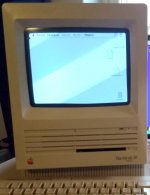
My SE FDHD has a slight geometry problem; the bottom edge of the image is not straight. From about half way horizontally, it's either that the left side curves up or the right side curves down. Looking at the picture attached, it might be that the bottom-right corner is slightly skewed to right and down.
I've had this machine for years, and I don't think it had this issue when I got it. It might have formed during my disk drive swaps, so it's probably something that I've bumped into during disassembly.
I am familiar with the usual height/width pots and the horizontal/vertical adjustment rings on the neck (and the dangers of CRTs, yes), but I haven't done any detailed geometry adjustments on CRT Macs yet. Any ideas on what to try?
My SE FDHD has a slight geometry problem; the bottom edge of the image is not straight. From about half way horizontally, it's either that the left side curves up or the right side curves down. Looking at the picture attached, it might be that the bottom-right corner is slightly skewed to right and down.
I've had this machine for years, and I don't think it had this issue when I got it. It might have formed during my disk drive swaps, so it's probably something that I've bumped into during disassembly.
I am familiar with the usual height/width pots and the horizontal/vertical adjustment rings on the neck (and the dangers of CRTs, yes), but I haven't done any detailed geometry adjustments on CRT Macs yet. Any ideas on what to try?

