• Hello MLAers! We've re-enabled auto-approval for accounts. If you are still waiting on account approval, please check this thread for more information.

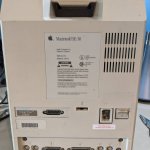
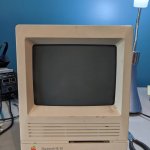
SE/30 with an expansion card

Just picked this one up for $50 on Fb, a bit rough on the outside, but has an interesting card in it. Opening it up now to see what's in store... 
IMG_20200606_150841_864.jpg

IMG_20200606_150841_863.jpg

 
You have a RasterOps ClearVue GS30 PDS video card in there.

It seems to be an 8-bit grayscale card designed for the RasterOps ClearVue Monitor (at 75Mhz).

There is a mention of in March 1990 MacWorld on Archive.org: https://archive.org/stream/MacWorld_9003_March_1990/MacWorld_9003_March_1990_djvu.txt

Code:
RasterOps ClearVue/GS 

Precise. Clear. 

A Complete Solution. 

RasterOps’ advanced technology in VLSI has made it possible to offer gray scale performance at monochrome prices. The RasterOps 
ClearVue/GS and ClearVue/GS30 are the result of a superior design in 8-bit display technology. So don’t pay more for a display system that 
gives you anything less. 

The choice is obvious. 

2500 Walsh Road, Santa Clara, California 9505 1 USA, 408-562-4200 

Includes monitor, 8-bil display board, lill/swivcl, and software. Copyright 1989 RasterOps Corporation. RasterOps, CIcarVuc/GS and 
ClearVuc/GS30 are trademarks of RasterOps Corporation. All other brand names arc protected by the trademark holder. 


INFORMATION HOTLINE: 1-800-468-7600 

See What 

Standard 

Monochrome 

Gray scale performance is a luxury you can now afford and a tool you can’t afford to be without. 
If you are using anything less than 8-bits per pixel, you are not using advanced technology. Image Studio, Digital Darkroom and PageMaker, plus hundreds of other software applications, are based on 8-bit display technology. Monochrome displays do not take advantage of the technological evolution of the Macintosh and third generation software. One bit per pixel just isn’t enough. 
The ClearVue/GS display lets you see 256 shades of gray with true visual fidelity. What you see on the screen is 100% true to your hard copy output. The other leading gray scale display reduces the image to 92% of your actual output. The ClearVue/GS 19” display has a resolution of 72 dots per inch, an industry standard developed by Apple. 
RasterOps’ advanced technol- ogy gives you the big picture. With the Extended 

Desktop feature, you can expand your work area. Imagine being able to work on a document up to eight times larger without scrolling. Pop-up menus bring up the menu bar anytime you need it, anywhere on the screen. And the refresh rate of 75 Hz renders the display flicker-free for long term viewing comfort. With built-in hardware Pan and Zoom, you can see the details of your work two or four times larger than the original image and then zoom out with a single keystroke.
 
Last edited by a moderator:
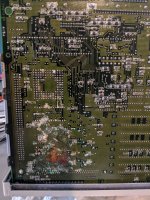
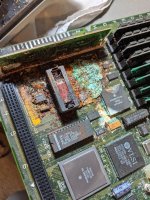
A Maxell bomb - so sad.

Still, be postive. Give it a good scrub with vinegar and hope & pray that none of the traces are damaged.

 
When you see rust on the bottom of the board there’s not much to pray for...

I‘d still clean it up but there’s no chance this board will work again. Scrap any chips that are still good and get on the lookout for a replacement.

 
Traces all surprisingly look OK, but the SMT chips were so rusted they just pushed off with light rubbing. Replacing those is beyond my skill. Will clean it up and maybe someone else could rescue it or salvage chips. 
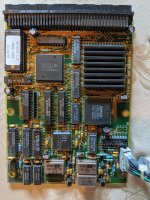
 
Traces all surprisingly look OK, but the SMT chips were so rusted they just pushed off with light rubbing. Replacing those is beyond my skill. Will clean it up and maybe someone else could rescue it or salvage chips. 
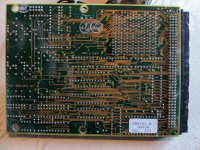
Yeah, hopefully it can go to someone who can rescue the special chips. The 68882 that took the brunt of it is relatively easily replaced. If that Mac SE/30 schematic project gets off the ground, someone could whip up a new PCB to give those chips, and many more from bombed boards, a new home.

 
I think, on a multi-layer board, the problem with the rust is that traces in the middle layers may be shot, and that would be basically impossible to fix.

 
Anyone have more information on the video card? Will it work with any monitor? Do I need drivers? Can't find much info beyond what was posted here.

 
Last edited by a moderator:
More photos would be good, I know its sad to see but its always intruiging seeing the extent of battery corrosion damage.

Got any photos of the RasterOps card yet?

 
So far I've gone through almost everything:

Salvaged

Shell/speaker - good condition, just a little dirt

Internal mounting brackets - rusty, but sanded off nicely, will coat with some prevent

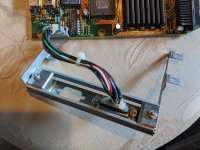
HDD Bracket / Power / SCSI cables - in my other SE/30 that was missing them

RAM - 1x4mb and 1x256k OK - 1x4 is in my other SE/30 now

Analog board/PSU - looks in good shape, need to test.

Unsalvageable:

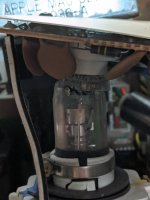
CRT - cracked tube on back.

HDD (tried, but made terrible noise once the heads moved, may pull of logic board as I have a few similar)

EM shield - just denigrated 

Motherboard - chips just fall off to the touch that were under the rust, but cleaned and will store incase someone needs a chip or cpu. Removed all caps.

Metal bar on the motherboard - all rust, may try to remove.

TBD:

Floppy - needs a serious servicing, but I'm hopeful it will work again.
ROM - still in bad shape, some contacts I think are eaten all the way through.

I'm thinking of a few project for the CRT/Case, and hopefully someone could use the PSU/internal brackets.

 
I've seen some cool projects where people embed a screen behind the CRT glass. Maybe it could be used for something like that.

Let me know if you decide that the floppy is bad. I am looking for a seek motor + leadscrew and eject motor for that Awful SE FDHD that I have. Also watching for a set of expansion bracket screws.

Also, while I don't know anything about the videocard... I'm sure it's worth more than $50. Sad that the Maxell bomb went off and that the CRT neck is cracked, but overall I think you did good for fifty bucks.

 
Last edited by a moderator:
embed a screen behind the CRT glass
Thats my plan right now, a "color" se/30 with a Pi 4 or similar. I've seen people "cut out" the back of the crt and polish the inside to make it clear (eg: https://www.youtube.com/watch?v=3grAxKGzBt0) - but really no great tutorials on how to not break the whole thing. (if anyone knows how to cut these, let me know!

Let me know if you decide that the floppy is bad
@PotatoFi - I'm willing to part with the floppy as is for shipping, I have a ton laying around here. Will even throw in a 3D printed gear if you want (I ordered a bunch to save on shipping :D)

Video card will go on eBay I suppose, I did get it to start up with it in, but have no idea about the drivers, nor do I have a monitor I could use it with.

And yes, all in all happy with the $50. Just wish I could have saved the board!

 
Thats my plan right now, a "color" se/30 with a Pi 4 or similar. I've seen people "cut out" the back of the crt and polish the inside to make it clear (eg: https://www.youtube.com/watch?v=3grAxKGzBt0) - but really no great tutorials on how to not break the whole thing. (if anyone knows how to cut these, 
I think you might find this thread useful, if you haven’t already seen it. As you speculated, it seems that cutting the CRT is pretty difficult, so forming a mold might be a better route.
 

It also seems that it would be worth trying to connect your SE/30 graphics card to any LCD panel you install in there - you’d have a grayscale SE/30 for a fraction of the cost.

 
@erichelgeson If you think you'll have spare parts that you won't be using, I have a short "shopping list":

  • Forementioned floppy parts
  • Hard drive bracket + two screws
  • Short SCSI cable
  • The three screws that hold the expansion bracket on

The last three items were sadly missing from my SE/30 when I got it. If you plan to pull those parts out of your SE/30 and don't have other plans, let me know. Would happily pay for them.

If you decide to do the CRT thing... would love to see the process.

 
I think you might find this thread useful, if you haven’t already seen it. As you speculated, it seems that cutting the CRT is pretty difficult, so forming a mold might be a better route.

Thanks - still a lot of details missing. Watching some other videos on how to make a crt fish tank they're using an angle grinder with a diamond cutting blade. I may have to get a better face mask to attempt this, but not out of my comfort zone.

Found this post/video but again lacking details and specifics https://retroguy.blog/2019/12/23/new-project-in-the-oven-classic-mac-as-a-modern-game-media-station-with-the-original-crt-glass/

 
Back
Top