• Hello MLAers! We've re-enabled auto-approval for accounts. If you are still waiting on account approval, please check this thread for more information.

SE/30 Video Mode Setting Not Sticking

jmacz

68020
I've got an SE/30, 8MB of memory, stock ROM with Mode32, running System 7.1.1, and it has a Bolle GrayCake internal grayscale card.

If I set the video mode (via the Monitors control panel) to Black and White, the setting sticks across reboots/shutdowns. If I set the video mode to Color/256, the setting sticks across reboots/shutdowns. If I set the video mode to Gray/256, upon next restart, it automatically changes to Color/256. Basically the Gray/256 won't stick and changes to Color/256. Note that when I switch to Gray/256, grayscale does work properly. It's just the setting doesn't stick after reboot.

This occurs even disabling all extensions. This occurs with Mode32 removed as well.

I think this setting is stored in PRAM and I tried zapping it, but that isn't helping either.

Any pointers for where I should look? cc: @zigzagjoe @Bolle given they are video experts on this platform. :)

 
Doesn't one of the 68k Mac diagnostic suites check PRAM? I know I've seen it recently, but cannot recall which application I was running.
 
I'm not convinced it's a PRAM issue given all other settings stick (like 32bit addressing mode, and when I choose black and white, that sticks).
 
Is the source for the declaration ROM available? You could check to see what it saves to PRAM. Perhaps the Gray flag is not one of the things saved to PRAM. Can the declaration ROM be updated? How is the Gray flag made known to the driver? Is it a flag or is it an entire CLUT? One can examine a CLUT to see if there's no colors (i.e. red = green = blue for all indexes).

Each slot (9 to E) gets 8 bytes in PRAM so I think there should be enough room to store a flag.

In PCI Macs, a name registry property saved to NVRAM is also 8 bytes of data on Old World Macs (unlimited in New World Macs). A device can have more than one property though (each with a 4 character name).

The devices in Old World Macs that can save a property is limited by the path format (A starting PCI bus number, 6 levels of PCI bridges, then a PCI device/function number).

For New World Macs, the path is not limited to PCI devices.

Does a program like SwitchRes have an option to save/restore the depth in case you need to bypass or override the driver?
 
Is the source for the declaration ROM available? You could check to see what it saves to PRAM. Perhaps the Gray flag is not one of the things saved to PRAM. Can the declaration ROM be updated?

Will have to defer that question to @Bolle as it’s his grayscale card :)
 
cscSetGray is described in Designing Cards and Drivers for the Macintosh Family 2nd Edition (1990)
and also in Designing PCI Cards and Drivers (1999)

SetDefaultMode is described in the 1990 document and is obsolete in the 1999 document.
It takes a single byte (an sResource ID) which is stored to PRAM.

The first two bytes of PRAM for a slot contains the card's Board ID. The third byte (vendorUse1) is reserved for spID of the slot resource describing the last screen pixel depth that this card was set to (passed to the SetMode routine of the driver). The sample code saves the default mode to the fourth byte (vendorUse2). ATI driver in supermario may use vendorUse4 instead. Civic driver in supermario has flags (for composite out) in vendorUse5.

Here's some example usage from supermario:
Code:
SP_BoardID			ds.w	1			; BoardID.
SP_Depth			ds.b	1			; spID of Depth (Mode).						(vendorUse1)
SP_LastConfig		ds.b	1			; spID of last boot-up configuration.		(vendorUse2)
SP_DfltConfig		ds.b	1			; spID of default configuration…			(vendorUse3)
SP_MonID			ds.b	1			; Sense code of last display.				(vendorUse4)
SP_Flags			ds.b	1			; Various flags.							(vendorUse5)
SP_AltSense			Ds.b	1			; Alternate senseID byte.					(vendorUse6)


; Slot pRAM flag bits
;
spSyncOnGreen		Equ		0			; True if we’re supposed to put sync on green.
spAltSenseEnb		Equ		1			; True if AltSense was used before (for keeping SOG state).

spVRAMBit0			Equ		2			; These two bits are used to encode the amount of…
spVRAMBit1			Equ		3			; …vRAM currently available.

numSPVRamBits		Equ		2			; Width for Bfins/Bfext of spVRAMBits
spVRAMBits			Equ		31-spVRAMBit1 ; Offset for Bfins/Bfext.

spUseAltClk			Equ		4			; True if we have a Puma instead of a Clifton/Clifton+.
spFamilyChanged		Equ		5			; True if the family mode changed; always reset during PrimaryInit.

spAltSenseValidMask	Equ		$40			; Upper two bits must be valid in order to use lower six.
spAltSenseMask		Equ		$3F			; Lower six bits are the indexed (mapped) sense code.
spAltSenseDisable	Equ		$80			; Bits used for temporarily disabling the alternate senseID.

Here's another:
Code:
savedMode		EQU		2								; VendorUse1 offset into sPRAM record
savedSRsrcID	EQU		3								; VendorUse2 offset into sPRAM record
savedRawSRsrcID	EQU		4								; VendorUse3 offset into sPRAM record
specialFlag		EQU		5
savedClockType	EQU		6

None of the drivers (sample code or supermario) appear to save the Gray flag.
 
I've got an SE/30, 8MB of memory, stock ROM with Mode32, running System 7.1.1, and it has a Bolle GrayCake internal grayscale card.

If I set the video mode (via the Monitors control panel) to Black and White, the setting sticks across reboots/shutdowns. If I set the video mode to Color/256, the setting sticks across reboots/shutdowns. If I set the video mode to Gray/256, upon next restart, it automatically changes to Color/256. Basically the Gray/256 won't stick and changes to Color/256. Note that when I switch to Gray/256, grayscale does work properly. It's just the setting doesn't stick after reboot.

This occurs even disabling all extensions. This occurs with Mode32 removed as well.

I think this setting is stored in PRAM and I tried zapping it, but that isn't helping either.

Any pointers for where I should look? cc: @zigzagjoe @Bolle given they are video experts on this platform. :)

I had a similar issue with my Graycake. If zapping PRAM doesn’t solve it then trashing preferences might.
 
Grey flag is not expected to be saved by the video driver. Off the top of my head, the system definitely retains the active gamma table and depth in the scrn resource in the System file. I'm assuming the greyscale mode would be stored there too but I've never had occasion to verify that. I've never had to implement any specific behavior to handle grey mode beyond replying appropriately to get/setGrey.

The third byte of card PRAM (also) contains the selected depth mode as set by the monitors control panel. There is no expectation that the video driver does anything with this; during quickdraw initialization this byte will be read by the ROM and passed to the SetMode control call. This is the bit depth only, no grey flag; so 1, 2, 4, 8 etc bpp only as specified by constant values ("firstVidMode" and the like).

With the "early" ABI there's no requirement for the video driver to save persistent configuration at all actually, which is what led to video cards having physical switches or monitor sense for resolution select or a variety of other home-baked methods of handling multi resolution support.

Later cscGetDefaultMode/cscsetDefaultMode was introduced which allows to save the active sResource ID expected by Mac OS; the driver is expected to read that and set that as the active sResource at primaryinit and the other sResources are present but disabled. This is to allow software mode selection from the Monitors CP and is what I use for the varied resolutions my card supports. sResources contains one resolution and the depths possible for that resolution, along with other needed parameters. It doesn't store the active depth or luminance mapping mode.

As far as I am aware there isn't a requirement that the video driver manipulate or honor the scrn resource at all, but it could definitely cause odd behavior if the scrn resource is damaged or unable to be written. I think if you wanted to try to reset it you'd want to open the system file and find for scrn # 0, then blow it away. Open monitors, toggle the active depth/mode/or something, close monitors, and it ought to then write a new resource.
 
Is there a document that describes the 'scrn' resource?

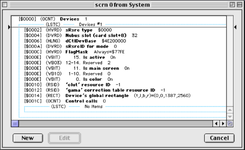
There's no description of the 'scrn' resource in RIncludes of Universal Headers but there's an 'scrn' template in Resorcerer.
scrn resource.png

It has an "is color" flag, but that might be a descriptor of the display, not of the current settings.

There's a list of control calls in the 'scrn' resource. What kind of control calls can be set here? Does anything set these control calls in the 'scrn' resource? I suppose it could be made to contain a setGray control call.

Found this note:
scrn invalidation - Due to popular demand, a video card will be able to invalidate the scrn resource programmatically. Typically, this is most useful to cards that support different sized monitors or multiple screen sizes on a single monitor. When the Primarylnit code of the card senses that the monitor connected to the card has changed, it can invalidate the scrn resource by calling _Invalscrn. When QuickDraw detects that this bit is set, it will disregard the current scm configuration, until a new scrn resource is built by Monitors. As with the video mode family support, scrn invalidation is targeted toward cards that can identify the type of monitor connected.
 
I had a similar issue with my Graycake. If zapping PRAM doesn’t solve it then trashing preferences might.

Yeah, zapping PRAM doesn't help. Which preferences are you referring to? I didn't see anything interesting in the Preferences folder for this setting. I threw away the entire folder and that also didn't help. Were you able to solve it on your system?

I remember seeing this on my other SE/30 when it had the Gray Cake in it. I vaguely recollect that it started honoring the setting when I put a non-stock ROM in.

As far as I am aware there isn't a requirement that the video driver manipulate or honor the scrn resource at all, but it could definitely cause odd behavior if the scrn resource is damaged or unable to be written. I think if you wanted to try to reset it you'd want to open the system file and find for scrn # 0, then blow it away. Open monitors, toggle the active depth/mode/or something, close monitors, and it ought to then write a new resource.

I tried blowing away the SCRN #0 resource. Changing the video settings does cause a new one to be written. But still didn't resolve the issue.
 
Back
Top