• Hello MLAers! We've re-enabled auto-approval for accounts. If you are still waiting on account approval, please check this thread for more information.

SE/30 Not Recognizing Disks In Internally-Connected Drives

Turaiel

6502
I'm so close to being finished with my SE/30 restoration. Initially, it had the 1.44 MB floppy drive connected internally. After fighting with it for weeks, I pulled my 800k drive out of its external enclosure and installed that in place of the 1.44 MB. Now, when I insert a disk I'm prompted to initialize it. I thought maybe the cable was the issue, but I swapped it with a known-good one and the problem continued.

I know the drive works, and that the floppy disk is good, because everything works fine when I connect the drive with the cable from the external enclosure.

Any ideas on that?

 
I bet it is the bourns filter based on the symptoms.  It is a 20 pin DIP part.  The Apple part number is 115-0002.

IlikeTech

 
Just reading some things in the dead Mac scrolls. It would seem like the only thing that can cause that kind of problem?

 
From what I've read, the Bourns filter going bad generally causes an unresponsive gray screen on boot. In this case, the system does boot fully and if the system disk is removed, it will attempt to read from the internal and external floppy drives. The problem is just that it thinks that all disks on a drive connected to the internal port are uninitialized.

 
Bourns filter on the SWIM will cause a "phantom drive problem", meaning it will ask you to format a disk in a drive that isnt even connected or present. 

Does it recognize external drives? or no drives at all?? 

If it doesnt see anything then maybe its time to look at the traces from the SWIM back to the BUS, and back to the floppy connector itself. 

Also, I am sure your aware, but I will say it anyway. You cant put an 800K drive in there, and expect it to read the 2-hole 1.44MB floppy diskettes. You have to use DS-DD disks with an 800K drive ;)

 
Last edited by a moderator:
It only fails to recognize disks in drives connected to the internal floppy header. The same 800k drive works externally. The original internal drive is a 1.44 MB drive, which just doesn't seem to work in general. However, if I plug THAT drive in externally, the head moves a little bit but the drive doesn't work at all.

To summarize:

1.44 MB drive doesn't recognize disks internally or externally. Externally it spins slightly but doesn't react otherwise.

800k drive works perfectly externally, does not work internally. I am using 800k disks in both, and HD disks only in the 1.44 MB drive.

1.44 MB drive works better externally on my SE than my SE/30, but still cannot read disks.

I've tested both drives using known-good cables and known-good disks.

 
I guess that wouldn't surprise me terribly. The board wasn't in great shape when I started the repairs; corrosion everywhere. Which chip is that so I can inspect it?

 
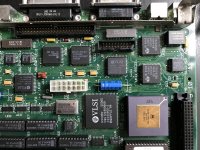
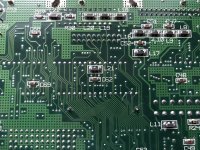
Thanks for pointing that out. I looked over the top and bottom of the board around this chip and I didn't find any obviously bad traces, but my electronics skill is minimal. I've attached some photos in case anyone can see anything that sticks out to them.

IMG_4209.JPG

IMG_4205.JPG

 
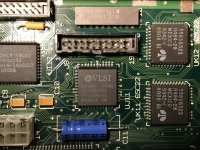
It looks like your logic board has been recently recapped. I see three non-original tantalum caps to the left of the SWIM chip on your picture. I'd suggest to check them as well to ensure there is no shorted traces or bad solder joints...

 
Last edited by a moderator:
I did the capacitor replacements myself. Can traces be shorted if they aren't exposed on the surface? I'll have to check them more closely when I get back on Monday. Thanks!

 
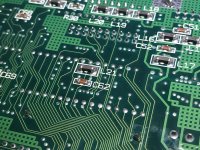
I found that the things pointed out were most likely a combination of bad lighting and dust/cotton swab fibers. I've cleaned up the areas a bit, so here are some new pictures. I still can't find anything particularly worrisome.

mltI1N5.jpg

IrTPMks.jpg

 
Actually, the second picture clearly identifies you have quite a few cracked solder joints on the floppy connector itself. Try re soldering that connector and go at it again?

 
Back
Top