• Hello MLAers! We've re-enabled auto-approval for accounts. If you are still waiting on account approval, please check this thread for more information.

Se/30 have to bang the box to get a screen

Sometimes the screen doesn't work unless I bang the side. My hunch is the card inside is touching something. 

Any other hunches? Thanks

 
We’ve all had this problem. 

It’s cold solder joints on the analog board. 

Open up the computer, take off the white shield (those black plastic push rivets come apart, and can be reused), and start soldering. 

This is one of the simpler fixes, as there’s not a whole lot of taking apart, but if ya don’t have a 9” T-15 screwdriver to open the case, it’s not easy at all......


 
It's frequently the flyback transformer solder joints on the analog board.  I'd start with these first.

 
Last edited by a moderator:
Cracked solder joints at the cable connections (Yoke/CRT and Analog to Motherboard connectors), and certain areas about the high voltage circuit like the cap and flyback transformer.

But do not just add solder or reheat the joint. You need to remove the old solder, clean up the board and circuit part with some IPA, and then solder with fresh solder off a spool.

 
I can also reinforce what already has been said with cold solder joints. I got a new to me SE30 this week and one pin on the P1 connector on the analog board had completely broke away from the solder.

 
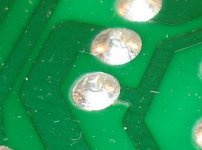
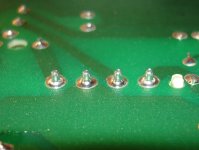
some of the joints I had on my 512kE

These are VERY bad.

Make sure to use a very hot solder iron, to get a good flow and don't dwell on the joint too long, or you'll lift the trace, and use some good flux

15823561_1320897884598263_4108002410991593859_n.jpg15871448_1321007391253979_7869369073873194687_n.jpg

 
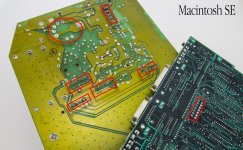
I made this for reference a few yers ago. These are the most critical joints, but they should all be checked over.

SE_solder_points.jpg

 
Back
Top