
-
 Hello Guest! We're hosting a challenge to welcome vintage Intel macs to the MLA during the month of July! See this thread for more information.
 -
We've made some quality of life improvements to the Trading Post. More info here.
You are using an out of date browser. It may not display this or other websites correctly.
You should upgrade or use an alternative browser.
You should upgrade or use an alternative browser.
SE/30 - Hard drive activity light - Original color?
- Thread starter joshc
- Start date



I've had two that were red and one that was yellow, but no greens...



Mine is sort of a pale-amber-to-yellow-green-ish color. ...and now my screen isn't on and must've done something wrong when I reassembled it last...** but yeah, it's more yellow than say bright green, like an Apple IIc power light.
edit: I forgot to plug the yoke board back on :facepalm:
edit: I forgot to plug the yoke board back on :facepalm:
Last edited by a moderator:

I've had amber and red colors from the factory. I don't think I've seen actual green but maybe they existed.


My SE/30 also has an Amber LED.
OK, it seems the consensus is that OEM were Amber or Red, thanks everyone! If someone could upload a photo of theirs in action that would be great...
Incidentally, the SCSI2SD v5.1's built in LED is amber - and this shines through the SE/30's bezel depending on how you mount it. I might still solder an amber LED to my SCSI2SD to make it a little brighter but I'm already happy!
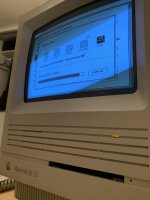
Here's a photo of my SCSI2SD equipped SE/30 with its built-in LED shining through...
Incidentally, the SCSI2SD v5.1's built in LED is amber - and this shines through the SE/30's bezel depending on how you mount it. I might still solder an amber LED to my SCSI2SD to make it a little brighter but I'm already happy!
Here's a photo of my SCSI2SD equipped SE/30 with its built-in LED shining through...

Some insight here...
The SE usually had a red LED when it shipped with the 20MB MiniScribe. I have seen the odd MiniScribe with the amber, but almost all seem to be red.
Amber lights became more common in 1989 when the SE shipped with other drive capacities inside. The 40MB drive seemed to get an amber LED.
Every SE/30 I have seen has an amber LED, regardless of capacity, though I don't doubt the greens because...
...I have seen the green on a factory SE. It was a SuperDrive model and I believe it was manufactured sometime in early 1991. There could well be some SE/30s with that as well. I do remember that particular SE had a 40MB drive.
For what it's worth, the Iici I have came standard with an 80MB drive with an amber LED for its hard drive (and a green for its power light). It's a mid-1991. I think amber was the most common LED by then, with red almost phased out entirely if not entirely, and green sometimes getting mixed in (though rarely).
Also, check the access lights on the ZFP SCSI drives (20SC, etc) back then. I've seen all three colors on them, although the only stock green I've encountered is on the HD20.
Last but not least, don't forget you can retrofit them. Does anyone know the exact size of the cable needed? I had to do a little soldering work to get an LED wired up once...put a blue in an SE just for fun.
The SE usually had a red LED when it shipped with the 20MB MiniScribe. I have seen the odd MiniScribe with the amber, but almost all seem to be red.
Amber lights became more common in 1989 when the SE shipped with other drive capacities inside. The 40MB drive seemed to get an amber LED.
Every SE/30 I have seen has an amber LED, regardless of capacity, though I don't doubt the greens because...
...I have seen the green on a factory SE. It was a SuperDrive model and I believe it was manufactured sometime in early 1991. There could well be some SE/30s with that as well. I do remember that particular SE had a 40MB drive.
For what it's worth, the Iici I have came standard with an 80MB drive with an amber LED for its hard drive (and a green for its power light). It's a mid-1991. I think amber was the most common LED by then, with red almost phased out entirely if not entirely, and green sometimes getting mixed in (though rarely).
Also, check the access lights on the ZFP SCSI drives (20SC, etc) back then. I've seen all three colors on them, although the only stock green I've encountered is on the HD20.
Last but not least, don't forget you can retrofit them. Does anyone know the exact size of the cable needed? I had to do a little soldering work to get an LED wired up once...put a blue in an SE just for fun.

There were several different connectors that drives used over the years. Generally as time progressed the connectors became smaller. You'd have to check your drive to figure out which one you need. Basically the full-height drives usually had the big MiniScribe-style connector while half-height drives used a more compact style. Later Quantum drives used a tiny connector. Seagate and other manufacturers often put LED connectors in the same jumper block with the ID settings, so you'd need whichever size jumper-style connector for those.Last but not least, don't forget you can retrofit them. Does anyone know the exact size of the cable needed? I had to do a little soldering work to get an LED wired up once...put a blue in an SE just for fun.
I read something years ago that red isn't recommended for casual use because it's used heavily in commercial and industrial electronics to denote errors/failure of some sort. Makes sense, really, so I avoid red for anything that's not used to indicate a problem. The only exception is bicolor LEDs, which are sometimes difficult to find in anything other than green/red combo; I've used those for combined power/HD access before.

I have, for years, wanted to replace my amber SE/30 HD LED with a not-too-bright warmish white one (definitely not a harsh bluish white), for no good reason other than I think it would look nice aesthetically. I’ve never seen such a thing for sale in the few places I’ve checked, though.
Mine one is amber. (I'm under way replacing to new LED at the moment)
Quadra 700 is Amber as well
I think Green is sort fo indication for power LED?
Cheers
AP
Quadra 700 is Amber as well
I think Green is sort fo indication for power LED?
Cheers
AP
There were several different connectors that drives used over the years. Generally as time progressed the connectors became smaller. You'd have to check your drive to figure out which one you need. Basically the full-height drives usually had the big MiniScribe-style connector while half-height drives used a more compact style. Later Quantum drives used a tiny connector. Seagate and other manufacturers often put LED connectors in the same jumper block with the ID settings, so you'd need whichever size jumper-style connector for those.
I read something years ago that red isn't recommended for casual use because it's used heavily in commercial and industrial electronics to denote errors/failure of some sort. Makes sense, really, so I avoid red for anything that's not used to indicate a problem. The only exception is bicolor LEDs, which are sometimes difficult to find in anything other than green/red combo; I've used those for combined power/HD access before.
The connector in particular I'm looking for is the one that fits the half-height style...the early 90s Quantum LPS or ELS, usually found in an LC. I've transplanted a few of those from battery leak LCs into SEs. The MiniScribe connector just won't fit...would love to know the size for that (also the newer Quantum). I've got way too many MiniScribe connectors laying around from all the dead MiniScribes I've yanked from SEs...
Red was far more common in the late 80s. In addition to the SE, which often had it with its 20MB drive, I have a Toshiba T1200 which uses red for several indicators:
-The access light on the floppy drive itself
-The above-keyboard floppy access light
-The above-keyboard HDD access light
-The power button when it's in low-speed mode (it can be set between 4.5MHz and 9MHz...I think those were the speeds, at least...)
I don't recall IBM or any other company offhand using it on anything computer-related, but my LG TV (which I bought two years ago) has a red LED to indicate power. Nintendo has also used red to indicate power-on.

My SE/30 is pale yellow and my SE is red.

What a coincidence! I did the same thing today too!I just made a connector between the SCSI2SD header and the original LED on the HDs drive sled. It’s the real deal that way!
I also soldered in a pin header to use the SE/30's LED with my SCSI2SD. I compared mine side-by-side with my Quadra 700 and though there's some age difference the power LED on the Quadra is definitely green and the activity LEDs are, near as makes no difference the same, and definitely yellow/amber.
Last edited by a moderator:

I did that a few days ago on mine too!What a coincidence! I did the same thing today too!

Every SE/30 I have seen has had an amber LED. I did actually swap to a red LED in one of my SE/30s, because I really like the look of the red.
Only the early production SEs from 1987 have a red LED stock from what I've seen. My later SE (from 1989) has the original Miniscribe 20MB drive with an amber LED, and I've seen other later-production SEs with an amber LED as well.
Never seen a green before, but that would probably look pretty cool.
Only the early production SEs from 1987 have a red LED stock from what I've seen. My later SE (from 1989) has the original Miniscribe 20MB drive with an amber LED, and I've seen other later-production SEs with an amber LED as well.
Never seen a green before, but that would probably look pretty cool.
Similar threads


- Replies
- 6
- Views
- 1K
- Replies
- 0
- Views
- 233
- Replies
- 11
- Views
- 2K
