• Hello MLAers! We've re-enabled auto-approval for accounts. If you are still waiting on account approval, please check this thread for more information.

SE/30: Can't boot to desktop - "disk initialization failed because the disk is locked"

s_pupp

6502
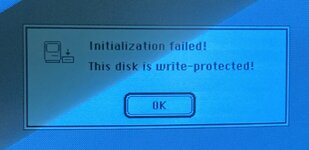
I turned on the SE/30, and got a "disk initialization failed because the disk is locked" message before the desktop could load. Clicking "OK" leads to an endless loop of this message.

This is in the setting of working on a floppy drive. The SE/30 had worked all day. I had just installed a repaired read/write head mechanism into an otherwise working floppy drive, and turned the SE/30 on to test the drive. Upon receiving the "disk is locked" message, I assumed the floppy drive was the issue, and tried another drive. Same problem. I removed the floppy cable altogether. Same issue. I tried an SE logic board - the floppy drives both work just fine.

Given that I've confirmed the SE/30 board is the problem, I could use some guidance. Could it be a Bournes filter issue? A SWIM issue - in which case, where is the SWIM chip?

Thanks in advance.
 
Unfortunately I don't have much experience with floppy drive issues, but I can tell you that the SWIM chip is at UJ11.
 
Further testing seems to confirm a floppy circuit problem: The SE/30 believes that there is an external floppy drive attached, and that it contains a locked disk with no system folder. This imaginary external drive disk can neither be ejected or initialized. When an external floppy drive is attached, with or without a disk in it, or when there is a floppy disk in the internal drive, the error message does not happen.

Details
Upon turning on the SE/30 with no SCSI device and with an empty internal floppy drive (or internal drive completely disconnected), the following appears and stays on the screen indefinitely:
X.jpg

This suggests to me that the SE/30 believes there is a floppy disk inserted that has no system folder. At no point does the flashing question mark appear.

Inserting a bootable floppy disk into the internal drive results in a normal startup.

Booting from BlueSCSI with an empty internal floppy drive, this dialog box appears:
unreadable_proc.jpg

The picture in the dialog box points to an external drive, but there is no external drive connected.
Clicking "Eject" results in the same message appearing again a few seconds later.
Clicking "Initialize" results in this dialog box:

ext_proc.jpg
Again, the picture is of an external floppy disk drive.
Clicking OK results in the former message appearing again.

The only thing that breaks this is inserting a disk into the internal floppy drive.

However, with an external floppy drive connected, with or without a disk inserted into it, none of this happens; the SE/30 behaves entirely normally.


Ideally, I'd like to use this SE/30 without having an external drive attached.
I'll start with replacing the Bournes filter. I hate desoldering these things - I find them to be quite resistant to removal attempts.
 
Yes, I would check the Bournes first: check the resistance value of each resistor in the pack vs. the values in the Pina guides.
 
Yes, I would check the Bournes first: check the resistance value of each resistor in the pack vs. the values in the Pina guides.
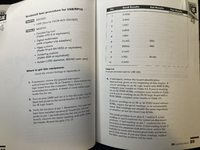
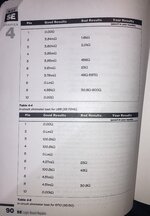
Good idea. I had a memory of seeing the resistance charts, and found them in Larry Pina's "Mac Classic & SE Repair and Upgrade Secrets," starting at page 88. There are three charts, one for the SE, one for SE FDHD, and one for SE/30.

My values were nothing like those charted for good results, nor for bad results. I checked a different SE/30 logic board - similar values to the malfunctioning board, and nothing like the chart. Same comparing two working SE FDHD logic boards with each other and with the appropriate chart. I tried a different multimeter with the same results. I'm at a loss as to why my measured resistances were inconsistent with the published readings on all boards tested. It must have been operator error - but the instructions were pretty simple.

I went ahead and replaced the Bourns filter, and the SE/30 logic board is back to functioning normally.
My thanks to all for the input.

Pina 88-89.png
Pina 90.jpeg
 
I had this issue with a lc475 and was annoying as hell to figure out. Recapped the caps closest to floppy and that fixed it. On an se/30 i am not sure what those caps would be. Also clean swim chip and areas around where caps leaked goo with isopropyl 99%
 
I had this issue with a lc475 and was annoying as hell to figure out. Recapped the caps closest to floppy and that fixed it. On an se/30 i am not sure what those caps would be. Also clean swim chip and areas around where caps leaked goo with isopropyl 99%
All good advice. In my case, it was a bad Bourn filter.

The symptoms were mentioned in the Mac Classic & SE Repair and Upgrade Secrets book; I had even dog-eared the pages at some point, then promptly forgot it all until LaPorta mentioned it. I could have saved some time and effort by “RTFM,” the “M” referring to the book that was sitting just a foot away from me!
 
All good advice. In my case, it was a bad Bourn filter.

The symptoms were mentioned in the Mac Classic & SE Repair and Upgrade Secrets book; I had even dog-eared the pages at some point, then promptly forgot it all until LaPorta mentioned it. I could have saved some time and effort by “RTFM,” the “M” referring to the book that was sitting just a foot away from me!
Awesome, glad you figured it out:)
 
Back
Top