• Hello MLAers! We've re-enabled auto-approval for accounts. If you are still waiting on account approval, please check this thread for more information.

SCSI drive does not spin up - LC475

Hi all,

First post on here, didn't know where else to come really

I am upgrading an LC/Performa 475 for a video I'm making, and I have run into a little bit of a problem with the new hard drive

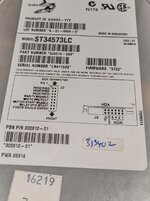
I installed an old Seagate 4GB SCSI drive, one of those that is 80 pins, I use an adapter with it

The drive works, and I have been able to install an OS to it. Problem is, it won't start with the computer. It will only do this, if I boot off an install CD, and mount/wake up the drive so that it's spun up. From there I can restart, and load from the internal drive, and it does load the OS. But when cold booting, there is nothing, it just doesn't spin up the drive leading to the Disk symbol

I don't know what the deal is... Incorrect termination? It at least works in some fashion

Any help would be appreciated
 
Welcome here.

I seem to recall this issue with another user here. It has something to do with a jumper pin setting on the drive. There’s a jumper for not spinning up the drive until asked by the system. Hopefully someone here can help with that.
 
Wow. I have this EXACT same problem. If you open the case and manually connect power to the drive, you hear it spin up and it will boot, but for some reason, it stops spinning when you restart. What a pain. Will look for the delay jumper. Also using the 80 pin adapter with a 10k SCSI drive.
 
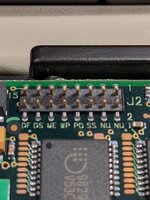
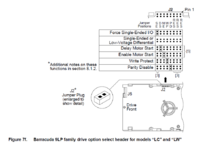
Ok, so update. A few things are now known. The drive has jumpers, but they are on the bottom of the drive, but none of them was populated, one set of pins says Enable Motor Start, but none of these may be the problem

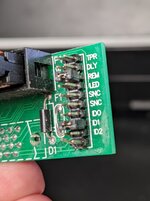
I have attached the adapter that I was using, this was the config it already had. I found by removing all the jumpers, the drive powers on when you flick the switch. However I still am not getting any booting. I have tried a few keyboard shortcuts, none seem to work. The second off bottom pin was listed as ID2, which the drive identified itself as during the install, but still won't load... not sure what else to try


PXL_20220329_203849032.jpgPXL_20220329_194934185.jpgPXL_20220329_194831965.jpg
 
Try removing the jumper next to ID1 in the adapter - that will make the drive SCSI ID "0". Also remove the jumper next to REM (not sure what that does, but probably not needed). Put that jumper on TPR (Termination Power). Then, in you have a small enough jumper (or can bridge with a bit of fine wire) connect the farthest pair of pins away from the "J2" silkscreen on the underside of the drive to "Force Single Ended". See what happens.
 
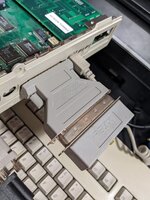
Yeah, I actually cracked this a little later on. This was actually a twofold problem. There were Termination issues. The jumpers on the drive adapter were stopping it from spinning up, that was one thing. Later I found just plugging in the optical drive even while not powered on, suddenly made it boot. The drive of course had a terminator on it, and that kicked it into touch. Trying with it out reverted the behaviour. So my solution? Grabbing the terminator from the back of the optical drive and shoving it on a 25-pin SCSI adapter adapter seemed to make it work. I actually found that messing with the jumpers on the adapter made little to no difference with my drive. Perhaps there is a jumper that could be added to the bottom to make it so I don't need the bulky terminator on the back, but they're extra small jumpers
 

Attachments

  • manual.PNG
    manual.PNG
    49.9 KB · Views: 10
  • PXL_20220329_210702710.jpg
    PXL_20220329_210702710.jpg
    1.2 MB · Views: 10
Glad you got it going. Unfortunately, most SCA80 drives expect external termination - designed for hot-plugging, where you don't want to introduce a terminated drive by mistake and crash the whole storage system. You're getting away with the termination on the "wrong end" of the chain - perhaps because the HD is not so picky or because the overall SCSI "chain" is so short. If you want to do away with that external terminator, you'll need one of @max1zzz's terminated SCA80 adapters. I have a few - they work great!
 
Ahh, I'll take that under advisement :) I will most likely be doing away with the mechanical storage anyways, and possible going with a RaSCSI, I've seen some of the mad things they can do :) Thanks for all your help, and that goes for everyone on this thread too :)
 
Back
Top