

• Hello MLAers! We've re-enabled auto-approval for accounts. If you are still waiting on account approval, please check this thread for more information.

Sci drive not working

Status
Not open for further replies.
Got a power user sci drive (refurbished).

Syquest 44 mb brand new cartridge.

I plugged into my Se/30

the application "scsi probe" sees it at slot 3. 

Thats it. No access to it. Nothing. 

I think you can gather Im trying o use it to store files. Pass files to the se/30. Nothing is working

Im using bmow 7.1 32 bit rom/. Ill ask him what he thinks
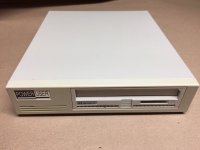
s-l1600.jpg

 
Last edited by a moderator:
You might need to use a disk partitioning application to get it running. I would try LaCie's Silverlining software, but there are several.

You'll need to use that tool to format each cartridge.

 
Syquests are picky.

Got a pair of them, easy to use with some units and not seen with others, yes i agree with Cory, have a try with softwares.

 
I'd recommend installing the Syquest software.  I've found that nearly all the cartridge drives regardless of make and model require drivers to make them useable.  Not that you can't insert a cartridge before you turn on the computer, but that's just annoying.

 
I think olePigeon is right about installing the Syquest software.  I don't think Syquest support was ever built-in and always required the Syquest INIT to load during the computer's startup process.

 
You can use any disk formatting software with SyQuest, but if you use the wrong kind, it won't necessarily support changing cartridges properly without restarting. The SyQuest extension will poll the drive for disk changes.

 
Not that you can't insert a cartridge before you turn on the computer, but that's just annoying.
Thank you! I'll have to look. That's what I've been doing with my EZ-135 and most of the carts I have for it are formatted with Silverlining.

It worked with the cartridge inserted on boot-up and I can swap carts, so it didn't actually occur to me to look more.

 
Im trying to find the right formatting software. Like LaCie's Silverlining software. 

Any other apps?

I have 2 Macs. One se/30 with 32 bit ROM from BMOW, and it can also boot into standard system 6 . 

Also have a g4 Mac. OS 9.2

Im going to need the cartridge to work on both Macs. Useless otherwise.

What would be the best software to format this cartridge?

It's a brand new cartridge also. 

Thanks!

 
Ok, Im in the process of trying to fix the situation. Formate the disk. Bought a terminator. If all else fails.  Ive lost 100 dollars. I can live with that. But How the hell do I get my se/30 back? Is there a total system reset? 

 
Last edited by a moderator:
Reset in what sense? You can put the regular ROM and the old startup disk back in.

 
Well, I have the ROMinator from BMOW. And I want to keep it. I wrote him. I just want to reset as in. Free my se/30 from this scsi lock Ive found myself in.

 
Last edited by a moderator:
Well the power user dive is recognized by LaCie Silverlining. Until I put my Syquest 44 mb brand new cartridge in. Then it spins and does nothing. I put the disk in when it is recognized and Im taken on the most confusing trip around a program. 

 
Your SCSI problems are caused by the fact that your SCSI chain and peripherals are set up incorrectly. The way to undo that is to either remove the SCSI device(s) or properly terminate them.

It sounds like the terminator came in though, which is good.

I put the disk in when it is recognized and Im taken on the most confusing trip around a program. 
Around Silverlining or another program? Can you describe what it's doing? Is it offering  to let you partition the disk?

With the cartridge inserted, can you get to options for partitioning?

 
My se/30 is totally f*%^%cked. All from this one little termination issue. In the process of trying to fix the issue other issues came up. Ill make a new thread

 
Every cartridge drive I've used required the respective company's software.  I never known one to not require software to work correctly.

If you haven't done so (and as far as I can tell, you haven't said otherwise) you should install the Syquest software and use the bundled utility for formatting disks.  You shouldn't need additional special software to erase the disk.

If you installed the SCSI Probe extension, I suggest you remove it.  It will cause issues with your SCSI drives.  I've never gotten the SCSI Probe extension to work correctly without causing more issues than it solves.

 
Status
Not open for further replies.
Back
Top



