Hi folks,
The flyback is fixed [https://68kmla.org/bb/index.php?threads/spot-the-bust-flyback-competition.47610/post-559192], but startup fails!
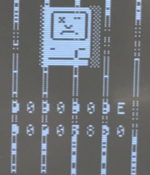
According to this TinkerDifferent page: https://tinkerdifferent.com/resources/sad-mac-error-codes.82/
The closest error appears to be:
$000E The Data Bus test failed. The Z field indicated the bad bit(s) as a 32-bit mask for bits 0-31, either a bad SIMM or a data bus failure.
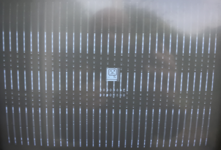
To me it looks like the bottom row of digits are saying 0x9090B8D0 or something and it looks like the top nybble appears to have failed on every word. But also it looks like enough of at least some of the RAM is working so that the stack is set up and it can call some functions, because I guess drawing the sad Mac icon and the digits involves some subroutines? From my recollection of the Plus boot process it first sets the SP fairly low in memory and only after it's checked RAM it moves it to the top.
There are 4x 1MB SIMMs in that SE (let's call them A (Hi1), B (Lo1), C (Hi2), D (Lo2)). In theory, if there were at least 2 SIMMs that worked well enough. I might need to go through 6 combinations: AB, AC, AD, BC, BD, CD.
I'm a bit reluctant to open the SE and try them, because I understand the plastic clips on the sockets are pretty fragile. But given that one of the SIMMs has a lower byte that's good (B or D) I can cut the combinations:
AB, AD (if both of these are bad, then 'A' must be faulty) => CB (if still bad => DB is the only remaining one).
Still, 4 combinations is fairly involved. Maybe I can cut it down further, either A or C is certainly bad, but most likely 'C' (and D or B might be bad), so trying to
DB in slot Hi:Lo 1 (most likely to work: failing image will tell me if B or D has failed, so we'll call that x) => Ax/xA and if that fails, Cx/xC is the only remaining option. This involves removing 2 SIMMs; inserting 1 to 3 maximum. That could be tolerable.
However, I'm also puzzled by the vertical patterns. They repeat on each word fetch, but word fetches on an SE aren't independent; instead the hardware fetches a 2 word FPM burst once every 4 cycles. The second word burst is just another column fetch. But could a RAM failure be identical for a new column (same page)?
Actually, I think it points to a DRAM failure. Nybble errors appear in bursts, but they're not always there. If it was in the Logic board, I guess it'd be more consistently there. Bits 15 and 12 fail more commonly and together, Bits 14 and 13 fail together less commonly. Maybe that doesn't imply a RAM issue, but a dot-clock shift register issue. But I don't think that makes sense either, because if there's a shift register issue, it would tend to cause all the bits to fail from a given position, e.g. if bit 1 always shifts a 0 into bit 2, then the bottom 2 bits would always be white (or more likely to be white). Also, if it was a shift register issue, it wouldn't cause a Sad Mac (because a memory test wouldn't find it).
Does anyone have insights here?
The flyback is fixed [https://68kmla.org/bb/index.php?threads/spot-the-bust-flyback-competition.47610/post-559192], but startup fails!
According to this TinkerDifferent page: https://tinkerdifferent.com/resources/sad-mac-error-codes.82/
The closest error appears to be:
$000E The Data Bus test failed. The Z field indicated the bad bit(s) as a 32-bit mask for bits 0-31, either a bad SIMM or a data bus failure.
To me it looks like the bottom row of digits are saying 0x9090B8D0 or something and it looks like the top nybble appears to have failed on every word. But also it looks like enough of at least some of the RAM is working so that the stack is set up and it can call some functions, because I guess drawing the sad Mac icon and the digits involves some subroutines? From my recollection of the Plus boot process it first sets the SP fairly low in memory and only after it's checked RAM it moves it to the top.
There are 4x 1MB SIMMs in that SE (let's call them A (Hi1), B (Lo1), C (Hi2), D (Lo2)). In theory, if there were at least 2 SIMMs that worked well enough. I might need to go through 6 combinations: AB, AC, AD, BC, BD, CD.
I'm a bit reluctant to open the SE and try them, because I understand the plastic clips on the sockets are pretty fragile. But given that one of the SIMMs has a lower byte that's good (B or D) I can cut the combinations:
AB, AD (if both of these are bad, then 'A' must be faulty) => CB (if still bad => DB is the only remaining one).
Still, 4 combinations is fairly involved. Maybe I can cut it down further, either A or C is certainly bad, but most likely 'C' (and D or B might be bad), so trying to
DB in slot Hi:Lo 1 (most likely to work: failing image will tell me if B or D has failed, so we'll call that x) => Ax/xA and if that fails, Cx/xC is the only remaining option. This involves removing 2 SIMMs; inserting 1 to 3 maximum. That could be tolerable.
However, I'm also puzzled by the vertical patterns. They repeat on each word fetch, but word fetches on an SE aren't independent; instead the hardware fetches a 2 word FPM burst once every 4 cycles. The second word burst is just another column fetch. But could a RAM failure be identical for a new column (same page)?
Actually, I think it points to a DRAM failure. Nybble errors appear in bursts, but they're not always there. If it was in the Logic board, I guess it'd be more consistently there. Bits 15 and 12 fail more commonly and together, Bits 14 and 13 fail together less commonly. Maybe that doesn't imply a RAM issue, but a dot-clock shift register issue. But I don't think that makes sense either, because if there's a shift register issue, it would tend to cause all the bits to fail from a given position, e.g. if bit 1 always shifts a 0 into bit 2, then the bottom 2 bits would always be white (or more likely to be white). Also, if it was a shift register issue, it wouldn't cause a Sad Mac (because a memory test wouldn't find it).
Does anyone have insights here?