• Hello MLAers! We've re-enabled auto-approval for accounts. If you are still waiting on account approval, please check this thread for more information.

Read/Write PRAM and xPRAM

Hello folks!

I recently bought a PowerBook Wallstreet/PDQ. Of course the PRAM battery is dead. That's nothing too bad but since I'm a software guy I thought that it should be possible to save the (x)PRAM to disk on shutdown and restore it after reboot if a PRAM reset is detected (e.g. year < 2024 or year >= 2039). So the last volume settings, display brightness, region (Date & Time) and so on are restored.

I know there are some solutions to achieve my needs but... Where's the fun part when just using them? 😄 I really want to understand things how they were done back in the days.

Btw: "PRAM-Reader" (https://macintoshgarden.org/apps/pram-reader) doesn't work at all. Restoring the saved state leads to a black screen and a complete hang.

What I've found out:
  • "Old" PRAM is 20bytes, "extended" PRAM is 236bytes (according to "Inside Macintosh, Parameter RAM Utilities", from 1994).
  • Getting the pointer for the PRAM is done by using "GetSysPPtr".
  • Changing values is done by changing them directly in memory.
  • Saving is done by using "WriteParam".
The documentation seems to work with the first 20 bytes (reading and writing works). But the extended PRAM doesn't seem to be directly after these 20 bytes. Reading 256 bytes and then writing them back causes crashes, hangs and so on.

And here comes the tricky part: I want to do everything in REALbasic! (That's the language I'm most familiar with on Mac.)

I hope someone out there has some advice for me. :)

Thank you all!
Mike
 
it should be possible to save the (x)PRAM to disk on shutdown and restore it after reboot if a PRAM reset is detected (e.g. year < 2024 or year >= 2039). So the last volume settings, display brightness, region (Date & Time) and so on are restored.

This is totally possible, and sounds like a fun project to attempt to me :-)

But the extended PRAM doesn't seem to be directly after these 20 bytes

You don't access the xPRAM like that. You have to use the (undocumented) _ReadXPRam and _WriteXPRam traps. There's loads of info on that on https://okmij.org/ftp/xPRAM.html including example code in ASM.

And here comes the tricky part: I want to do everything in REALbasic!

You're right, this is the tricky part, though not impossible :-) As far as I know, REALbasic can only make applications, and by the time you're able to run applications, things aren't consulting the PRAM very much. Things like the sound volume, when in use, are used from their copies in main memory, and only written back to the PRAM when they change - they're only copied out of the xPRAM at startup. So changing the xPRAM won't change anything until the next reboot.

What makes this even more annoying is that some of the stuff out of xPRAM is loaded extremely early, before really any custom code can run. The main really annoying culprit here is the 32-bit addressing flag, which of course has to be consulted right at the start of the boot process.

So, one thing you could try is to write a little application that goes in the startup items folder and which loads the xPRAM if required, then immediately reboots: this might work. The OS will, in theory, reload the values you fiddled with from the xPRAM, and all will be sweetness and light - except that you have to wait for the computer to boot twice.

(This is the solution that I adopted for Force32, which is a little extension that forces 32-bit addressing always to be on - though that is an extension that runs early, so the double reboot is less annoying. It's also, interestingly, roughly what Apple did themselves when 32-bit addressing became mandatory: if 32-bit mode is set off, you get a double reboot the first time when the OS sets it on)
 
It's also, interestingly, roughly what Apple did themselves when 32-bit addressing became mandatory: if 32-bit mode is set off, you get a double reboot the first time when the OS sets it on)
The 7.6.1 double boot frequently scares me half to death when I've been soldering on my Centris. Almost as bad as accidentally leaving 768MB of RAM in a Beige G3 and wondering why video isn't initialising.
 
This is totally possible, and sounds like a fun project to attempt to me :)
I hope that the fun part won't change to frustration... 😄

You don't access the xPRAM like that. You have to use the (undocumented) _ReadXPRam and _WriteXPRam traps. There's loads of info on that on https://okmij.org/ftp/xPRAM.html including example code in ASM.
Okay, I already stumbled over these traps... But I was hoping not to need them.
With that in mind I did some testing but I'm a little stuck. - Maybe you (or someone else) can help here...

I declared "CallUniversalProc" as follows:
Code:
Declare Function API_CallUniversalProc Lib "InterfaceLib" Alias "CallUniversalProc" (theProcPtr As Ptr, procInfo As Integer, ByRef buffer As Ptr, bufferSize AS Integer) As Integer

But I think that this isn't right due to the header definition in "MixedMode.h":
C++:
EXTERN_API_C( long )
CallUniversalProc(
  UniversalProcPtr    theProcPtr,
  ProcInfoType        procInfo,
  ...);
Do you have any idea how I declare a function in RB with dynamic parameters?

Also building of the procInfo is a bit obscure...
C++:
#define COMP_NORET_2(name, a1, a2)                                            \
    name##_procinfo = kPascalStackBased                \
        | STACK_ROUTINE_PARAMETER(1, SIZE_CODE(sizeof(a1)))    \
        | STACK_ROUTINE_PARAMETER(2, SIZE_CODE(sizeof(a2)))
#define RD_ALLOC(routine) static RoutineDescriptor            \
    routine##_RD = BUILD_ROUTINE_DESCRIPTOR(routine##_procinfo, routine)

enum {
  COMP_NORET_2(read_extended_PRAM,char *,const short)
};
I assume that "a1" is "char *" and "a2" is "const short"?
Do you know which length a "char *" (Pointer) is? - Two or four byte? My current assumption is four byte.

Currently when reading xPRAM (like I implemented it) I'm getting error 3 and my app crashes.

Thank you for your help and tips! :cool:
 
For something like this I personally wouldn't bother making anything PPC-native. It's not like the speed really matters, and obviously the trap is rather easier to call from 68k code.
Haven't thought about doing native 68k... - I gave it a try and I'm stuck at the very same problem. I want to call a trap from RB but I absolutely don't know how to do that. I created a new post for that specific question.

All pointers are four bytes.
At least this assumption was right. 😄

Anyway, thanks for the tips and thoughts!
 
I got it working! ...kind of...

The optional parameters for CallUniversalProc have to be Pointers.
And one "Declare Function" was wrong... One parameter had an extra "ByRef" and that caused the code not to execute/crash.

The saved result is now the same as in "PRAM-Reader". - And the behavior when restoring from file ist also the same. Complete crash of the PowerBook. 😞

Then I created a new project in CodeWarrior to try the code from here: https://okmij.org/ftp/xPRAM.html
Reading xPRAM works and it gives me different results than my RB code, so using these results to restore may work (I didn't test that). - But I don't have any idea what really is the difference...

Does anyone else have any idea what I could check now?
 
What do the differences look like? You can either post the two files here or use Hex fiend to have a look at them.
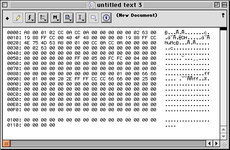
Image 01:
Saved file of my RB application.
The first 20 bytes are PRAM (can be ignored here) then followed by 256 bytes of xPRAM. This is the exact same data that "PRAM-Reader" gets.

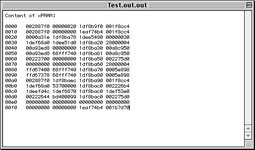
Image 02:
256 bytes of the xPRAM-Call from C++ (CodeWarrior).

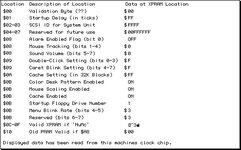
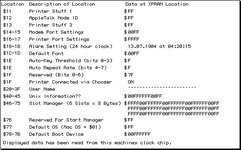
Image 03 - 05:
xPRAM data read out by "Pram Doctor". - That also differs from the first two screenshots.
 

Attachments

  • 01_RB_Call.jpg
    01_RB_Call.jpg
    87 KB · Views: 20
  • 02_CPP_Call.jpg
    02_CPP_Call.jpg
    53 KB · Views: 21
  • 03_PramDoctor_1.jpg
    03_PramDoctor_1.jpg
    54.8 KB · Views: 19
  • 04_PramDoctor_2.jpg
    04_PramDoctor_2.jpg
    59.8 KB · Views: 14
  • 05_PramDoctor_3.jpg
    05_PramDoctor_3.jpg
    52.7 KB · Views: 19
I'll give it up... In the last few days I tested almost every possible combination. Even ditching RB and using C/C++ instead doesn't work.
Everytime I restore the saved PRAM either nothing happens or the PowerBook freezes completely.

The big problem is that I have no application where I can say that the dumped PRAM is in fact the "real one" (for comparison to the data my code fetches and saves).

What I also found out: "Pram Doctor" is not suitable. Maybe it's way too old. Sometimes the saved PRAM data contains strings from system menus or even displayed text. So I ditched that app for comparison etc.

TechTool Lite 3.0.4 seems to be the first application to save and restore (x)PRAM values (nearly?) correctly. But not everything I thought gets restored. (For example, the display brightness won't be restored.)
The saved file is way bigger than I'd expect (566 bytes). There is a part where my dumped data equals the TT-Lite saved data (but still not all of my 256 saved bytes).

I still hope that here's someone who has an idea on how to achieve saving and restoring (x)PRAM...
 
I know this is an old thread, but I wanted to share my thoughts. PRAM vs xPRAM is always a bit of a challenge. The PRAM is sort of sliced and diced in between the xPRAM bits.

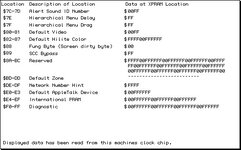
Attached is a pretty good file that explains the layout of the clock chip memory. You can follow this to find the PRAM and xPRAM bits. Generally I have found PRAM Doctor to be very helpful to dynamically update any PRAM or xPRAM value.

@MightyMike this would be a very fun little program to write. On boot, restore PRAM from a file. Pull PRAM battery and forget it. Like @cheesestraws mentioned, this could be done with the _READXPRAM and _WRITEXPRAM traps pretty easily.

First iteration of the program could just write in some hardcoded values. In fact I spend most of my "play time" these days dabbling with 1024KB ROMs. So this could just be even be baked right into the ROM, to call the _WRITEXPRAM trap. To make it even more fun, maybe make 256 bytes in the ROM user-editable (with a HEX editor and the SIMM programmer of course), and those addresses could be the values to write into XPRAM. Maybe something like if the user holds down X during boot, then write to the XPRAM.

Now you've got me thinking of spinning this up :)
 

Attachments

Last edited:
So this could just be even be baked right into the ROM, to call the _WRITEXPRAM trap. To make it even more fun, maybe make 256 bytes in the ROM user-editable (with a HEX editor and the SIMM programmer of course), and those addresses could be the values to write into XPRAM.
So this piqued my interest. I've been developing a new ROM disk driver for 1024KB ROMs. It is pretty far along, and a couple smart people have offered to beta test this before I share it out. You know, just in case there are some silly bugs :) But when I got home, I made a small tweak to the ROM to call the trap to write PRAM, and this works beautifully.

For example one thing that always drives me nuts with a dead PRAM battery, is having to set the mouse to max speed on every boot. Problem solved now, putting this right into the ROM. Maybe this could just be pure shenanigans, and we could have a specific byte in ROM where if it equals a value such as 01, then this will trip the driver to load a table of PRAM values from specific addresses in ROM. For advanced users that want this functionality.
 
It'd be interesting to be able to check the date value on boot, and if it's within a certain distance of 1904, automatically load the values. Then you could add the byte as well to manually trigger it when the time isn't indicating the values have been wiped, and could set that byte via INIT at boot, for example by holding down a key. I figure moving the trigger mechanism to something external means that people could easily invent their own (re)set triggers. Being able to modify PRAM at any time would also be a bonus, and that could be triggered through a number of methods.
 
Setting the byte at INIT time won't be soon enough for some things unless you reset the machine immediately afterwards so it picks up the new values. This is why, for example, Force32 reboots the machine as soon as it's twiddled the xPRAM. The same is true of the AppleTalk interface: the PRAM does not store the "running" value of that, just the value for the next boot, so if you twiddle it at boot time you either need to do it before AppleTalk has finished loading (perhaps in an 'adev' or similar?) or you need to reboot afterwards.
 
With the "old" base PRAM, I think Apple's intent is for us to update the value in low memory directly, then call the WritePRAM trap (notice this is not WriteXPRAM). It appears that the WritePRAM trap will essentially copy all 20-bytes of PRAM from low-memory back into the clock chip.

Certainly in my testing this is the best way to update the "old" base PRAM. Doing it this way for example, the Mouse CDEV matches the change, which matches PRAM and low-memory.

But for the more obtrusive changes such as 32-bit mode, I don't think it would be possible to avoid a reboot.
 
Last edited:
And interestingly, when you call WritePRAM (0xA038), the system really uses the WriteXPRAM (0xA052) trap to write the 20-bytes of PRAM from low memory back to the clock chip.
 
OK for the fun of the community, here is the mock code I threw together for this. I'm thinking of having a specific offset set aside in ROM to trigger this. So if the appropriate offset = 0x01, then run this routine to set the mouse tracking and volume. When burning the ROM, users could optionally find the offset in ROM and set to 0x00 to not run this.

#pragma parameter __D0 MyWritePRAM(__D0, __A0)
OSErr MyWritePRAM(SysPPtr lowmem1, long minus1) = { 0xA038 };

// Set xPRAM Byte 8 (Volume & Mouse tracking)
// Dec 51 = Hex 0x33 = Bin 0b00110011
// 1) Get pointer to low-level memory that holds the "old" PRAM
SysPPtr lowmemptr = GetSysPPtr();
// 2) Clear the hi byte of volClik in low-level memory
lowmemptr->volClik = (unsigned short)lowmemptr->volClik & 0x00FF;
// 3) Set the hi byte of volClik to 0x33 in low-level memory
lowmemptr->volClik = lowmemptr->volClik | (0x33 << 8);
// 4) Set PRAM byte in clock chip to 0x33
// WritePRAM writes all 20 bytes of "old" PRAM from low-level memory back to the clock chip
MyWritePRAM(GetSysPPtr(),0x0A06);
 
Back
Top