



So, my good ol' temperamental Classic is at it again. After the time of success of booting from the ROM (hard drive is still dead and unconnected) to be able to do work on floppies as needed, it decided to start throwing random Sad Macs at me after placing the memory expansion card back in. Prior to all of my work on this Classic, the expansion card came with it and was working before. I'll do a quick rundown of how setup went today:
Put the logic board back in the Classic without the card.
Turn on Classic. Did the ? disk. Forgot to plug in the keyboard to boot off the ROM.
Turn off Classic.
Dug out the keyboard (I know it's my Mac one. All the Apple logos make it a hard miss) and plugged it in as well as the memory expansion card.
Turn on Classic.
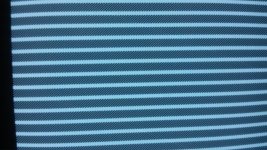
Jail bars! No! After a while, jail bars fade into Sad Mac.
Random Sad Mac code every time. I occasionally got 00000004 00000400 a few times in a row.
Jail bars point to the memory. Alright, I'm on to something. I open the case back up and look the card over, do a few tests only to realize...
I didn't fully seat the card! A simple oversight that might've proved to be someone else's migraine down the road. So just in case someone get a memory expansion card for a Classic and ran into this problem. Don't instantly assume that card is bad! Sometimes you gotta push it in good. Here's some pictures of the random Sad Macs I nabbed and some of the deformities to the jail bars from an improperly seated card.
One thing to note about these jail bars is that they'll slowly disappear after the Sad Mac is displayed. Sometimes they'll leave fragments, sometimes they'll take the whole screen in a garbled mess of black and white pixels. The bars are rarely solid and almost always fade away.
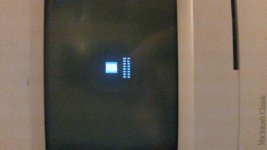

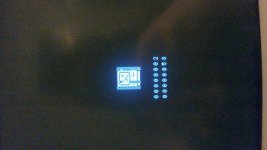
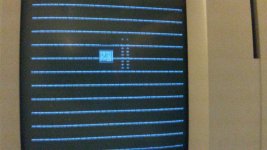
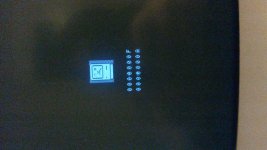
I just thought I'd make this post real quick for people who might end up overlooking the memory expansion card and if it's not seated right, get those random Sad Macs, or just like looking at Sad Macs for whatever reason. I was also about to turn to help from the army if I couldn't find that my simple oversight was the problem.
Put the logic board back in the Classic without the card.
Turn on Classic. Did the ? disk. Forgot to plug in the keyboard to boot off the ROM.
Turn off Classic.
Dug out the keyboard (I know it's my Mac one. All the Apple logos make it a hard miss) and plugged it in as well as the memory expansion card.
Turn on Classic.
Jail bars! No! After a while, jail bars fade into Sad Mac.
Random Sad Mac code every time. I occasionally got 00000004 00000400 a few times in a row.
Jail bars point to the memory. Alright, I'm on to something. I open the case back up and look the card over, do a few tests only to realize...
I didn't fully seat the card! A simple oversight that might've proved to be someone else's migraine down the road. So just in case someone get a memory expansion card for a Classic and ran into this problem. Don't instantly assume that card is bad! Sometimes you gotta push it in good. Here's some pictures of the random Sad Macs I nabbed and some of the deformities to the jail bars from an improperly seated card.
One thing to note about these jail bars is that they'll slowly disappear after the Sad Mac is displayed. Sometimes they'll leave fragments, sometimes they'll take the whole screen in a garbled mess of black and white pixels. The bars are rarely solid and almost always fade away.
I just thought I'd make this post real quick for people who might end up overlooking the memory expansion card and if it's not seated right, get those random Sad Macs, or just like looking at Sad Macs for whatever reason.
I was also about to turn to help from the army if I couldn't find that my simple oversight was the problem.





