• Hello MLAers! We've re-enabled auto-approval for accounts. If you are still waiting on account approval, please check this thread for more information.

R7000 beige G3 issues

So, maybe the Mac edition card has no issues with the ATI drivers? Maybe the problems arise with flashed PC Cards? Just a thought.
Thanks for sharing your experiences and also posting the driver versions used.

The flashed card thing did cross my mind. However, I think that I experienced the freeze problem with built-in Rage Pro video as well, when later (R7000 compatible) ATI drivers were enabled.

I will need to revisit this maybe and as a first step try with the same drivers you're using.

 
This is very interesting. Your drive image works perfectly. Then I tested my own boot drive again and it crashed on boot, as before. So it’s a software problem.
 
Yep.. and you know what’s even stranger ? I haven’t been able to replicate success starting from scratch. So I’m keeping backups! I have tried , in vain installing 9.2.2 from the universal iso and the macos9lives image to a fresh drive. But it hangs just when it starts to load the desktop: the taskbar disappears and the mouse freezes. It only boots with extensions disabled. Maybe you can figure it out now that you have a working image. One thing is for sure… I’m not putting the g3 back in. I’m keeping the Yikes G4 400 @ 433 (added another fan to the case) and keep things the way they are.
 
Yep.. and you know what’s even stranger ? I haven’t been able to replicate success starting from scratch. So I’m keeping backups! I have tried , in vain installing 9.2.2 from the universal iso and the macos9lives image to a fresh drive. But it hangs just when it starts to load the desktop: the taskbar disappears and the mouse freezes. It only boots with extensions disabled. Maybe you can figure it out now that you have a working image. One thing is for sure… I’m not putting the g3 back in. I’m keeping the Yikes G4 400 @ 433 (added another fan to the case) and keep things the way they are.
Ah, so you do have the same freeze at desktop issue that I do! I will sit down and compare ATI driver versions but right now I need the G4 back in my Yikes to install Windows NT 4.0 ;)

Try moving over all the ATI extensions from your working drive image to the one that doesn’t currently boot. I think one particular extension is the culprit - maybe ATI Graphics Accelerator.
 
Someone figured out how to get the PowerPC version of NT (which always existed) to work on Macintosh hardware. It’s the novelty and curiosity factor.
 
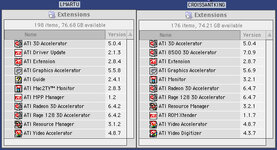
Just had a quick look at the versions of the ATI drivers in the boot drive @lmartu sent over vs. my non-working version.

Looks like @lmartu ’s versions are a bit older. They play nice with the G4 module.

IMG_9473.jpeg
 
I'm circling back to this issue, as I have a new G4 ZIF that I DIYed from a 466MHz DA card. It's quite a beauty - it runs stable at 567MHz.

@croissantking ok! Interesting to see if just changing the drivers solves the issue

I don't have your partition anymore, but I was able to put together the same exact driver configuration as you previously had, which was a combination of the package on the 9.2.2 universal installer, and January 14, 2002 ATI Retail Update.

It doesn't work. There was something special about your partition that will need further investigation to understand.

Can you remember which CPU cache enabler software you had on there?

BTW, I have an original Mac Radeon 7000 now, so it's not a flashed card thing.
 
Looks like switching from Powerlogix CPU Director to XLR8 Mach Speed Control has resolved this for me.

I noticed with the Powerlogix INIT that Altivec was being reported as disabled in Gauge Pro, while with the XLR8 INIT it’s reported as enabled. The other difference is that XLR8 loads up much earlier in the boot process (i.e. before the ATI extensions) which might be relevant too.
 
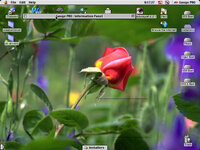
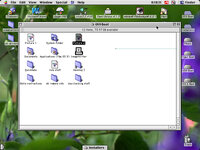
XLR8 is still working, but I am having image corruption issues:

Picture_2.jpg
Picture_3.jpg

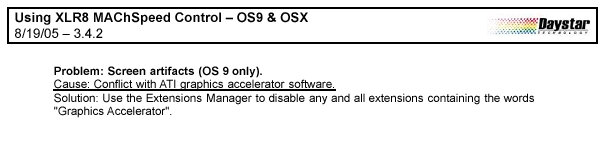
Nasty. Apparently it's a known issue. Daystar's solution is to disable the ATI accelerator extension:

Picture_1.jpg

But the UI is pretty sluggish without 2D acceleration, so it's not a great solution.
 
I wonder if it would be worth trying to flash something like a Geforce2 MX or Geforce4 MX PCI card to get away from the ATI drivers. They're not fast cards, but not slower than a 7000, and perhaps even less loved, so either should be cheap if you can find one.
 
I wonder if it would be worth trying to flash something like a Geforce2 MX or Geforce4 MX PCI card to get away from the ATI drivers. They're not fast cards, but not slower than a 7000, and perhaps even less loved, so either should be cheap if you can find one.

Sounds interesting, but do you know if anyone has successfully done this with a PCI card? The only GeForce cards that were bundled with Macs were AGP versions AFAIK.
 
Sounds interesting, but do you know if anyone has successfully done this with a PCI card? The only GeForce cards that were bundled with Macs were AGP versions AFAIK.
I don't know about successfully flashing Nvidia PCI cards. There's some Original and Modified Mac ROMs for Nvidia cards at
http://themacelite.wikidot.com/wikidownloads2
I would dump them with my DumpPCIRom.sh script to verify if the modifications are valid.
https://68kmla.org/bb/index.php?threads/geforce4-mx440-64mb-flashable.49714/post-568077
 
I don't know either, I've only seen the ROMs out there. I do know that the same Radeon 7000 ROM works on both PCI and AGP cards, so it's within reason that the same might be true for Nvidia.

This page claims that a B&W G3 or newer is required. I'm not sure why.

So this idea is far from a proven solution, but it might be fun to try.
 
Back
Top