• Hello MLAers! We've re-enabled auto-approval for accounts. If you are still waiting on account approval, please check this thread for more information.

Quicksilver power supply — where is the fuse?

A 733 Quicksilver has just come my way, but is completely unresponsive. CUDA reset etc has had no effect. So, I have just extracted the power supply to check the fuse.

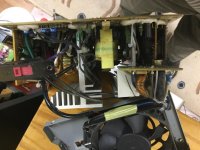
That step was easy enough, except that I can't for the life of me see a fuse. More positively, I also can't see evidence of fried components, nor are there bulging caps or suspicious smells. But finding the fuse is my first priority. Would it, could it, should it be inside the small white plastic box wired more or less immediately to the power input? Here it is, at the corner (photo is upside down, sorry). The two leads look to my untrained eye to be about the right distance apart for a standard cylindrical fuse. If I go a-poking around in there, will I get lucky?

IMG_0090.JPG

 
Fuse is on the PCB itself, its almost never inline. 

If the primary fuse is ok, you need to check for the standby voltage to see if its missing or not. If its present, then you need to jump out the standby to see if the power supply attempts to start. 

If not, then your looking at the opto-isolators in the main switching supply, or the main control IC itself, or even the enable transistor. 

If your missing standby voltage, then you need to take a look at the standby power section for faults. Or primary voltage if missing. 

Also, the main switching transistors as they age they develop micro-cracks, or holes in the MOS layer which can result in a spontaneous short and either pop the fuse, or go with a "BANG". 

Ever had power supplies that spontaneously combust when plugging into the wall for no reason, Thats why...

 
Last edited by a moderator:
you can use an ATX power supply, if you buy a converter or re-wire it correctly.  You will not have 28 volts so you cannot use an ADC monitor, but I imagine most of those have had their CCFL backlight burn out by now.....

Im thinking that there is a reason that fuse popped.  its probably not the root cause of the issue.  If you replace it, it may well blow again or worse...

 
Last edited by a moderator:
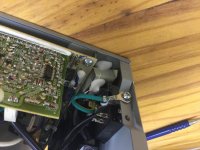
OK, so thus steered in a better direction, I'm pretty sure I have located the fuse, which is not that white doohickey but a standard fuse soldered on the first small circuit board connected to the wiring after it comes into the unit (makes sense). It is mounted vertically and is shrinkwrapped in a black cover. In the pic (which again is upside down), it is at the bottom right.

My multimeter shows that the fuse is not blown, so this repair is likely going to be beyond me. Sigh.... I'll have to wait for a donor or affordable ps to come up.

The machine would be used with an ADC display, so no ATX here.

IMG_0092.JPG

 
All very well, except that I don't know what I am doing!

Jump the standby means to 'press the on button' by touching the positive and negative lines, right? That would be with the ps installed in the machine?

 
I really feel you are jumping into dangerous teritorry there. There is, on eBay, a DVI adaptor for ADC monitors that comes with a power supply to supply power to the monitor separately, you would then be free to use an ATX power supply in the computer. It will last longer than a used unit. you also get the added benefit of being able to use the adc monitor on any computer you like.

to answer your question, to jumper the power supply on, you ground the green wire.

 
Last edited by a moderator:
I'm going to look for a donor machine. The ps is not supplying any power to any of the pins, so something is definitely fried.

 
Back
Top