• Hello MLAers! We've re-enabled auto-approval for accounts. If you are still waiting on account approval, please check this thread for more information.

Quadra 700 Death Chimes and No Video

Hi all

I have a Quadra 700 which when powered on does the following:

- Normal "bong" chime

- Quickly after the death chimes

- There is no video output

- The green LED is lit

I've done a couple of quick tests to confirm the following:

- Tried another power supply just in case there might be a power issue

- Removed all video SIMMs and RAM

- Put in a fresh battery - can't recall whether Q700 required it

- Board looks to be in very good condition - definitely no battery damage, etc, and as the Q700 came with tantalum caps, there is no electrolyte leakage issues

- Tried with a working Nubus video card

Any advice would be appreciated.

Cheers

Michael

 
Hi all

I have a Quadra 700 which when powered on does the following:

- Normal "bong" chime

- Quickly after the death chimes

- There is no video output

- The green LED is lit

I've done a couple of quick tests to confirm the following:

- Tried another power supply just in case there might be a power issue

- Removed all video SIMMs and RAM

- Put in a fresh battery - can't recall whether Q700 required it

- Board looks to be in very good condition - definitely no battery damage, etc, and as the Q700 came with tantalum caps, there is no electrolyte leakage issues

- Tried with a working Nubus video card

Any advice would be appreciated.

Cheers

Michael
Considering that the board was already recapped it is possible that the previous owner did not install the caps correctly and caused this issue,  check the polarity of all the caps and their values. Considering how cheap capacitors are it might be worth getting a new set and recapping it yourself.

 
Hi Challenger 1983, thanks for the reply.

The Q700 came from the factory with tantalums, so that was the reference I was making. I'm 99% sure these have not been replaced. I will, however do as you say, and just doublecheck polarity, etc.

 
Hi Challenger 1983, thanks for the reply.

The Q700 came from the factory with tantalums, so that was the reference I was making. I'm 99% sure these have not been replaced. I will, however do as you say, and just doublecheck polarity, etc.
Oh my bad, I completely forgot, but yes it would be good practice to check the polarity and make sure nothing is the wrong way around 

 
Tried with a working Nubus video card
Just to clarify, you tried it with no DRAM/VRAM (other than soldered, obviously) and no nubus cards, and got the death chimes?

Do you have an internal scsi hdd/scsi2sd/etc installed? If there's nothing connected internally, it will need termination, iirc. I've had similar issues (unpopulated memory slots and good chime then bad chime) due to a) my scsi2sd not being configured correctly,  b) not having a drive in it, and c) the original HDD not working (I surmised the write arm was fused to the bumper stop).

Hope this might be a solution for you.

And no battery collateral damage anywhere?

The green LED, FYI, is the power indicator. The HDD activity LED is amber :) At least be default... Someone might've swapped the led+wiring I suppose.
 
Last edited by a moderator:
Thanks Jessenator, hadn't considered any termination issues in this instance, but worth a shot. Usually the termination is for a booting system, which this is not. My testing has included completely bare bones with nothing at all apart from power installed.

On another note, the power circuit works as it will also power on from the keyboard, but results are the same.

Yep, green power LED soldered directly on front of board, not HDD one.

Thanks for replying.

 
Update: I've checked out all capacitors and polarity looks correct, and to my eye, I'd say they have not been touched. I've been over most of the board with my microscope and can't see any obvious trace damage. Am looking to see if any of the surface mount components on the underside of the board may have been knocked off from a previous board removal/insertion.

Will search for any hires photos which may help as it looks like there are a few resistor positions missing - although they may have never been there. Hard to tell from the solder on the pad.

 
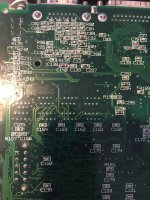
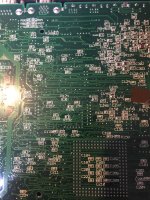
I cannot find any photos of the underside of the logic board, and was wondering if anyone could help by posting theirs. I'm particularly keen to see if there are resistors in the following locations generally centre to top right of board.

C73

C134

R103

R136

R174

R191

R192

R193

R195

Cheers

Michael

 
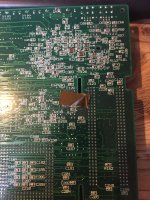
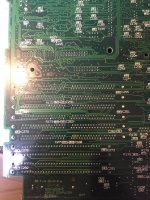
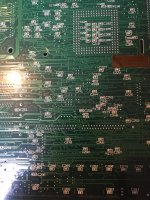
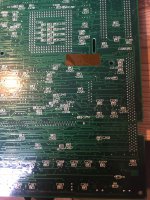
Here's the best photos I can do at the moment  These are of a spare board that I tested as working a couple of months ago, so ought to be OK.  Sorry about the lighting.

I can't find R174 at all, or any Rs above 191, but my eyes aren't attuned to dense circuit boards really... up to that point they all seem to be unpopulated though.

62722602140__C583DB33-0D14-47AD-B4CA-132044779215.JPG

62722607618__6F62B803-73D1-43F5-A935-35019EE8DC58.JPG

62722608558__2C43F4A8-CB3A-409D-83DB-63088B13E728.JPG

62722610418__DAEB5231-DA78-4A00-AE4D-6F6AECBE3F7C.JPG

62722611825__D30320C0-715C-4F2A-84AC-DD2126135338.JPG

62722612672__51003E88-2A54-4F7C-9457-9D5108F1E37E.JPG

 
Hi cheesestraws, thank you so much for the photos. They were spot on. They confirm that the missing resistors and capacitors are normal as they are also not on yours. So that ticks that box.

It's fun and frustrating at the same time, as this board almost looks new apart from the fact it's not working.

Cheers

Michael

 
It's the ones that look like they ought to work that always make me worry.... good luck with your detective work.  If you'd like photos/information about any other bit of the board, let me know.

 
Hey there, I know this post has been now 4 years old but I was wondering. Where you able to figure out the issue?

I am facing the same exact situation. Death chime and no video. Tried external video cards and insta death chime
 
Hi @naruse, sorry I haven't been on for a bit, but to to answer your question I did not.
I've taken a hiatus from my gear and it's all packed up since moving house.
I do plan on getting it all back out to look through my collection. I've since learned a few more potential diagnostic techniques which I might employ as well. When I get back to it I'll post here.
Did you get anywhere with yours?
 
hey @michaelweare

Unfortunately I have not, I thought it was a bad ram; changed all the ICs; nothing. Checked with a scope the clocks and everything seemed to be well.
I am at a road end, I dont know what else to look for so any suggestion on where to look at or what other diagnostics you might have in mind are welcome :)

Also, I tried an external video card and same thing, no video

I had put away the computer on the closet as I cannot see what else I can do to it to get the video :(.
 
How do the ram slots look? I'm only asking because I had a IIci recently which chimed good then death chimed immediately thereafter. I applied deoxit to the RAM slots and that resolved the issue- the IIci works fine now. Maybe you've already cleared that as a possible issue, but if not, it's a pretty easy thing to rule out.
 
@MJ313 they where quite corroded, to the point that I completely removed them, since the Q700 has onboard ram I am trying to boot with that instead of any ram slots
 
if they were corroded, i'm gonna guess that a battery exploded somewhere. might want to beep out all the memory lines according to the schematics.


quadra 700 reloaded when?
 
already did, several times, and I found some disconnected lines though! -- I repaired them to the point that I was able to get a good chime but no video unfortunately :(
 
Back
Top