• Hello MLAers! We've re-enabled auto-approval for accounts. If you are still waiting on account approval, please check this thread for more information.

Quadra 610 VRAM issue

Last year some of you kindly helped me recap and fix my Quadra 610. I replaced a transceiver (U25) that cap juice destroyed and added a couple of bodge wires. It has 68MB of RAM. It ran fine for a while and then crashed randomly. So it went to storage for a bit, but I took it back out and tracked the problem down to the VRAM. With only the onboard VRAM it runs fine. I bought two new "purple" 256k VRAM modules (likely working fine) but the problem persists. In 1024x768, 256 color mode, the lower third of the screen is corrupt. In 16-color mode it is fine. I cleaned the SIMM slots but it made no difference. I don't see any visible damage around the SIMMs either. Where else should I look, and what else might I test?

Here is an image:
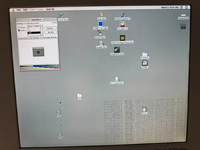
1749731996746.png
 
I'd tell probably : either a faulty VRAM module or address line (bad trace) on the mac... Your 610 is "stock 25 Mhz" or overclocked?
 
It is stock 25 Mhz. I don't believe it is bad VRAM. I don't see visible damage around the VRAM SIMMs. I wonder if it is related to the replacement U25.
 
Thanks again to everyone who supported me with repairing my Quadra 610 a while back. I'm back at this issue- screen issues when running in thousands of colors. The bottom half of the screen is corrupted. This 256 colors at any resolution works fine. Only using the onboard VRAM works fine.

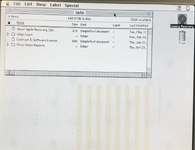
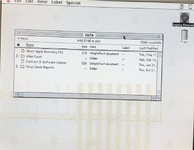
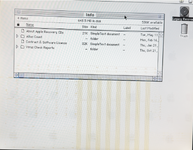
Here is what it looks like - hopefully you can see that dragging a window to the bottom half and back up brings some of the corruption with it.

Screenshot 2025-10-22 084722.png

Screenshot 2025-10-22 084739.png


Screenshot 2025-10-22 084758.png

Here is what I've tried in the last few weeks:

1. Different VRAM - no change. I even bought new "purple" VRAM.
2. Continuity checks for VRAM SIMMs and chips - nothing broken. I checked between VRAM and CLUT, VRAM and djMEMC and the bus transceivers U20, U23, U24, U25.
3. I got a cheap USB 24mHz 8 channel logic analyzer, so I hooked it up to all pins on the VRAM SIMMs. All +5V and grounds are working, and the rest have changing signals. I also hooked it up to the CLUT and the PD pins all have signals on them. I suspect my logic analyzer may not be fast and big enough to a useful, decodable signal but I'm new to logic analyzers so I'm not completely sure. I saw enough to see changes in signals everywhere however.

The only thing left I can think of is that U25 - which I had to replace because it was taken out with a cap - is somehow out of spec. But since the machine otherwise boots and operates normally I'm thinking this probably isn't the case. If I'm not mistaken it handles D0-D7.

Does anyone have pointers on what else I could try to fix this issue?
 
Ensure the sampling rate of your logic analyzer is at least twice the frequency of your bus frequency (see Nyquist-Shannon sampling theorem)
Also check the voltage of your logic analyzer is compatible.
I also think you should be extra cautious where you connect the GND of the logic analyzer or oscilloscope, otherwise you may cause a short circuit.
Could a logic analyzer change impedance significantly and disturb the signal. ?
 
Last edited:
I forgot to add that I ran MacTest and it failed on the VRAM check, as I thought it would.

I doubt I'll get a better logic analyzer to read the busses. The one I have is compatible with 5v logic. Really I was just trying to confirm that some signal was on the data lines instead of all low or all high or no signal at all, and I'm fairly certain I confirmed that. There doesn't appear to be any shorts. I was careful with grounds and everything when testing.

If it is the case that an IC is bad - the Antelope CLUT or djMEMC - then I suppose I'll just have to live with fewer colors.
 
Does MacTest give you a more detailed report, like the range of address that goes bad ?
Maybe that could help pinpoint what pins on the bus should be specifically checked.
Have you found the schematics of the motherboard?
How hard would it be to source the chips you mentioned and replace them?
 
i'll have to rerun it to get the error. I'm pretty certain its related to the SIMMs however since the onboard ram seems to be fine. I should probably rerun the VRAM test with no SIMMs to confirm.

As far as I know the only source of the Antelope CLUT and djMEMC are other donor apple machines... Q610 and possibly Q800.
 
Without SIMMs, onboard VRAM alone, the test is OK.

With SIMMS:

Video RAM Failure at address $F9080200!
Failed data pattern = $FF0000!
 
Back
Top