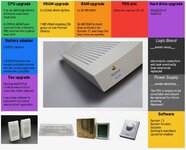
I got myself another 68K Macintosh, because I find them fun to work on.
This time, it's a Macintosh Quadra 605 with a Motorola XC68LC040RC25B (25MHz w/o FPU), 36MB RAM, 160MB HDD, 1.44MB FDD (manual-injection), 512KB VRAM, and the only issue it has is the death chime and no video. I wired a series of AA batteries (3 of them) to the battery holder since the no video needs a PRAM battery, but the death chime was still present.
I cleaned the board twice and it still didn't work, but my BlueSCSI and floppy drive get power and I used my Performa 450's PSU since that was recapped and decided to take the old caps off to diagnose it some more.
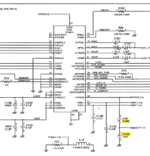
However, at this time with the caps removed, 2 pads broke off for the caps and 4 others aren't too far behind. Yet, those 4 I can just use wire to patch them, which is a good thing. But for these two, I cannot tell if they interconnect to each other or not.
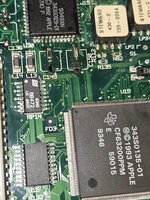
C149 (+) and C150 (+) are the two that are the ones I cannot tell if these connect to each other or not.
Anyone have any ideas?
My plan is to recap both the PSU and logic board, find a replacement top chassis for the system, upgrade to an XC68040RC33, swap the resistors for 33MHz, get a BlueSCSI V2 (internally), and upgrade the RAM to 132MB along with the VRAM to 1MB.
This time, it's a Macintosh Quadra 605 with a Motorola XC68LC040RC25B (25MHz w/o FPU), 36MB RAM, 160MB HDD, 1.44MB FDD (manual-injection), 512KB VRAM, and the only issue it has is the death chime and no video. I wired a series of AA batteries (3 of them) to the battery holder since the no video needs a PRAM battery, but the death chime was still present.
I cleaned the board twice and it still didn't work, but my BlueSCSI and floppy drive get power and I used my Performa 450's PSU since that was recapped and decided to take the old caps off to diagnose it some more.
However, at this time with the caps removed, 2 pads broke off for the caps and 4 others aren't too far behind. Yet, those 4 I can just use wire to patch them, which is a good thing. But for these two, I cannot tell if they interconnect to each other or not.
C149 (+) and C150 (+) are the two that are the ones I cannot tell if these connect to each other or not.
Anyone have any ideas?
My plan is to recap both the PSU and logic board, find a replacement top chassis for the system, upgrade to an XC68040RC33, swap the resistors for 33MHz, get a BlueSCSI V2 (internally), and upgrade the RAM to 132MB along with the VRAM to 1MB.