• Hello MLAers! We've re-enabled auto-approval for accounts. If you are still waiting on account approval, please check this thread for more information.

PowerMac G5 won‘t boot After shutdown

I bought a PM G5 early 2005 with dual 2 GHz‘s. I installed Mac OS X Tiger an some other programs and Games. The original power supply failed and i installed a New used Part. 4x 1GB RAMs are installed but OS X detected only 2 GB. After some Gaming on it i shutdown the Computer. Next morning i want to start the Mac up but no led came on no chime. Only the Fans are spinning. I replaced the battery and RAM, reseat the gpu and Both of the CPU. No life only the fans are still spinning. Is there any hope for this machine
 
have you tried replugging the power cord? sometimes my mdd doesn't turn back on after i shut it down unless i reseat the power cable. i think the power supply is weird but i don't have $200 to blow on an SFX psu right now to test
 
does the motherboard look good? no leaks, burns, bulgy caps, etc? and what about the PRAM, did you zap that? i never had a G5 so idk their "temperaments" but i've had similar weird stuff happen to me before with other machines and that's usually where i start
 
I have a Power Mac G5 DP 1.8 GHz AGP with an identical problem: it only boots when one CPU (specifically CPU "A") is installed. Introducing a second CPU, or even swapping the existing ones, causes the same behavior you're seeing with your G5. This strongly indicates a Logic Board issue, mirroring my experience. I'd suggest trying to boot your system with only one CPU, or even no GPU, as these are easy troubleshooting steps that could help.
 
Are any LEDs lit when off or on? Have you reset the CUDA switches on the motherboard. The CPU connectors are super sensitive and not designed in any way for repeated plugging in and out, check these and also clean with solvent spray if they were touched during troubleshooting.
 
Many years ago, I got into restoring broken / unresponsive G5 PMs when they were still making reasonable £s 2nd hand. Many had failed with similar symptoms to the above, so it wasn't a bad earner getting them going again and moving on for a small profit.

What I discovered (as did the PM G5 community IIRC) was that many of these "failed" G5s were suffering the same issue as early XBoxes - in the latter case, it was known as the RROD (Red Ring Of Death). In the XBox case, the issue was often micro fractures in the solder between the large CPU and GPU chips and motherboard.

Manufacturing using tin-based solder (to move away from lead) was still relatively new, and the speculation was the multiple - often extreme - heat cycles was causing the solder "joints" in the large BGA chips to 'fracture' - effectively causing an open connection when cold. (the same sort of issue we often see in lead-based solder on 128/512/Plus analog boards) For the XBox, one of the solutions was to introduce a "clamp" to physically press down on the large BGA video chip - in a brute force kinda way. Of course, the proper solution would be to reflow the chip, but back then that was prohibitively expensive - hence the cheaper, brute-force approach.

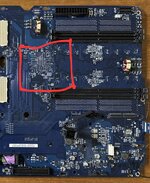
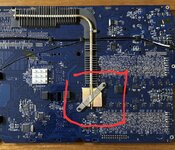
Why am I going on about this?... Well, the way I ended up 'fixing' a number of 'dead' G5s at the time was using a similar technique... not on a CPU or GPU chip, but on what I believe was the PM G5 equivalent of an Intel 'northbridge' (?) chip. Whatever the chip's purpose, it's the one located between the memory chip banks on the underside of the logic board. As you can see from these photos.
Screenshot_20250531_090827_eBay.jpg

Screenshot_20250531_090739_eBay.jpg

Apple knew it got hot (see the extensive heat sink arrangement) but those plastic "spring clamps" were clearly not providing enough pressure to overcome the solder fracture issue that developed over the long term. My solution, replace them with either slightly shorter ones with stronger springs (when I could find them) or replace the plastic clamps with an fashioned nut / bolt to gently increase the pressure from the heatsink on the chip. Yes, it was a crude approach - but you'd be surprised how many PM G5s this brought back to life...

Of course, this may not help in this case, and YMMV... But I thought I'd share just in case... Good luck!

 
Many years ago, I got into restoring broken / unresponsive G5 PMs when they were still making reasonable £s 2nd hand. Many had failed with similar symptoms to the above, so it wasn't a bad earner getting them going again and moving on for a small profit.

What I discovered (as did the PM G5 community IIRC) was that many of these "failed" G5s were suffering the same issue as early XBoxes - in the latter case, it was known as the RROD (Red Ring Of Death). In the XBox case, the issue was often micro fractures in the solder between the large CPU and GPU chips and motherboard.

Manufacturing using tin-based solder (to move away from lead) was still relatively new, and the speculation was the multiple - often extreme - heat cycles was causing the solder "joints" in the large BGA chips to 'fracture' - effectively causing an open connection when cold. (the same sort of issue we often see in lead-based solder on 128/512/Plus analog boards) For the XBox, one of the solutions was to introduce a "clamp" to physically press down on the large BGA video chip - in a brute force kinda way. Of course, the proper solution would be to reflow the chip, but back then that was prohibitively expensive - hence the cheaper, brute-force approach.

Why am I going on about this?... Well, the way I ended up 'fixing' a number of 'dead' G5s at the time was using a similar technique... not on a CPU or GPU chip, but on what I believe was the PM G5 equivalent of an Intel 'northbridge' (?) chip. Whatever the chip's purpose, it's the one located between the memory chip banks on the underside of the logic board. As you can see from these photos.
View attachment 87264

View attachment 87265

Apple knew it got hot (see the extensive heat sink arrangement) but those plastic "spring clamps" were clearly not providing enough pressure to overcome the solder fracture issue that developed over the long term. My solution, replace them with either slightly shorter ones with stronger springs (when I could find them) or replace the plastic clamps with an fashioned nut / bolt to gently increase the pressure from the heatsink on the chip. Yes, it was a crude approach - but you'd be surprised how many PM G5s this brought back to life...

Of course, this may not help in this case, and YMMV... But I thought I'd share just in case... Good luck!

Yes i‘m going to Build the Board out and locking for broken joint‘s. I looked in other Forums and found somthing like that. Maybe i can fix it. 🤞
 
Hi Guys. I found a cheap logicboard. I swap that and it wasn‘t working. The only thing i was Not checking was the CPUs. I also found two of them extremly cheap on eBay here in germany. I swap them and it is working again. Thanks for your help
 
Back
Top