• Hello MLAers! We've re-enabled auto-approval for accounts. If you are still waiting on account approval, please check this thread for more information.

Powerbook G4 battery cycle count

My daughter's 15" 1.67mhz G4 has a newish battery that reports itself as having done 65,000 cycles. Yup.

For obvious reasons, the charging is not going so well. The battery has maybe only done 50 cycles in reality, and the cells should be good, so the problem is the circuitry. If I disconnect the circuitry, leave and then reconnect, would that clear the counter? Or is it toast?


 
You could try running down the battery to the point the computer turns off, then charge it all the way up, maybe it will recalabrate itself.

 
I can report that disassembly of a battery and desoldering-resoldering of the microchip from the leads connecting it to the cells does appear to clear up the microchip controller's confusion. Like you'd expect, I might add.

An older but still new-ish battery than the one mentioned in the post above was treated to this process this morning. It had failed about a year ago. No cells are touched in the soldering, so doing this is about as safe as fiddling with a battery with a soldering iron gets. It involves cracking the plastic seam and opening the battery (I tapped gently on the seams with a broad chisel -- works a treat, though care must be taken, as all you want to do is break the glueline, not drive the chisel into the battery!), disconnection of the leads on the microchip controller (I did all four for the sake of thoroughness, but presumably disconnection of + and - would do the trick too), tapping the old foot for a few minutes to make sure all was cleared, and then reassembly. Took me about half an hour, all in.

The battery was previously at 0% and would not charge. All recommended power management measures etc had been taken, repeatedly, to no effect. After the treatment described, however, the battery immediately began to charge up on insertion in the machine and behaved normally. It is now giving me a four hour charge. So the battery's having its head cleared seems to have done the trick.

Of course, the question is whether this is a fluke or would work more generally, and whether it will last. I don't think it a fluke, since there was method in the madness, but I will report back in a week or two on how the battery behaves itself following cycling a few times, and I will then give the other battery the same treatment to see the effect on it.

Evidently the firmware in these things is a delicate flower.

 
Hi,

I wonder if this method would resuscitate a battery which isn't being recognized by the computer? I have one, and it's lights don't flash, nor does Mac OS report that it's even there.

I already have a new one (which, curiously, had only 83% of its total capacity right out of the box), so there's no risk of rendering the computer to which it belongs "battery-less".

I may give this a try myself. It couldn't hurt (provided care is taken near the cells, of course).

c

 
I have a couple of G4 PowerBooks, and remembered today that I had a 12" PB battery in storage that had failed a long time ago. I had tried all the usual resets, and had eventually replaced it with a Newertech unit from OWC that has (as usual) been unproblematic. "I wonder about that old battery," said I....

The battery's symptoms, as I recall, were that it would charge for a few seconds, then turn off for a few minutes, and only ever charge to some unusable minimum. Again, I knew that this was a newish battery with a low cycle count that had failed; the packaging told me that it was 5200mAh and generic. I decided to try this one like the last.

So I just within the past hour fired up the soldering iron, took off the battery's lid, and this time disconnected the -ve lead from the controller board and left the rest. I left for a few minutes, then resoldered the -ve lead.

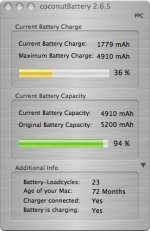
I am presently posting from the machine in question with the battery taking a regular charge. I haven't cycled it yet, but interesting, the battery cycle count was preserved (23). Clearing the controller's memory had the desired effect.

I haven't gotten around to disassembly of the other battery mentioned a couple of posts ago, but if I can make this three for three, I will be a happy man.

battery.jpg

 
Spoke too soon. Odd behaviour has returned: charging stopped at 44% or 2176mAh.

I think I'll desolder all four leads, wait a day, reassemble and see if that makes any difference, but I can't see it somehow. Ho hum.

 
Did just that.

The result was that the controller still retained the cycle count, but lost all sense that the battery was actually partially charged from the day before (the charge showed up as 0%, even though the battery actually ran the laptop when reassembled for some 2.5 hours after I got the low battery warning).

"Calibration!" thought I. So I have been cycling the battery, charging and discharging it twice today. It is either calibrating, or improving, one or the other, as so far I am able to charge it up to 68% before charging stops. I hope the numbers will improve to match up better with the capacity posted in that graphic after more cycles.

At any rate, what I have now is certainly better than what I had before -- a battery that will charge to 2/3 capacity is certainly preferable to one that would scarcely charge at all, especially since it is a spare. On the surface of things, then, this still looks like a way to try to rehabilitate PBG4 batteries that go awry.

 
Back
Top