• Hello MLAers! We've re-enabled auto-approval for accounts. If you are still waiting on account approval, please check this thread for more information.

Powerbook G4 12" - Boot OS9?

I remember this as a problem with the unsupported bluetooth module, I removed it. See step 53:
https://www.ifixit.com/Guide/PowerBook+G4+Aluminum+12-Inch+867+MHz+Bluetooth+Replacement/216

This is really deep in there, easier to unplug it and leave it in (step 30)

With the audio, you can solder-bridge the jack on the audio daughterboard to simulate the dummy plug if you want to make this cleaner. If you are interested I can get a photo of this.

Thanks, I would very much appreciate a photo of that.
 
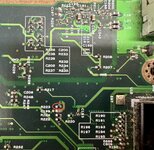
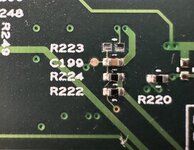
IMG_2108.jpeg IMG_2110.jpeg

This is the easiest way to rework I found: remove R223. Easily reversible if needed. This is located underneath the hard drive bracket, I think it can be removed without taking out the motherboard. Tested good today.

This way the computer thinks there is always a headphone plugged in. No startup chime, but from then on sound works from internal speakers including volume control. If you plug in external speakers/headphone, sound comes from both internal and external.
 
Last edited:
Back
Top