• Hello MLAers! We've re-enabled auto-approval for accounts. If you are still waiting on account approval, please check this thread for more information.

Powerbook 520c aftermarket 32mb ram solutions

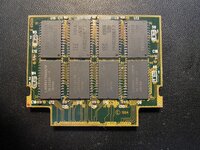
Would this card need some traces cut and bodge wires added to work?
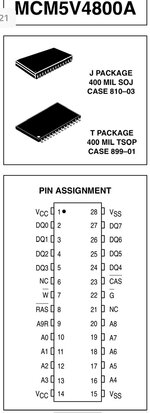
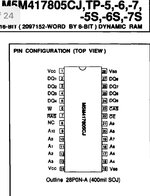
Yes, it’s perfectly possible, if you’re prepared to put in the work. Compare the pinouts of the low (512k) and high (2MB) density chips:

IMG_7382.jpegIMG_7383.jpeg

I note the following differences:

-The 512k chip has write enable on pin 7, while on the 2MB chip it’s on pin 6

-512k chip has RAS on pin 8, 2MB chip has it on pin 7

-The high density chip has an additional address line A9 on pin 21.

-Pins 6 and 21 are not connected on the 512k chip; pin 8 is not connected on the 2MB chip.

So you’d need to rewire your card to account for these differences.

The RAM is arranged into 4x banks of four chips, each of which share common connections to things like address and data lines. Some lines such as write enable are common across all banks so are simpler to wire up.

Still tempted to try?
 
I have a 4MB card and tried modding it to 8MB but all I get is a death chime. I know for sure the chips are good, so it's something on the card that needs to be changed seemingly... part number is XMP 54004/163A014781
 
Thanks for explaining the differences croissantking, it looks quite involved as you said.
A bit more research on my behalf is needed I think
 
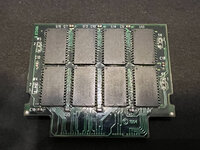
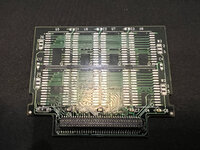
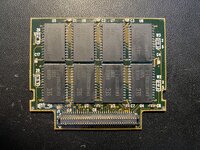
@croissantking do you have pictures of your modified memory card (front/back) - the one that was in your YouTube video (not the pictures in this particular thread but the card that you filmed your video with)?

My 16MB memory card I think looks identical to the one in your video and seems to have NEC D42S17800G5-60-7JD chips on it. 8 chips on one side, 8 blank pads on the other side. I also have a 16MB unused memory card from a 5300 series and it has 8 of Samsung chips KM48C2100ALT-7 which matches the donor chips you used in your video as well.

I took a first stab a week ago to move the 8 donor chips to the empty pads on my existing memory card. Ensured all of them were neatly soldered on and were in the correct orientation. But the new chips were not recognized when I booted up to test.

I then realized there are some empty resistor and capacitor pads on the side that had the blank pads. I did some trial and error looking at the resistors/caps on the populated side but no combination of adding resistors/caps worked for me - just resulted in a failure to even get a boot chime. So I've removed the donor chips for now and my 540c is working, albeit with only 20MB of memory.

Was curious if you had pictures to confirm the original card is the same one I have (with the same chips), and whether you had to populate the empty resistor/capacitor positions on the blank pad side of the card and if so, what was the configuration?

Thanks!
 
Yes, I did.. pulled off the ones from the other side, measured them, and put ones of similar capacitance on the other side.
 
Here's my front and back.

IMG_8140.JPG

Not sure why the iPhone close/macro mode always causes distortion in the pictures. The solder joints look a little weird in the picture about but in real life, they are clean.

IMG_8141.JPG

I think this is the same card you have?
 
Ok well in that case, I must have done something wrong. Or my donor chips are bad -- although the donor board that those chips came from was working before. Anyhow, will try again.
 
Do you remember what capacitance you used for the decoupling caps on the newly populated side of the board?
 
Well, failed again.

All the chips are on solid and I have connectivity from each pin going to the right spot. Shorted the right pads (just like the other side) and added the five capacitors.

But once installed the 540c won't boot, won't chime, I see the drive light blip but that's it and just sits there. Remove the memory card and it works. Just like last time.

As far as I can tell, the donor chips are the exact same chips from your photos and they were working before in the 5300c. I also tried a different CPU daughterboard just to see if it was something with the CPU board or connector, nope. Same issue so something on this memory card.
 
Well, failed again.

All the chips are on solid and I have connectivity from each pin going to the right spot. Shorted the right pads (just like the other side) and added the five capacitors.

But once installed the 540c won't boot, won't chime, I see the drive light blip but that's it and just sits there. Remove the memory card and it works. Just like last time.

As far as I can tell, the donor chips are the exact same chips from your photos and they were working before in the 5300c. I also tried a different CPU daughterboard just to see if it was something with the CPU board or connector, nope. Same issue so something on this memory card.

I was thinking check the connector but then you said you swapped CPU cards. ...did you also also visually check the connector PINs? its not too hard to bend the ones on CPU card side when inserting and removing the RAM cards. would be odd if you accidentally did it to both but in the realm of possible, along those lines did you try another known good RAM card?

In any case, I totally dig your perseverance, these things can be so frustrating!
 
Back
Top