


• Hello MLAers! We've re-enabled auto-approval for accounts. If you are still waiting on account approval, please check this thread for more information.

PowerBook 520, lines on screen, pram batteries

jimjimx

6502
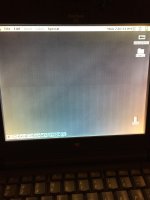
Does anyone know what causes this, and what will fix it?

I pulled it out of storage and wired up a new PSU (IBM 16v 4.5A), and was disappointed to see these lines. 

The top half was worse, but after squeezing the top edge, it became better than the bottom half.  

Next, see if I can rebuild the pram batteries with 2025s. 

(Does anyone know what the pram batteries are?)
F5FC9D6B-45AB-44F6-80C0-63953FBC35C8.jpeg

 
That is normal with that type of display. you may need to play with the brightness/contrast a bit to reduce the effect. But chances are, there are capacitors in the display itself that will need checked/replaced. 

 
Last edited by a moderator:
Thanks for the advise. 

I’ll try to find those caps, and more info on the pram batteries. I know there’s 2 of them. 

@techknight . In what area should I look for the caps?

 
In the screen itself. There are others on this site that may have documentation to exactly where, but I know it needs caps because I have a monochrome display myself for the 520, and they are leaking. I dont need the display so its sitting in pieces disassembled, rotting away. lol. 

 
  1. The PRAM Batteries are Panasonic VL 2330 placed in series.
  2. Red +, Black -, and White is the center tap.
  3. This is the information I asked for, found myself, and give to all others looking for it.
 
Back
Top

