


Hi,
I recently got a PowerBook 3400c (200mhz/144mb/2gb).
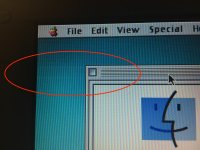
Seems to be in decent shape except for some slightly loose hinges (i think they are just loose where they screw down to the rest of the frame, not the actual hinges themselves) and some display ghosting/shadows. See photo below. The ghosting runs left and right from the source (in this case, the title bar of About This Computer), and to a much lesser extent top to bottom.
The display also takes a good minute or two to get up to normal brightness from a room temperature startup. Not sure if that is related to the ghosting.
Is this ghosting effect a common problem with the 3400c? Any way to fix it? I used to have a 3400c up until 2007 or so and don't recall it doing this. A PowerBook 540c that I currently have also doesn't exhibit this behavior.
I recently got a PowerBook 3400c (200mhz/144mb/2gb).
Seems to be in decent shape except for some slightly loose hinges (i think they are just loose where they screw down to the rest of the frame, not the actual hinges themselves) and some display ghosting/shadows. See photo below. The ghosting runs left and right from the source (in this case, the title bar of About This Computer), and to a much lesser extent top to bottom.
The display also takes a good minute or two to get up to normal brightness from a room temperature startup. Not sure if that is related to the ghosting.
Is this ghosting effect a common problem with the 3400c? Any way to fix it? I used to have a 3400c up until 2007 or so and don't recall it doing this. A PowerBook 540c that I currently have also doesn't exhibit this behavior.






