• Hello MLAers! We've re-enabled auto-approval for accounts. If you are still waiting on account approval, please check this thread for more information.

PowerBook 2400c x 2: GLOD city

Byrd

68LC040
Hi,

I own and love using 2 x PowerBook 2400c - one a stock 180Mhz model, the other a 240Mhz G3 Newertech unit. Both have worked flawlessly for years, both had good batteries, the G3 unit was the oldest where I replaced several SMT fuses when received. The G3 unit started to show issues a year or so ago when the G3 unit's L2 cache failed to be recognised at startup, before slumping into the dreaded "green light of death" coma I couldn't get out of.

The stock 2400c/180 was going well, I tore down both units with hopes to get both working, maybe switching the motherboard and CPUs around. Did so - and now met with GLOD coma on both units, no matter what I try! There is a "fuzt" sound when power is applied before the GLOD comes on after 30 seconds, both units do the same thing.

I was wondering what other people have tried to get out of this funk, more info below:

- All SMT fuses check out, including all those on the DC power board and the ones I replaced years ago - there are a lot
- PRAM batteries were cut out years ago with no corrosion around the connectors, I used these without PRAM batteries for years but thinking I should try to rebuild one NiMH 3.6V to rule out some sort of power manager issue
- I found the G3 motherboard had a tiny area of liquid damage on two SMT capacitors of unknown type, they crumbled off when touched, I repaired using comparable looking capacitors from a faulty IBM Thinkpad, similar era, repaired a small trace. Exact same issue - GLOD!
- Boards have been deep cleaned, connectors checked and inspected under magnification.
- There really aren't any caps to replace, the power board uses sealed (purple) organic caps which reportedly are good to stay
- I've left them plugged in for a few hours to charge the batteries, the units are warm as per normal use during this.

Any clues - thank you!
 
From what I can tell, green light of death essentially means that the mainboard couldn’t communicate with the CPU.
All the other stuff like fuse replacements are almost definitely placebos.
Dead PRAM should not be an issue, but will cause power up control to not work. I.e the machine will power on as soon as plugged in, and can’t be powered on after shut down.

Your 180mhz cpu module is likely dying or dead. I have 3-4 of those that won’t power up properly, with the same symptoms you describe. The Sony cache IC seems to get hot in operation, it could be a cause of failures.

The newer G3s appear to be fairly unreliable. I have an early rev one that is also just dead.

My advice: disassemble and let them sit for a few days, then assemble minimum configs and cross test.

Mainboard+CPU+Power board+ speaker
 
Thanks Mr Fink - agree it's something to do with the PCB sandwich and it's time to fill my desk with screws, plastics and bench test the two in various combinations. I remember having a basket case 2400c which needed to be flexed in just the right position to boot. Feel the years of these two logic boards poorly mounted to a weak internal frame (and a CPU upside down in a hot base) has got them to GLOD long term. Have also read of people getting their 2400c working on a bench well but progressively flakier with each install of components into the casing.

Deoxit might also be of use on the connectors, but they look clean and I've deep cleaned those things dozens of times with other products, but will purchase to try.

Real shame they really are cracking laptops and they worked so well for years.
 
Fragility, overheating and poor case design seem to be the main issues. The 180Mhz CPU on this one worked fine before pulling it all apart so fingers crossed I can at least get one going and admit the G3 is probably gone.
 
OK, some progress - did some deep cleaning of all CPU, DC board and motherboard connectors using Deoxit (little red and yellow bottles version). Both had some little black specks of crud come off from using a fine bottle brush and appeared cleaner from the process.

Stripped down @finkmac suggestion to absolute barebones just components mounted in the frame, no PRAM, no secondary RAM, speaker, and a sketchy heatsink perched on the CPUs - both chime immediately without power switch needing to be triggered. Switched CPUs around to how they came (noting the original 2400c board with ?water damage, recently repaired, was the original board that came with the G3), immediate chime again.

I’m not going to separate the CPUs anymore. Time to bolt it all back and see.
 
@PotoMac . I think I'll be looking into the PB5300 again soon, because I'm stuck with progress on the Mac SE. With your first 'good' DC Power board (great, I have a name for it now), I did get a GLOD. I think I'm going to strip the PB5300 down further and look properly on the underside. Also it might have broken SMT fuses?
 
Stripped down @finkmac suggestion to absolute barebones just components mounted in the frame, no PRAM, no secondary RAM, speaker, and a sketchy heatsink perched on the CPUs - both chime immediately without power switch needing to be triggered. Switched CPUs around to how they came (noting the original 2400c board with ?water damage, recently repaired, was the original board that came with the G3), immediate chime again.
this is normal behaviour, the power control circuit doesn't work properly without a good PRAM battery.
glad to hear they've come back to life

@PotoMac . I think I'll be looking into the PB5300 again soon, because I'm stuck with progress on the Mac SE. With your first 'good' DC Power board (great, I have a name for it now), I did get a GLOD. I think I'm going to strip the PB5300 down further and look properly on the underside. Also it might have broken SMT fuses?
? do you mean 2400c?
 
this is normal behaviour, the power control circuit doesn't work properly without a good PRAM battery.
glad to hear they've come back to life


? do you mean 2400c?
@Byrd 's issue with the 2400c made me think about why I got a GLOD with the PB5300 DC Power Board I borrowed from @PotoMac . That PB5300c/117 had some serious corrosion issues primarily on its DC Power Board. Alternatively when powered by a replacement board I bought off eBay it just keeps clicking every second or so with a green LED.
 
''..
Stripped down @finkmac suggestion to absolute barebones just components mounted in the frame, no PRAM, no secondary RAM, speaker, and a sketchy heatsink perched on the CPUs - both chime immediately without power switch needing to be triggered. Switched CPUs around to how they came (noting the original 2400c board with ?water damage, recently repaired, was the original board that came with the G3), immediate chime again.
..''


well that sounds positive, I'd be happy to hear the chime..is this confirmed working, I mean repeatedly?
often it actually is a bad connection between the CPU board and the motherboard. I sometimes read that a little flexing of the board in some places here and there also helped ( which would indicate a bad trace maybe).

my 180Mhz 2400c works fine( fingers crossed), I will never open it again after having removed the PRAM battery and ssd install.
 
Hi all,

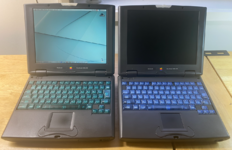
I've had partial success with my 2400c units - the stock 180Mhz unit is now working 100% reliably (with the repaired motherboard and SD to IDE adapter) while the 240Mhz G3 equipped unit worked for a while - before going back into GLOD city.

Some things to note:


- Whoever wrote this guide and documented screw dimensions needs a medal - the 2400c can be taken apart completely in a few minutes when you know what screws go where.

- The GLOD 180Mhz unit came to life after a deep clean of the CPU connector using Deoxit and repairing two of the brass standoffs in the internal frame, I noticed two brass mounts were loose in broken plastic and when threaded down slightly skewed the frame and CPU placement, possibly causing connection issues. Both mounts were repaired with JB Weld and had to find a slightly longer screw (the brass one) in one mount to grab the other mount. The thermal pad was also replaced on the bottom shell with a thicker pad.

- The GLOD G3 unit also chimed and booted on the bench but gingerly putting it back in the casing, screwing everything down it would alternate between chime/GLOD. I did get it fully assembled, and booting and was able to install Mac OS 9, however the OS displayed a "the onboard cache has detected an issue" warning during every boot. The next day it wouldn't turn on at all. More tearing down, I tried spacers between the double CPU edge connectors (to rule out flexing/wear), inspected the G3 and cache and applied pressure on certain areas but couldn't get a reliable boot. It's back together and I'll look for another CPU soon.

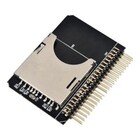
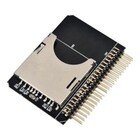
- These cheap SD to IDE adapters work well on the 2400c (had some spare they do not work in a TAM).

s-l140.jpg
- The mouse clicker was awful on both, you can take it apart three screws, slide out the trackpad off the ribbon and lift the entire unit out. Pop off the mouse button and you'll see two foam pads, both will be perished. I replaced the foam with some door frame foam cut to size, cleaned the buttons with solvent spray, bent back the little long black metal clicker thing, all seems well.

- I confirmed the DC boards, motherboards were working so can assume CPUs going bad in the 2400c is the main cause of GLOD and failure.

JB

Screenshot 2025-04-25 at 5.05.19 pm.pngs-l140.jpg
 
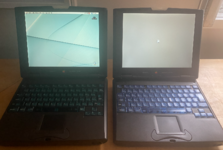
Another new day and .... that's all it got to before freezing. Any more effort no chime and GLOD.

Screenshot 2025-04-26 at 9.49.01 am.png
 
its like...almost there.
nice job with the 180Mhz machine..the correct disassembly..yes, I noticed those amount of specific different lenghts of screws/standoffs and washers, too..I followed this guide very exactly, didnt want to miss any part or mix up parts, because a missing/mixed up washer/screw here and there would make a huge difference in clearance or correct seating etc. such a delicate model.

also the nice rare clear keyboards, did you get one of those super rare 96MB RAM for it?
I wish I would find a G3 card for mine, if I dare to dismantle my working unit again.
 
Last edited:
I've given that G3 240Mhz upgrade a full inspection, freeze sprayed components, tried DIP switches, they were notorious for failures. It might work tomorrow ... or not :)

I picked up the transparent Yu plan keyboards separately some years ago, one came from a 68KMLAer. The G3 one has the 96MB RAM upgrade, purchased years ago when prices were reasonable. The 180Mhz has a 32GB SD card and the G3 128GB SD in the adapter mentioned. They take their time awaking from sleep 5 - 10 seconds but that's fine they don't have any other issues like when I tried in my TAM (data corruption, boot delays etc).
 
Updating my travels, picked up a "worked last time" 180Mhz stock CPU to replace the G3 in my better 2400c, and it did work for me, but note "last time", chiming and happily booting an perfectly working on desktop, cue another restart, GLOD never booting again :)

The motherboard on this one is absolutely pristine unlike the other board that needed some surface level repairs. I'm tempted to try all the "worked last time" 180Mhz CPU on the working 2400c, however noting the difficulty there am a bit wary of pulling it apart again.

Might have to find a parts unit or one with a broken screen that chimes.
 
Back
Top