


• Hello MLAers! We've re-enabled auto-approval for accounts. If you are still waiting on account approval, please check this thread for more information.

PowerBook 170 suddenly only showing garbage when powered up

Huxley

68000
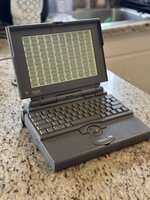
Curious if anyone has encountered this before? This PowerBook 170 was POST'ing just fine a few weeks ago (I think I mentioned it here previously, as its internal drive has Norton DiskLock installed), but now when I hit the power button it just makes a loud POP!! sound from the speaker and displays this delightful pattern. I left it unplugged for about a week and then held the Reset and Interrupt buttons on the back for ~15 seconds, but it didn't change the behavior.

Appreciate any tips or suggestions to bring this machine back to life! I've got a nice new BlueSCSI PowerBook Edition here ready to install...

Huxley
IMG_0263.jpeg
 
That's the typical screen you see on cold boot for a few seconds when the CMOS battery is dead. I believe it's the default contents of VRAM or something of that sort - it's supposed to refresh that and boot obviously, but yours isn't. It pretty much just means there's been a logic failure and it can't POST. First thing to check would be to remove the expansion RAM if there is any.
 
All PB170s display this image for a split second on startup, PRAM or not ... reseat RAM and the CPU daughter card. Pull the main battery too.
 
Update: I’ve removed the bottom of the PowerBook and I’m taking a look around inside. The innards are remarkably clean (yay!), and it does appear to have a RAM expansion card: “Microtech International” model “MP40052 REV B”

I also see the PRAM battery just under the display hinge, but it appears to be of the “coin cell soldered to the board” variety. Anyone know what kind of part I’d need to find to replace it? I’m doing some Googling but not getting too far…

I did try powering it on with the Microtech RAM card removed, but the garbage-pattern behavior was the same.
Thanks!

Huxley
 
Is the 170 like the 100 in that pressing both reset and interrupt together can clear issues like this? (Assuming it even has both buttons)
 
The 170 does have both buttons (little holes at the back, near the power supply). Try them by all means (use a pen). If the hard drive does not spin up then my guess is that the mother- or the daughterboard have died. Either can be had on Ebay occasionally. You might also check the power supply - does it output a more or less stable 7.5 V? You don't want to drop in new logic boards only for the power supply frying them right away.
 
Back
Top


