


TL;DR: Powerbook 170 boots to checkerboard and repeated chime, about 1s apart, doesn't stop.
Backstory: Got this powerbook 170 off of ebay for "untested/as-is" for cheap, no power supply. (For reasons, I thought it might work.) Got a power supply. Plugged in - nothing, no . . no nothing. Removed battery (only very mild beginnings of corrosion, easily wiped off, was a replacement NiCad). Then it powered on! Sort of.
I get the powerbook "checkerboard" and the familiar Apple chime (not the chimes of death, the standard "we're good" one), but the chime repeats over and over. The screen never progresses, and the chime never stops until I pull the plug. Sometimes the chime doesn't finish fading out before it chimes again, that's how close they are together.
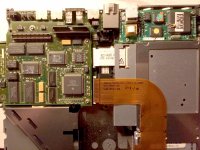
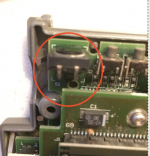
I opened it up, and was somewhat surprised it looked pretty clean - removed the memory, the daughterboard, and inspected the motherboard but didn't find any evidence of chips being blown (no black/brown stains, no bad solder joints, everything looked - pretty good really). The only thing I found that was sort of suspicious was the power jack itself had a slight bit of corrosion on the "lip" that seats the plug in. Not bad, just a little, shouldn't cause what I'm seeing, but that was the only thing I saw. I air-dusted everything, put it back together and - same thing.
Any thoughts? Thank you.
Backstory: Got this powerbook 170 off of ebay for "untested/as-is" for cheap, no power supply. (For reasons, I thought it might work.) Got a power supply. Plugged in - nothing, no . . no nothing. Removed battery (only very mild beginnings of corrosion, easily wiped off, was a replacement NiCad). Then it powered on! Sort of.
I get the powerbook "checkerboard" and the familiar Apple chime (not the chimes of death, the standard "we're good" one), but the chime repeats over and over. The screen never progresses, and the chime never stops until I pull the plug. Sometimes the chime doesn't finish fading out before it chimes again, that's how close they are together.
I opened it up, and was somewhat surprised it looked pretty clean - removed the memory, the daughterboard, and inspected the motherboard but didn't find any evidence of chips being blown (no black/brown stains, no bad solder joints, everything looked - pretty good really). The only thing I found that was sort of suspicious was the power jack itself had a slight bit of corrosion on the "lip" that seats the plug in. Not bad, just a little, shouldn't cause what I'm seeing, but that was the only thing I saw. I air-dusted everything, put it back together and - same thing.
Any thoughts? Thank you.



 Meanwhile if anyone has other thoughts please let me know. Thank you!



