• Hello MLAers! We've re-enabled auto-approval for accounts. If you are still waiting on account approval, please check this thread for more information.

Powerbook 145b corrosion repair

Jon183

6502
Hi everyone,

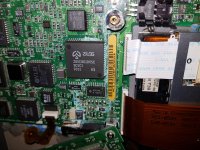
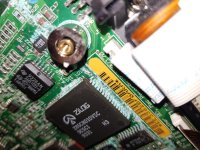
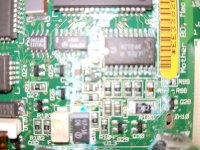
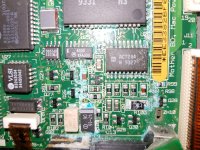
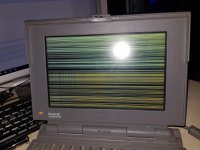
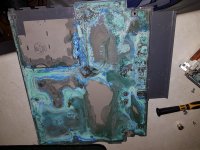
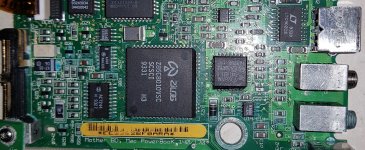
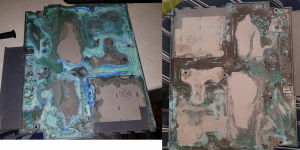
I purchased a 145b for $50 today, the issues can be seen in photo. No chime, lines on screen and corrosion. The powerbook still has original battery but I removed it. What should I do to fix it?

20171023_190916.jpg

20171023_190946.jpg

20171023_190958.jpg

20171023_191017.jpg

20171023_192754.jpg

 
Here is more, there is no corrosion under the board or under the daughterboard, only in the spots in the photos.

20171023_195520.jpg

 
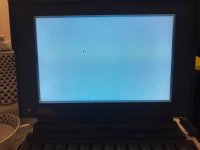
It did chime before and display a blank screen with a cursor, forgot to say. Ill wash it on Wednesday and report the results. My university has a classroom with facilities to bake boards, solder very tiny components and so on, I will take it there on Friday if Wednesday's clean isn't a success.

19990321_1456089311095119_6781348669976510497_n.jpg

 
Last edited by a moderator:
I got it working kind of, partially cleaned the board. I can move the mouse around but the screen flickers and has bad ghosting. Chimes too. HDD and floppy not doing anything.

Photo is what it looks like currently.

20171023_222236.jpg

 
Last edited by a moderator:
Ghosting may be just usual behaviour for that kind of screen.

Flickering is probably due to bad capacitors on the screen LCD and inverter board.

Hard drive is probably stuck.

 
the board isnt clean enough. You really need to ultrasonically clean that board, thats really the only way short from removing all the components to get that green corrosion out. Its conductive and causing all your problems. 

 
Last edited by a moderator:
I did see a youtube video about the inverter recap, I guess I can take it in with me on Friday to get it cleaned properly and screen recapped.

 
I pulled more things from the laptop today, should I recap the TDK CXA-2010 screen power board? Should I replace the caps on the board next to the panel its self and could I wash that board?

 
Is the battery alkaline on these? If so, I use a weak vinegar solution to remove the corrosion, and follow with a weak baking soda solution to neutralize the acid.
I've been able resurrect smaller devices like Game Gears with this method, along with recapping of course.
And yeah, the screen issue is almost definitely the LCD/inverter caps leaking like mad. Replace those ASAP.

A good rule on old machines like this though - replace every electrolytic capacitor you can find.
I've gotta do my 160 and 190cs both - the 160's already had the screen caps replaced and it did improve image quality overall significantly. There's still a little vertical ghosting, but that's the nature of these passive matrix LCDs.


 
Im going to eventually recap the powerbook LCD inverter, will probably do some ultrasonic cleaning on Monday if im allowed. I have about 4 boards that need cleaning, might as well get them cleaned properly.

The powerbook is 1 of 6 computers of mine that need repairs.

 
Last edited by a moderator:
Back
Top