


Happy #MARCHintosh 2026, everyone!
Here's a short write-up detailing the results of followed advice from others' various threads on this forum and some Pointers for Posterity™ for anyone who may find themselves tinkering with one of these brilliant machines. It's a two-parter: first, I'll detail replacing the spinning HDD and successfully booting from an SD card. Second, I'll go over my notes from the trials and tribulations of getting this machine networked using a 3Com Etherlink III 10 baseT PCMCIA card.
Many thanks to the venerable @LaPorta for their many fabulous write-ups here on the forum with regards to both of today's topics.
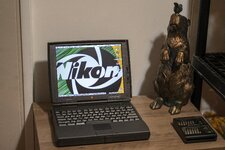
*The machine in question: Powerbook 1400c/133 64mb RAM*
1. Let's get rid of the original 2gb spinning hard drive.
It's long been common practice to "rip out the battery", but as our beloved heaps of apple-flavored retro tech continue to age (some more gracefully than others), the original hard drives that came with these machines are becoming ticking time bombs in their own right. So, let's rip out the hard drive as well and replace it with something not only less likely to spontaneously rust in place, but also something that allows for easy replacement and a host of versatile options for transferring files to-and-from one these beloved old hoopties.
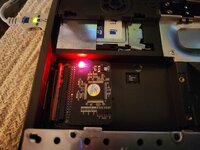
Several people have experienced varying degrees of success using PCMCIA compact flash/CF card readers with these machines. Wanting something completely internal, I opted for an IDE to SD card converter. It seems the Powerbook 1400 is a fickle beast, and will only play nicely with specific devices, as has become a theme with this exercise. I chose this converter based on a recommendation from a thread, and I can confirm it works a treat.
The converter is set up for full-size SD cards, and comes with an adapter for using microSD cards. I found this machine would only recognize and boot from a 4gb SDHC-type card. I tried several other cards of varying sizes and speeds, and none but the 4gb SDHC would work. In theory, it should recognize anything up to 128gb depending on OS version but there are varying opinions online about what the actual max capacity may be. I could just have some funky cards but they all work in other devices. YMMV.
The original plan for this machine was to run OS 8.5/6 for the best compatibility with the older apps and games I intended to run, as well as squeezing out the best possible performance. OS 9 is way heavier than 8.5/6 and requires significantly more processing power as well as a hefty amount of RAM just to function. I would advise against running OS 9 on these machines unless you have max RAM (64mb).
I formatted the SD card in Disk Utility on my modern Mac as HFS+ with the Apple Partition Map. Interestingly, when I booted from an 8.5 install CD (use cmd-opt-shift-del to boot from CD instead of the usual c-key), it recognized the card and installed fine but wouldn't boot. I would get a happy mac briefly, but then it would switch back to the blinking ? disk icon. I could only get it to play ball using an OS 9 install CD. I was surprised at this because from OS 8.1+, there is support for HFS+. The issue with using modern macOS to do the initial formatting of the SD card seems to be related to the drivers that are installed on the partition during formatting. There are a few threads on this forum where improper disk drivers had prevented installation on other SSD-type media, stemming back to system 7.5.3, where one user even had to go so far as formatting the drive as HFS in Linux to get the correct drivers loaded onto their media.
It would be preferable to run OS 8.6 for the performance gains but that brings us to the next section, wherein which we must run OS 9 in order to use the particular network card on hand...
2. Fun with Networking & File Transfer
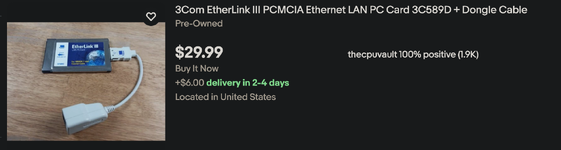
The Powerbook 1400 lacks built-in ethernet by default. There was an optional ethernet card, but it seems to be pretty rare these days. The other options include a handful of PCMCIA cards that will get you connected, and include actual drivers for mac. What did I have, though? The ubiquitous 3Com Etherlink III, which has no native mac driver and requires a hacked driver extension, written by Cameron Kaiser of Floodgap to run- and the ultimate reason I had to settle on OS 9. I installed the driver under 8.5 when the original hard drive was still in there, and the hacked driver extension caused a complete crash that required a re-install of the entire OS. This is a known issue, per link above. What's supposed to happen, is you drop the extension in the system folder and on reboot, you'll get a bomb error but after restarting, everything works. Instead, I got a bomb message with a blank button and made the machine hang and eat its system folder.
The adapter and dongle in question:
The solution: use OS9. I installed 9.1 and dropped the extension driver in the folder same as I had before, rebooted and after an unnerving few seconds, clicked the restart button of the bomb message as instructed, and lo and behold: the machine booted right up and the card worked seamlessly, appearing as a usable device and using the DHCP settings in the TCP/IP control panel. Go read the write-up on Floodgap and good luck. For whatever reason, some machines are finnicky and won't cooperate but others are completely fine. I hope this information is useful to someone who is looking to do this specific combination of things with this specific combination of things. Apparently there's more of us than you'd think.
Pointers for Posterity™
Here's a short write-up detailing the results of followed advice from others' various threads on this forum and some Pointers for Posterity™ for anyone who may find themselves tinkering with one of these brilliant machines. It's a two-parter: first, I'll detail replacing the spinning HDD and successfully booting from an SD card. Second, I'll go over my notes from the trials and tribulations of getting this machine networked using a 3Com Etherlink III 10 baseT PCMCIA card.
Many thanks to the venerable @LaPorta for their many fabulous write-ups here on the forum with regards to both of today's topics.
*The machine in question: Powerbook 1400c/133 64mb RAM*
1. Let's get rid of the original 2gb spinning hard drive.
It's long been common practice to "rip out the battery", but as our beloved heaps of apple-flavored retro tech continue to age (some more gracefully than others), the original hard drives that came with these machines are becoming ticking time bombs in their own right. So, let's rip out the hard drive as well and replace it with something not only less likely to spontaneously rust in place, but also something that allows for easy replacement and a host of versatile options for transferring files to-and-from one these beloved old hoopties.
Several people have experienced varying degrees of success using PCMCIA compact flash/CF card readers with these machines. Wanting something completely internal, I opted for an IDE to SD card converter. It seems the Powerbook 1400 is a fickle beast, and will only play nicely with specific devices, as has become a theme with this exercise. I chose this converter based on a recommendation from a thread, and I can confirm it works a treat.
The converter is set up for full-size SD cards, and comes with an adapter for using microSD cards. I found this machine would only recognize and boot from a 4gb SDHC-type card. I tried several other cards of varying sizes and speeds, and none but the 4gb SDHC would work. In theory, it should recognize anything up to 128gb depending on OS version but there are varying opinions online about what the actual max capacity may be. I could just have some funky cards but they all work in other devices. YMMV.
The original plan for this machine was to run OS 8.5/6 for the best compatibility with the older apps and games I intended to run, as well as squeezing out the best possible performance. OS 9 is way heavier than 8.5/6 and requires significantly more processing power as well as a hefty amount of RAM just to function. I would advise against running OS 9 on these machines unless you have max RAM (64mb).
I formatted the SD card in Disk Utility on my modern Mac as HFS+ with the Apple Partition Map. Interestingly, when I booted from an 8.5 install CD (use cmd-opt-shift-del to boot from CD instead of the usual c-key), it recognized the card and installed fine but wouldn't boot. I would get a happy mac briefly, but then it would switch back to the blinking ? disk icon. I could only get it to play ball using an OS 9 install CD. I was surprised at this because from OS 8.1+, there is support for HFS+. The issue with using modern macOS to do the initial formatting of the SD card seems to be related to the drivers that are installed on the partition during formatting. There are a few threads on this forum where improper disk drivers had prevented installation on other SSD-type media, stemming back to system 7.5.3, where one user even had to go so far as formatting the drive as HFS in Linux to get the correct drivers loaded onto their media.
It would be preferable to run OS 8.6 for the performance gains but that brings us to the next section, wherein which we must run OS 9 in order to use the particular network card on hand...
2. Fun with Networking & File Transfer
The Powerbook 1400 lacks built-in ethernet by default. There was an optional ethernet card, but it seems to be pretty rare these days. The other options include a handful of PCMCIA cards that will get you connected, and include actual drivers for mac. What did I have, though? The ubiquitous 3Com Etherlink III, which has no native mac driver and requires a hacked driver extension, written by Cameron Kaiser of Floodgap to run- and the ultimate reason I had to settle on OS 9. I installed the driver under 8.5 when the original hard drive was still in there, and the hacked driver extension caused a complete crash that required a re-install of the entire OS. This is a known issue, per link above. What's supposed to happen, is you drop the extension in the system folder and on reboot, you'll get a bomb error but after restarting, everything works. Instead, I got a bomb message with a blank button and made the machine hang and eat its system folder.
The adapter and dongle in question:
The solution: use OS9. I installed 9.1 and dropped the extension driver in the folder same as I had before, rebooted and after an unnerving few seconds, clicked the restart button of the bomb message as instructed, and lo and behold: the machine booted right up and the card worked seamlessly, appearing as a usable device and using the DHCP settings in the TCP/IP control panel. Go read the write-up on Floodgap and good luck. For whatever reason, some machines are finnicky and won't cooperate but others are completely fine. I hope this information is useful to someone who is looking to do this specific combination of things with this specific combination of things. Apparently there's more of us than you'd think.
Pointers for Posterity™
• Don't expect a huge speed boost from booting from an SSD on these machines, the PATA IDE interface will be a bottleneck regardless of drive media.
• The adapter has a spring-loaded/detent-locking socket that hold the card in place. Don't be like me and forget to click in the card. This will cause the system to see the 32mb firmware of the flash memory built into the adapter itself as a connected drive. It will appear able to be formatted, but won't let you of course- because it's read only. There went an hour of my life I'll never get back, until I discovered I simply needed to click the card in. *eyeroll*... Moving right along!
• If you go with OS 9, don't forget to turn off virtual memory too! (That's another age old debate, but in this context where we are limited on both RAM and storage space, the machine will perform its best without VM.)
• Be careful of the IDE cable that connects the hard drive. It's extremely short and easy to break or tear. Once that's out, you can gently fold the cable nearly vertical and plug in the adapter. You may want to use a piece of tape to secure the board to the plastic shield on the bottom of the hard drive bay to keep it from flopping around but that depends on your preferred level of Jank. I don't mind the flapping but didn't want anything to short on the underside of the keyboard cage so I just put a piece of tape on the cage where the card adapter would touch.
• Since this mod makes it a tool-free experience to then swap cards, it's easy and worth it to pop the SD card out from time to time and making a backup image of the entire drive. You could even go nuts and install a bunch of different OS versions on a stack of SD cards and carry them around in a holster or on a bandolier across your chest like Mr. Worf.
Last edited:


