
-
 Hello Guest! We're hosting a challenge to welcome vintage Intel macs to the MLA during the month of July! See this thread for more information.
 -
We've made some quality of life improvements to the Trading Post. More info here.
You are using an out of date browser. It may not display this or other websites correctly.
You should upgrade or use an alternative browser.
You should upgrade or use an alternative browser.
Powerbook 1400 16mb ram module upgrade to 24mb
- Thread starter EtherRad
- Start date


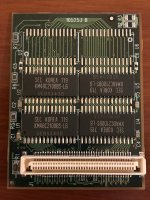

AFAIK it should work one way or another. Which factory module do you have on board?

I would get a datasheet for those memory chips. That will give you a pinout -- which pins have which functions. Then get out the multimeter and trace out which pins those resistors connect to and what they connect them to. Are they doing something simple like pulling up/down chip enable? If so, you'll need to install the two unpopulated resistors probably. Or are they doing something more or less complicated?
The unpopulated capacitors are almost certainly straightforward. They're just there as voltage smoothing ("bypass") and when you install the next two chips, install the corresponding capacitors to smooth the voltage for those chips.
The unpopulated capacitors are almost certainly straightforward. They're just there as voltage smoothing ("bypass") and when you install the next two chips, install the corresponding capacitors to smooth the voltage for those chips.
Last edited by a moderator:

Is that card OEM or third party? I need to root through the 1400 stack for a few parts again, so I'll try to find matching modules for a photo shoot.
I guess that was a silly question on my part. IIRC Apple only supplied 12MB and 16MB factory slot cards. Yours must be for the user slot given its size. Did they offer memory upgrade cards as well?

The other option would be to use a "donor" 16MB card and grab the chips and resistors/capacitors from it. I've heard of this being done with Toshiba notebook RAM modules in the late 90s.
Last edited by a moderator:
Got 80 bucks? http://www.memoryx.com/pb140024.html
Though I would call or email them first, they don't always actually have items in stock when they say they do. That's the price you pay for making your own ram I guess.
Though I would call or email them first, they don't always actually have items in stock when they say they do. That's the price you pay for making your own ram I guess.
Last edited by a moderator:


If you can find a good image of the 24MB module, that should answer a few questions for you.

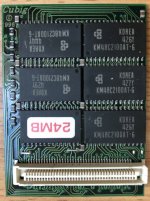
I have some extra RAM modules that I dont need (they are two and add up to 52 megs of ram I believe). I dont need them since I have my 1400 maxed out on RAM on another stick and have a g3 upgrade.
LMK dont need them
LMK dont need them
Did anyone take you up on this? I have a 1400c/166 with the minimum memory configuration of 16MB and can't find memory modules anywhere. I tried to message you directly but the site would not allow me to.I have some extra RAM modules that I dont need (they are two and add up to 52 megs of ram I believe). I dont need them since I have my 1400 maxed out on RAM on another stick and have a g3 upgrade.
LMK dont need them
I attempted to do the same with my 16 MB RAM extensions and soldered additional chips ordered from China on the empty spaces of the PCB to bring them to 24 MB for a total of 64 MB of RAM (currently i have to extensions á 16 MB and one base module with 16 MB bringing it to 48 MB). But my 1400c still does only recognize the 16 MB which were soldered on originally. What I’m doing wrong?
Attachments
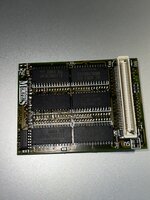
I removed the small 16 MB stock RAM card with just the expansion card left in and now it recognizes the full 24 MB soldered on the expansion card. But it throws in error that the memory check is failed and i shall contact my dealer. After i skip this message Mac OS boots flawlessly and even with the entire 24 MB used everything is stable. Once I put the 16 MB stock RAM back again only 16 of the 24 MB of the expansion RAM are recognized giving a total of 32 MB instead of 40 MB (24+16).

I attempted to do the same with my 16 MB RAM extensions and soldered additional chips ordered from China on the empty spaces of the PCB to bring them to 24 MB for a total of 64 MB of RAM (currently i have to extensions á 16 MB and one base module with 16 MB bringing it to 48 MB). But my 1400c still does only recognize the 16 MB which were soldered on originally. What I’m doing wrong?
I don't think it's clear enough what your setup is. There's 3 types of RAM on a PB 1400: Motherboard (Mobo or M), Factory (F) and User (U1 and U2). The Motherboard RAM is always 8MB. Factory RAM is a RAM module just on the right of the CPU. It's either 4MB or 8MB and nothing else. User RAM modules can be stacked and I think can be 8MB, 16MB or 24MB.I removed the small 16 MB stock RAM card with just the expansion card left in and now it recognizes the full 24 MB soldered on the expansion card. But it throws in error that the memory check is failed and i shall contact my dealer. After i skip this message Mac OS boots flawlessly and even with the entire 24 MB used everything is stable. Once I put the 16 MB stock RAM back again only 16 of the 24 MB of the expansion RAM are recognized giving a total of 32 MB instead of 40 MB (24+16).
I think, somehow what you're saying is you have 8Mb Mobo; 16MB Factory and 24MB User RAM (but this is a modified 16MB RAM expansion). It only seems to see 8MB Mobo, 16MB Factory and 16MB User1.
Or are you saying you have 8MB Mobo, 0MB Factory, 24MB User1 and 24MB User 2? With this kind of notation, which combinations give no error message and what memory is reported for each combination?
It may be a similar issue to this thread:
PowerBook 1400 series ROM and RAM tidbits
If both your cards are 24MB your donor board appears to be exhibiting an improved reaction the behavior of the 133MHz version mentioned in the everymac advisory in your IP. This now leads me to the 166' Developer Note. Can you determine and compare the production dates of the logic boards and...
 68kmla.org
OK. I'm still not sure what your RAM setup was, or quite how you were trying to achieve the 64MB. However, thanks to this thread; the thread I linked to earlier and a link to the PowerBook 1400 developer note, I'm making more sense of how the PB1400's memory really works.You are right, i have 8 MB MoBo and 8 MB factory (i forgot about MoBo RAM). So the additional chips are not recognized at all. I desoldered them again and the RAM errors are gone. Maybe the Chinese supplier sent me faulty chips or these are not compatible with the machine.
There are a number of interesting features:
- Factory card-installed RAM doesn't have buffered row and column address strobes, nor a buffered row address signal. I take this to mean that buffering is provided on the factory card itself. So, if you simply added DRAM to a factory card, I wonder if there could be a buffering issue?
- There are 8 banks of RAM available, that is, there are 8 chip select signals: Bank 0 is for the Mobo RAM, Bank 1 is the factory card, Banks 2..4 are User 1 and banks 5..7 are User 2.
- Every bank in theory can be up to 16MB, but all banks on a given card must be the same size. Therefore there's enough signals on PowerBook 1400 RAM to support up to 128MB of RAM (16MB x 8). Of course it's actually limited to 64MB, see (4). This implies it's possible to have a single User 1 card of up to 3 x 16MB= 48MB of RAM. Or for example, you could have 32MB + 16MB on user cards + 8MB on Mobo memory (and no factory memory). A 24MB must be configured as 3 banks x8MB of RAM, not a 1 x 16MB + 1 x 8MB. Or it could be possible to support 16MB on the factory card.
- RAM limitations are partly due to only having 8MB Mobo RAM. This leaves the maximum installable RAM as 7x16MB + 8MB = 120MB. The PB 1400 can't address that though, because memory multiplexing is done by the PBX chip, which is organised as a 32-entry x 2MB bank select map, where PBX[entry] maps physical address 0x200000*entry to 0x200000*entry+0x1fffff.
Similar threads

- Replies
- 11
- Views
- 1K

- Replies
- 11
- Views
- 1K


- Replies
- 2
- Views
- 383