• Hello MLAers! We've re-enabled auto-approval for accounts. If you are still waiting on account approval, please check this thread for more information.

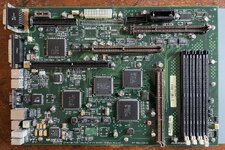
Power Computing PowerCenter Pro

Fizzbinn

68000
I've always been aware of the Mac clones but I don't think I've understood/appreciated how different some were before now. I've mainly thought they were just the same as Apple's offerings in PC cases, i.e. my Umax SuperMac c500 is very similar to a Performa 6360 but without the Apple video features. But they all weren't like that.

Case in point, the Power Computing PowerCenter Pro (my latest acquisition). Its based on Apple's Catalyst architecture (used by Power Macintosh 7200/8200 models) but it has several significant changes:
  • 60 MHz system bus
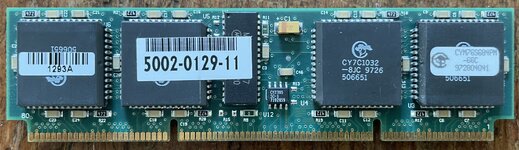
  • 1MB, 60MHz capable, 3.3V, L2 cache module (logic board has jumper to allow used of "standard" 5V L2 cache modules)
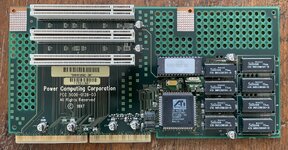
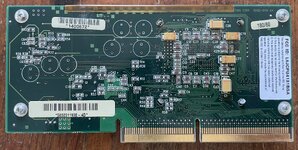
  • ATI Rage II PCI graphics on PCI riser card (2MB or 4MB versions, mine is the later), Mac DB-15 AND VGA HDB-15 monitor ports
The built in video in particular is like a preview of the beige G3 or PM 6500 but with a PPC 604e and higher RAM ceiling.

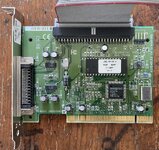
The logic board appears to have provisions for internal Fast/10Mb SCSI which was not a feature of of the Apple Catalyst based logic boards but the components weren't installed. Instead all PowerCenter Pro's shipped with a Ultra/20Mb SCSI Adaptec 2930 SCSI PCI card which supported the internal HD. interesting trade-off, lose a PCI slot to storage but don't need to use one for better than built in 7200/7500 video card.

Truly a neat system. I'd love to find an 210 or 240MHz 604e CPU card that works at the 60MHz bus frequency. It's not clear to me if any compatible G3/G4 upgrades supported opearating with 60MHz bus but that would be fun find too.
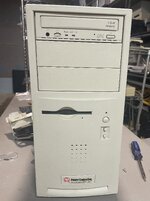
IMG_7345.jpeg

IMG_7338.jpeg

IMG_7328.jpeg

IMG_7333.jpeg

IMG_7336.jpeg
 
Last edited:
They all generally made some neat machines. Most were just Tanzania clones, but still with neat additions or alterations.

I don't think the memory is interleaved on those, so you do lose some performance . I'm not sure if I'm just parroting misinformation, but I do think the 60MHz bus did cause trouble with G4 upgrades but I'm not really sure. I think there was another dude recently (well, within a year or two) who was experimenting around with it. I know many upgrades allowed using bus speeds up to 60MHz.
 
I have a Tanzania clone, Powertower 225. I love the thing, I had no idea they made Catalyst clones. The bus speed I'm sure helps a ton when it comes to speed. I know the Tanzania clones had some kinda chipset/thing that increased RAM communication speed in some way, but it was still hamstrung by a 45Mhz bus. These clone systems are facinating.
 
I forgot the spelling of the website right now but I know that for sure several accelerators specifically did have 55-65mhz compatibility. so I guess the real problem is finding a seller that would have one (as obviously many of the 'more common accelerators' are just for <=50mhz bus)
 
I know one of the PowerComputing models supposedly had an option for a combo PCI/NuBus board. I've never seen photos of the hardware online, let alone IRL, so I'm not sure they ever shipped. Would've been kind of neat to run a Radius Rocket in the equivalent of a 9500.
 
I know one of the PowerComputing models supposedly had an option for a combo PCI/NuBus board. I've never seen photos of the hardware online, let alone IRL, so I'm not sure they ever shipped. Would've been kind of neat to run a Radius Rocket in the equivalent of a 9500.
Oh, I've actually seen those in machines on eBay beforfe. So, they very much existed but I've also heard they had "issues" and had compatibility problems (video cards didnt' work, etc.).

Edit: Stargate Lives!

Edit: I'm not sure where I heard of the compatibility issues. I honestly wonder how well things work in it.
 
Last edited:
I guess I need to get out more.

But, if that card's for this machine, it looks like onboard video is replaced with the NuBus controller, so you'd have to spend one of your two PCI slots (or NuBus, I guess) on a video card.
 
The Bus speed on CPU cards based system (tsunami - incl. power computing and umax 6 slot units, tnt and the power computing catalyst) is set by the CPU card itself. There are two types of those cards: those with hardcoded bus speed and those with adjustable bus speeds. The max bus speed of the original Apple designs is 50 mhz. Take an Apple 180 mhz 604 card for example. This is hardcoded to 4x 45 mhz and thus the bus is running fixed at 45 mhz and not the 3x 60 mhz in a power computing 60 mhz board. Many later G3 and G4 upgrade cards however introduced dials and switches to set bus speed and multiplier individually - to squeeze the maximum out of bus speed and cpu.
 
I think the PowerLogix G3 could be set to 60mhz. It's been a while since I did anything with my stuff. I do have a couple 210mhz cards. Haven't used any of them yet.
 
So before I get to trying a CPU upgrade I needed a hard disk since the original was missing. Since the bundled Adaptec 2930BU SCSI card (AHA-2930B MAC) card supports Ultra SCSI, 20MB/s I wanted to make use of that if I could.

IMG_7330.jpeg

From the Read Me:

Notes pertaining to the Adaptec 2930BUMac Ultra SCSI card

The Adaptec 2930BUMac Ultra SCSI card is capable of supporting up to a 20 MB/sec sustained data transfer rate from the installed primary hard drive(s). In conjunction with Ultra SCSI or fast SCSI drives, this can significantly improve data transfer rates in certain applications.

Available SCSI Buses (precautions on adding internal devices)

- The PowerCenter Pro has two internal SCSI buses. The built-in SCSI bus is a 5 MB/sec bus used for the CD-ROM drive, other internal SCSI devices such as Zip or Jaz, and any additional hard drives. The connector for this bus is located on the main logic board and uses a separate 50-pin cable.

- The Adaptec 2930BUMac Ultra SCSI card adds a second internal faster 20 MB/sec ultra SCSI bus which also uses a 50-pin cable specifically designed and tested by Power Computing for this bus.

- The internal SCSI cable, attached to the Adaptec 2930BUMac Ultra SCSI bus, supports a maximum of two internal hard drives in the MiniTower enclosure and one internal hard drive on the Low Profile enclosure.

- Any pre-installed hard drive(s) attached to the Adaptec 2930BUMac Ultra SCSI bus will be configured for SCSI ID 0 (and ID 1). This Adaptec 2930B Ultra SCSI bus is also compatible with most older generation SCSI 1 and SCSI 2 devices.

Fortuitously, BlueSCSI and ZuluSCSI recently added support for 20MB/s Ultra SCSI and I had a desktop BlueSCSIv2 I could repurpose (Its just a firmware update and a couple lines in an .ini file). ...only it wasn't working, the Mac and the BlueSCSI logs showed 10MB/s Fast SCSI.

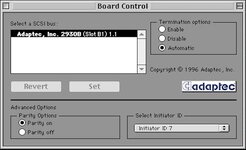
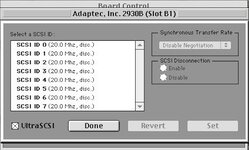
I eventually found there is an Adaptec control panel for this card that has a checkbox to enable "UltraSCSI". I didn't find mention of needing to do that in the Power Computing docs so I wonder if the one I have was disabled in the past, perhaps for compatibility with a different drive? This ever so descriptively named "Board Control" control panel (version 2.0.1 A, 1996) can be downloaded from the Macintosh Garden: Adaptec 2930BU Driver (PowerComputing). To enable (or check) the speed, open the control panel, select your card then choose "Target Options..." from the Special menu.

Board Control_result.jpg

Boad Control Ultra_result.jpg

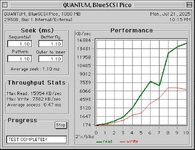
Definitely could notice the performance improvement in use, quite snappy!

8_0 Ultra_result.jpg
 
Back
Top