• Hello MLAers! We've re-enabled auto-approval for accounts. If you are still waiting on account approval, please check this thread for more information.

Portable and 12 volts !!!

falen5

6502
Oh happy day. Ive done it again.

I was testing my new rebuilt battery and it  worked perfectly. The portable booted, drive spun up. Battery level showed 90%. everything going great. So i said , 'last thing I have to do is plug in the charger to see if it charges the new battery

thats when i fecked up!!!

On my bench I had the portables external power lead, and a 12 volt power lead from a different machine.

I grabbed the wrong dam lead and plugged it in without even thinking....... it was the 12 volt and had the same connector.

Machine wont power up now..... not surprised !!

I took it all apart.

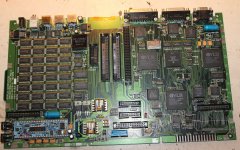
i see 2 transistors with heat sinks, look a bit burnt/darkened. They are right next to where the battery connects. Ive marked them in the picture.

Anyone know what they are , part number - I dont know if they are gone , but got to start somewhere

I cant see a fuse on here

was working perfectly.......... arrrrggghhhhh!!!!
PORT AAa.jpg

 
Dam.

Ive a bad feeling bout this.

It wont start with a good battery. Tried putting in the 9volt, and the charger , THE RIGHT CHARGER!!,  and still nothing.

Have gone over the entire board looking for a burnt resistor, anything, all I can see is the heat marks on the 2 transistors heat sinks.

Only good thing is I have 2 portables. One working and now one dead.

will have to start comparing readings from both boards to find something.

 
I did something similar a few years ago with my oldest 128k. I was working on it , cleaning, servicing. Put it all back together. Went to just test it one last time.

plugged in the wrong lead. 240 volt into a 110 volt analog board. Boom!!!

Again , i was finish all the work , about to put it up in the attic.

ah sure - theres always something

 
what i plugged into it was the power lead for a multi battery charger for my canon. Was charging them earlier . Cleared off the table before i took out the portable. The macs power supply is the original that came with it. I plugged it in and ran the cable to the back of the machine.  2 of them have the same dam power connector and ended up lying in the same place - my own stupidity!!

no words!!

LaPorts - im testing the new battery on my other portable, Do you know if the battery stops charging when it gets to 100%. There is a lighting bolt icon for charging. Should that dissapear when it is fully charged.

just want to make sure the portable is happy with this battery.

what would happen if it kept charging!!..... would the battery explode!!

We take this stuff for granted these days, but on these old machines you never know.

Weh Hey - its here next to me , ive been watching it as im typing.

the lighting bolt icon has just disappeared. Thats good right?

anyway......Ive killed my second portable. Will try the faithful Irish method of electronics repair. Get drunk, keep looking at the dead board, talk to it nicely, and maybey St Patrick will perform a miracle

 
Just watched all techknights videos on youtube concerning portables. Thankfully I saw one board , the same as mine, with the same heat marks on the 2 transistors i mentioned earlier. And he had that board working.

Mabey they are not the problem. I have no idea

Delighted with the new battery.

It is true. A Portable cannot function properly without a good 6 volt battery.

I did all the recapping on these just using the original power supply , only to then learn that could do damage. Thats why I got the new battery. Only now the machine is working as it was meant to,

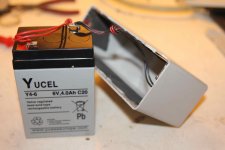
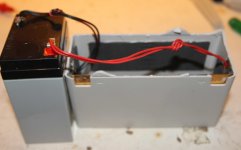
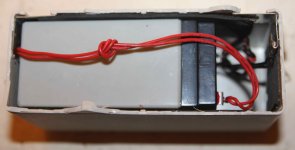
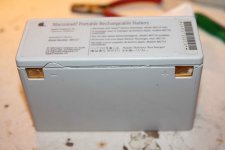
heres my crude attempt - fits really well - not finished yet - need to test its safe before is seal it back up.

heres where i got the battery

https://www.ebay.ie/itm/ULTRA-MAX-6V-4-5AH-as-4AH-Sealed-Battery-for-Security-Alarm-Burglar-Alarm/121367260751?ssPageName=STRK%3AMEBIDX%3AIT&_trksid=p2060353.m2749.l2649

10 euro!!

b.jpg

a.jpg

c.jpg

d.jpg

 
I’ll admit I cannot be sure if it stops with the lightning bolt or not. I’d have to whip out my Portable and see. So I don’t need the portable set up all the time, I use a battery maintainer with my battery on a shelf to keep it charged.

 
Ive watched it for the last few hours and the charging icon does disappear when charging gets to 100%

So however the circuitry senses the charge of the battery, it appears to be working.

Sadly for my other portable, it looks like that's where i sent in 12 volts.

Oh dear.

 
If the battery was connected while you plugged the 12V charger in you sent 12V right into the Hybrid.

I would bet the transistors are all good.

The fuse is the yellow thing right under one of the transistors you marked. It does not protect anything on the board though from power coming in from the power jack other than maybe the Hybrid because of the way it’s wired up. It is sitting between the battery connector and the rest of the board. Check it anyways, chances are it blew and at least protected the Hybrid but I don’t think it did.

 
Last edited by a moderator:
Just tried that fuse Bolle. The fuse is good. Thats bad.

That hybrid board is all about power management ? thats probably exactly where the 12 volts went.

 
discovered i get a click from the speaker when i press reset/interupt , when just powered by the exernal power supply.

but get no clicking if its powered by the battery

power going different places !!

No chips or components getting warm

 
I'd also check hybrid board/associated power line resistors. The wattage rating on them may have been surpassed and they may be open/shorted depending.

 
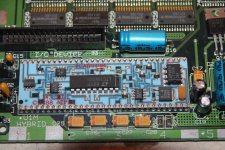
Had a look and all I can safely say is there is no power going to the 8pin chip , on the hybrid, furthest from the reset /interupt switches.

it has the numbers - 8925   and LT1054 on it.(circled in red in the picture)

I see different voltages all over the place 6.5 volt ,6 , 3.5 , 2.2

All the other chips are getting power (it seems) except that one. I tried with the external power supply, and then the main battery - still no power going to that chip

Only after taking a picture with the camera and zooming in I see either a resistor or capacitor that looks cooked - circled in green.

Ive never seen a circuit board like this before - what are all those little black rectangles - are they connections, or 'painted on' resistors !!!

Im scared to ask , but are there more components and traces on the underside of this hybrid board - how would you even take hybrid board off to have a look !!!

I have no electronics training Laporta - of any kind. I can solder , recap, and do a continuity test with a meter..... not much else.

hybrid.jpg

 
Last edited by a moderator:
Nor do I, my friend: I am learning as I go. TechKnight is really good with this sort of thing; you should invite him to the thread. Otherwise, I would tell you. The best thing I can do is get you photos of mine to see. So far as I know, there are no components on the back side.

He was gracious enough to help with my Portable:


Last edited by a moderator:
Using my old method of fault finding now.

I have my working portable logic board, next to my 12 volt special!!

Taking readings from components on good board and comparing to the bad one.

They are all the same so far.

On the hybrid board I cant see any resistors. Only caps, transistors and chips. Those little black square are printed on resistors??( thats how we used to make the potentiometers in boruns electronics. The resistance 'goo' was printed onto the ceramic , in the horse shoe shape, and then cooked in the oven)

Now comparing every resistor on the board - and thats allot of resistors. So far they are all the same.

Can anyone hazard a guess at what component may have been damaged from stupidly/ mistakingly  plugging in a 12 volt supply.

I honestly cant see any signs of visible damage. Anywhere. No smells of burning. No components heating up.

Decided to wash the board again for the laugh. No change.

Ill just keep talking to the board, and looking at it in a funny.

 
Last edited by a moderator:
The hybrid is likely fine. 

The problem is most likely the PMU IC on the other end of the board, its probably toast. 

But to be sure, with the battery plugged in, press NMI and RESET buttons at the same time. This will reset the PMU. 

Measure the voltage at the transistor directly in the middle next to your 4-pin molex connector. its output should be 5.2V 

if you have that, the Hybrid is working. Then what I need you to do is attempt to power it up and feel around the CPU area with your fingers, mainly the 74 series chips near it if they are getting excessively hot. They fail often. 

 
Back
Top