• Hello MLAers! We've re-enabled auto-approval for accounts. If you are still waiting on account approval, please check this thread for more information.

PM7200: these hard drives suitable?

I want to get a replacement hard drive for my Power Mac 7200/120. The previous Quantum Fireball SCSI that was inside the machine died, and I had no such luck getting a BlueSCSI. The HD that came out of it had "1.2GB FRBLS 655-0394 *MF631047M6QLA*" written on the label. I was able to find 3 HDs. They are:

https://www.ebay.com.au/itm/3262800...lzPYE/V3QCe2De/Cz2qiKzGg+Q==|tkp:BFBMxoGZhtFk

https://www.ebay.com.au/itm/134829882169?customid=&toolid=10050&autorefresh=true

https://www.ebay.com.au/itm/131554193008

The numbers and letters on each one of these HDs are slightly different, but all of them are 1.2GB in size and contain "655-0394". Which of these HDs is suitable for the machine I have?
 
What's stopping you from getting a BlueSCSI?
It will be cheaper than an old drive prone to failure sooner or later...
 
Those prices are crazy and justified only for data recovery - as a matter fact, I had to recover data from a crashed HD and the recovery service asked me if I wanted to purchase the clone drive from which they would “harvest” the heads or they would buy it themselves. The cost involved was 120$ if I procured it vs 250-300$! this was years ago and now I understand why they are so many hard drives sold at these crazy prices online. however in your case you’re not trying to recover data and it makes absolutely no sense to purchase a spinner, any solid state ZuluSCSi, BlueeSCSI, SCSItoSD or whatever is like 100 times better…
 
I want to get a replacement hard drive for my Power Mac 7200/120. The previous Quantum Fireball SCSI that was inside the machine died, and I had no such luck getting a BlueSCSI. The HD that came out of it had "1.2GB FRBLS 655-0394 *MF631047M6QLA*" written on the label. I was able to find 3 HDs. They are:

https://www.ebay.com.au/itm/326280063432?_skw=quantum+fireball+hd&itmmeta=01JA46682SY60TVHXW51H4J5BM&hash=item4bf7cea9c8:g:FGYAAOSw4phm8MQd&itmprp=enc:AQAJAAAA8HoV3kP08IDx+KZ9MfhVJKn2Q0Kz5p59ui0+GMNfqgpuwW3KJ/Q4DfGErbYURSSr6cxhyOIlEJl7kR6GfPdfBRpIESqK6LQxvPvoTPOwGhcdxMEL91aXYmgCGo0YO6Py9POtsArUPcW7X4kPv7EX+SUx48AlfnYQF5gHoqaUmltFASmpVI5yFKotI/Q94X9HRELy+LWSNRe0aCuwac42gJGOUXwz8T7WaxXSrWGUGPJa6vjCJRbJU86177QcfDasTYM8emdkTSYyXcDrjyjZ98/QUV/7Ox+l6pVqVlzhlzPYE/V3QCe2De/Cz2qiKzGg+Q==|tkp:BFBMxoGZhtFk

https://www.ebay.com.au/itm/134829882169?customid=&toolid=10050&autorefresh=true

https://www.ebay.com.au/itm/131554193008

The numbers and letters on each one of these HDs are slightly different, but all of them are 1.2GB in size and contain "655-0394". Which of these HDs is suitable for the machine I have?
Also, don't feel certain that BlueSCSI will work. It doesn't work reliably with my 8100/110 with Newer Tech MaxPowr G3. It can see drive images, but every time I try to install an OS on it, it fails the installation at some point. This happens whether or not I install from physical CD (original 7100/8100 restore CD), brunt CD or if I install from a CD image on the BlueSCSI. Apparently the BlueSCSI is a bit picky concerning which SCSI controller chip you have. I've spoken to people with Amigas who have had it working with one controller, and not working properly with a different controller.
 
Also, don't feel certain that BlueSCSI will work. It doesn't work reliably with my 8100/110 with Newer Tech MaxPowr G3. It can see drive images, but every time I try to install an OS on it, it fails the installation at some point. This happens whether or not I install from physical CD (original 7100/8100 restore CD), brunt CD or if I install from a CD image on the BlueSCSI. Apparently the BlueSCSI is a bit picky concerning which SCSI controller chip you have. I've spoken to people with Amigas who have had it working with one controller, and not working properly with a different controller.
I’d add - BlueSCSI can be picky about SD cards and a lot of the IDE/ATA SD/HD adapters are too.

Anecdotally it seems like the cheap cards that work fine in a camera might not always be good enough to work reliably as a hard drive. I’ve seen everything from glitchy performance to random system freezes, inability to wake from sleep, and lost data. All fixed by switching to a different SD card.
 
I’d add - BlueSCSI can be picky about SD cards and a lot of the IDE/ATA SD/HD adapters are too.

Anecdotally it seems like the cheap cards that work fine in a camera might not always be good enough to work reliably as a hard drive. I’ve seen everything from glitchy performance to random system freezes, inability to wake from sleep, and lost data. All fixed by switching to a different SD card.
I've only tested it with brand name SD cards, Samsung, Sandisk, and "A1" (application optimized) type cards. Doesn't matter which one I use, it can never complete an OS install on my Power Macintosh. Almost every single video I've seen of people praising the BlueSCSI, is with older Macs, so I'm thinking it's probably not tested as much with PPC era Macs perhaps?
I do have a fully working SCSI drive with OS9 in my system though, and I'm getting another working SCSI drive soon, so I probably won't have to depend on BlueSCSI any time very soon.
Also, in my experience, memory cards, while great for some things, wear out REALLY quick if used as a system drive in a retro computer. I've tried industrial CF Cards in PCs, and they work great for a while, but if you're going to use the system beyond a "write once, read many" kind of style, you'll likely to wear out the cards really quickly. I have not, however, worn out the A1 certified card in my Amiga 1200 with PiStorm32 yet, so those types of cards DO seem to last longer. However the idea that "a memory card is basically an SSD" that a lot of people seem to subscribe to, is certainly not correct. These are commodity products and meant to be disposable, so personally I do see memory card based storage as a very limited lifespan solution.
 
I've only tested it with brand name SD cards, Samsung, Sandisk, and "A1" (application optimized) type cards. Doesn't matter which one I use, it can never complete an OS install on my Power Macintosh. Almost every single video I've seen of people praising the BlueSCSI, is with older Macs, so I'm thinking it's probably not tested as much with PPC era Macs perhaps?
I do have a fully working SCSI drive with OS9 in my system though, and I'm getting another working SCSI drive soon, so I probably won't have to depend on BlueSCSI any time very soon.
A lot of PPC-era Macs had internal IDE, so the need for a Blue/ZuluSCSI is greatly reduced. Anything with internal IDE is absolutely better off with an off the shelf PATA SSD, IMHO. My G4 tower, I have one of those as well as a CF card in a PATA adapter and both are rock solid.

That said, since I switched from "SD card I found in a drawer" to a Sandisk Industrial SD card, I've had no issues with my ZuluSCSI on a 7300 or G4, including formatting disks, installing OS 9, and copying multiple GBs of data to/from old SCSI drives. That said, the "found" SD cards were also Sandisk, they were just the cheap ones. (Or possibly counterfeit - that's always a possibility these days.)

I did have a lot of failures/crashes with the BlueSCSI on my IIsi, which looked I/O or disk related (couldn't install an OS, couldn't copy a lot of data, etc.) until I recapped the motherboard and cleaned the RAM contacts.

I suspect you're right that people are mostly using these intermittently and for read-only workloads. Doing any kind of content creation on a 68k mac... not ideal. And you can only play so many rounds of Lemmings or Crystal Quest.
 
Last edited:
To add, just by way of general thought process:

If you're using Mac OS 7.6.1 or newer, the 7200 should happily address volumes up to 2TB, and with 8.1 or newer it will even do so more efficiently. So there's no specific need to stick to slow or small disks, even if you want to be using older 7-era software, this stuff all runs fine in 8.1 if you have like ~32-64 megs of RAM or are good at trimming some of the fat out of a System Folder.

With enough RAM, any 7200 should run 9 "fine" but 8.1 may be a better compromise on the /75 and /90, that's kind of a judgement call. (this sort of depends on what hardware/software/functionality you might want, e.g. if you wanted to use USB, 9.x might make the most sense, or if you had 256 megs of RAM and wanted to run some 9-era software, 9.x will make most sense even on a slow CPU.)

I use a SCSI2SD v6 in my 8600/300 with OS 9 and it's great there, it benches meaningfully better than the stock disks in almost every way. I don't yet have one but it's my understanding that the newest ZuluSCSIs are nearly as good, or maybe even better by now. So that'd be my recommendation for a 7200 if you wanted to stay on the SCSI bus for whatever reason. The only thing I'd say I don't fully trust the modern SCSI replacers with is real-time content creation applications, audio/video capture in particular. (Editing of pre-captured footage should be fine, playback should be fine, and non-realtime applications such as CD ripping should be fine.)

The 7200 does not have onboard IDE, but it does have PCI slots, so one option is to add a Mac compatible IDE or SATA card. (again, disks/volumes up to 2TB, I haven't personally tested a >2TB disk to see if partitioning it will work, but most people would probably rather aim for a cheap SSD anyway. (if I wanted to do video capture with my 8600/300, I'd pop a SATA card in and aim the video capture software at an empty 2TB 7200rpm desktop disk, or any midrange SSD.)
 
I prefer using spinners in classic computers but they're getting expensive and they're all gonna die someday *stares into the distance and contemplates own mortality*
Anyway, basically any SCSI drive will work with the onboard SCSI subsystem. If you get something that's not a 50-pin drive, such as a 68-pin or 80-pin SCA drive, you'll need an adapter and possibly (definitely with an SCA drive) a cable terminator.
For a time, SCSI-to-IDE adapters were available (I think IO Data and ACARD made them) that clipped onto the back of an IDE drive and allowed them to run directly off the SCSI bus, but these are rare and kind of expensive for what they are. It would cost less to get a good, working native SCSI drive than to find one of these IDE adapters.
I'd definitely consider a PCI IDE (or even SATA) card since you have the option in a 7200. I've used them before (ACARD's are arguably the best in terms of price/performance/availability) and they're pretty good.
 
Anyway, basically any SCSI drive will work with the onboard SCSI subsystem. If you get something that's not a 50-pin drive, such as a 68-pin or 80-pin SCA drive, you'll need an adapter and possibly (definitely with an SCA drive) a cable terminator.
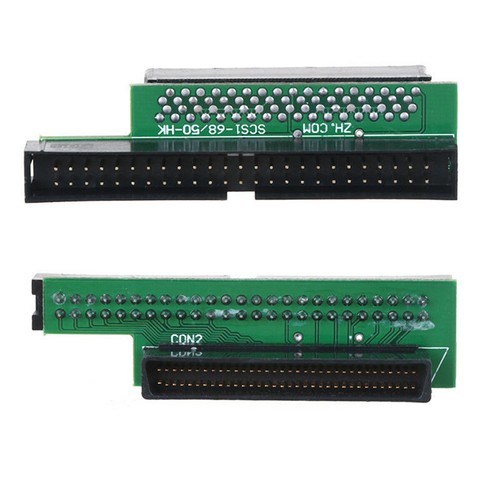
I’ve never been able to get 68- or 80-pin SCSI drives to work in any Mac. I have many, and have tried them in quite a few SCSI Macs with no luck. I gave up and assumed you had to have a 50-pin. Perhaps it’s my adapters? This is the one I’ve been trying to use lately for 68 pin drives:


Do you have any suggestions for an adapter known to work?
 
I’ve never been able to get 68- or 80-pin SCSI drives to work in any Mac. I have many, and have tried them in quite a few SCSI Macs with no luck. I gave up and assumed you had to have a 50-pin. Perhaps it’s my adapters? This is the one I’ve been trying to use lately for 68 pin drives:


Do you have any suggestions for an adapter known to work?
I have an SCA-80 drive in my 7300 right now with an adapter similar to that; although it was purchased with the drive from Other World back in the late '90s.

Unlike the adapter in the pic, mine has onboard termination. Maybe that's your issue?
 
Do you have any suggestions for an adapter known to work?
I usually don't have problems with adapters. They tend to be passive devices so as long as they don't look like they're made of garbage they should function as intended.

One of the reasons most people are happy that SCSI and ATA went away in favor of SATA and SAS is that there's basically no hardware configuration with the new standards. SCSI in particular was a mess.

SCSI drives had a variety of settings and often some of those settings would cause them to not work properly on a Mac. Not the least is termination, which is why I mentioned an external cable terminator being a possible requirement for some configurations. You can also try putting something else, such as the CDROM, as the last device on the SCSI bus with termination enabled, if the hard drive doesn't have an option (which most SCA drives don't).
Parity usually doesn't matter (the Mac's onboard SCSI ignores it entirely) but you can try flipping it on/off on the drive to see if anything changes.
You may also need to see if the drive has a "force single-ended" mode and enable it.
Some drives may also have a "force narrow/8-bit mode" that you need to enable to use a wide SCSI drive on a narrow SCSI bus.
Of course you'd need to check IDs and make sure you're running the disk with an ID of 6 or lower (7 is the Mac, and IDs from 8-15 are unavailable on narrow SCSI systems).
 
Back
Top