• Hello MLAers! We've re-enabled auto-approval for accounts. If you are still waiting on account approval, please check this thread for more information.

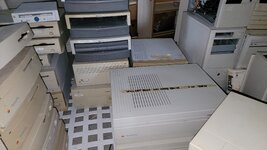
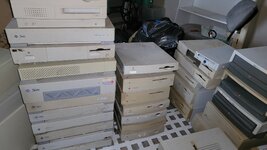
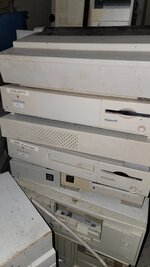
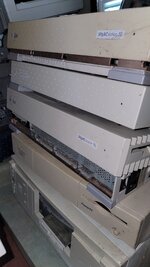
Picked up a few macs, don't know where to start

kurb69

6502
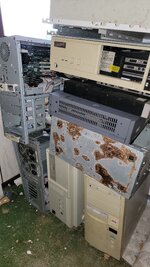
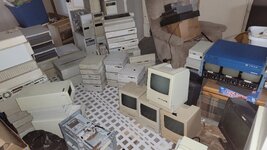
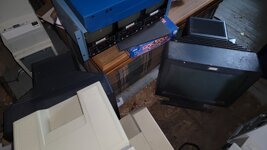
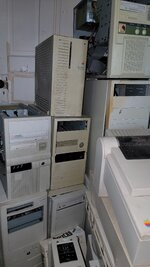
So its more than a few, and its not just macs... I don't know where to begin. I know many macs have batteries in them that grenade so my thought was i'd start there for the sake of preservation. Which models should I start with? I know its a mac forum but i would appreciate any helpful information that may help me preserve and restore these machines!

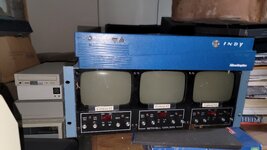
I have about 30 monitors i picked up at the same time as well about a dozen apple/mac ones. Plus a ton of sun system ones.

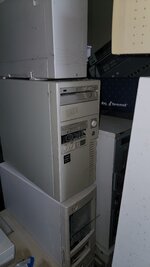
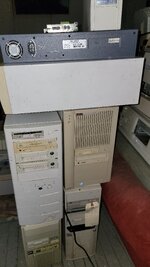
This was a haul out of an abandoned trailer, apparently the previous owner was an IT guy at a university in the late 80s/early 90s and these were basically put away in the mid 90s and never touched again until now. A few are marked bad this or bad that, a few are marked good, some say OK, but the vast majority arent labeled at all.. I opened up the quadra 700 and its like new inside. I opened up 2 of the IIfx and one of them is mint the other is all rusted out. They are dirty on the outside as this trailer was rough and active with mice/squirrels so theres some corrosion from the ammonia but seems better than expected for 30 years of sitting there.

THANK YOU IN ADVANCE FOR ANY HELP OR GUIDANCE!
 

Attachments

  • 20250824_180251.jpg
    20250824_180251.jpg
    1.6 MB · Views: 134
  • 20250824_180612.jpg
    20250824_180612.jpg
    1.2 MB · Views: 126
  • 20250824_180531.jpg
    20250824_180531.jpg
    894.6 KB · Views: 122
  • 20250824_180521.jpg
    20250824_180521.jpg
    1,006 KB · Views: 103
  • 20250824_180508.jpg
    20250824_180508.jpg
    2.2 MB · Views: 109
  • 20250824_180453.jpg
    20250824_180453.jpg
    1.1 MB · Views: 108
  • 20250824_180439.jpg
    20250824_180439.jpg
    895.5 KB · Views: 109
  • 20250824_180414.jpg
    20250824_180414.jpg
    2.2 MB · Views: 97
  • 20250824_180403.jpg
    20250824_180403.jpg
    2.1 MB · Views: 96
  • 20250824_180346.jpg
    20250824_180346.jpg
    1.4 MB · Views: 82
  • 20250824_180325.jpg
    20250824_180325.jpg
    827.3 KB · Views: 74
  • 20250824_180316.jpg
    20250824_180316.jpg
    1.3 MB · Views: 73
  • 20250824_180307.jpg
    20250824_180307.jpg
    1 MB · Views: 92
Get all the batteries out first, then make a spreadsheet. Assess for condition and damage; you don't need to know much about how the machines ought to look to know whether they're knackered or not. Then work out what order you want to do things in, and what you want to keep vs. get rid of.
 
Get all the batteries out first, then make a spreadsheet. Assess for condition and damage; you don't need to know much about how the machines ought to look to know whether they're knackered or not. Then work out what order you want to do things in, and what you want to keep vs. get rid of.
From what you can see which machines have internal batteries?
 
So what you saying is i have another full time job on top of my full time job lol

Yes, I'm afraid so. I got The Fear just looking at that pile, you've taken on a lot of work to get it all sorted.

Nearly all computers have batteries in to keep the clock going when the power is off, and it's those that are the problem here.
 
I didn't see a battery in the quadra when i had it open ill have to do some deeper research and check out youtube. this was what i was afraid of. ive changed out batteries in my lc 575, imac g3, and iigs in the past and they were right there easy to spot when you open it up thats why i was confused and figured id ask. I don't know where to start.
 
If you got these from an ex-IT person you may have got lucky and the may have already removed them, because it's relatively well-known that it's a good idea. But you shouldn't assume that, or that they didn't miss one - because if they did miss one, sod's law says it's in the computer you want most.
 
If you got these from an ex-IT person you may have got lucky and the may have already removed them, because it's relatively well-known that it's a good idea. But you shouldn't assume that, or that they didn't miss one - because if they did miss one, sod's law says it's in the computer you want most.
Understood i can definitely find enough time to take out a few a day over the next couple weeks. It will be a fun learning experience. I just wish I had a designated area i could work on stuff like this my house is pretty cramped
 
Somewhere in the list of things to do is back up of any of the working disk drives for irreplaceable software and drivers. Probably not a priority but for me it's one of the best parts with buying vintage stuff. You never know what you'll find. Maybe you'll find a map for a buried treasure.
 
Somewhere in the list of things to do is back up of any of the working disk drives for irreplaceable software and drivers. Probably not a priority but for me it's one of the best parts with buying vintage stuff. You never know what you'll find. Maybe you'll find a map for a buried treasure.
I would love to do that. I bet the university had a bunch of good shit on there. I hope to have all the batteries out within 1-2 weeks. I am working on the quadra 700 now. I am going to give them all a basic cleaning when im removing the batteries and once thats doing ill go from there
 
couple of these guys too batteries out
 

Attachments

  • 20250824_163106.jpg
    20250824_163106.jpg
    1.7 MB · Views: 84
  • 20250824_163100.jpg
    20250824_163100.jpg
    1.5 MB · Views: 80
  • 20250824_163053.jpg
    20250824_163053.jpg
    1.6 MB · Views: 68
  • 20250824_163046.jpg
    20250824_163046.jpg
    1.3 MB · Views: 71
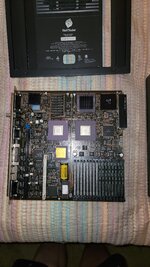
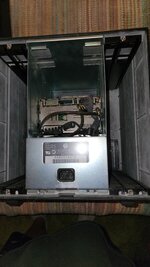
quadra 700 broken down, cleaned up and battery out, on to the next. i am going to post the internals as i go along. hopefully people can catch any problems or if im lucky there may be some unique cards in some of them.
 

Attachments

  • 20250824_204112.jpg
    20250824_204112.jpg
    1.4 MB · Views: 83
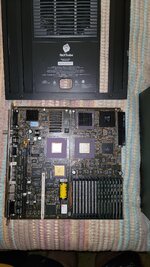
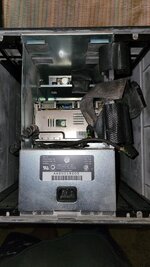
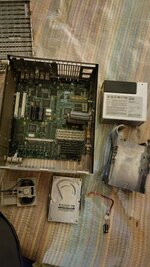
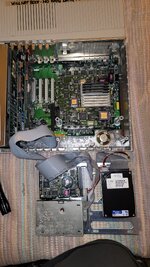
one of the 2 IIfx broken down. today was the day i learned there are 2 batteries in a IIfx. looks good inside, i think. could anyone tell me what the cards are? and why are there seemingly 3 hard drives.. this is it for me for today ill take a few more apart tomorrow
 

Attachments

  • 20250824_212929.jpg
    20250824_212929.jpg
    1.7 MB · Views: 93
Well this is fun. Fun for us, perhaps a bit scary for you. :D

The Quadra 700 will be the least of your concerns, the only problems tend to be battery damage (doesn't apply in your case) or power supply issues.

As suggested, a spreadsheet of some kind will help you keep organised and keep track of what state each machine is in. I use Airtable for this.

and why are there seemingly 3 hard drives
That's two hard drives and an Apple SuperDrive, which was Apple's floppy drive that could handle 400K/800K/1.4MB disks. Macs used different drives to PCs.

I don't know where to begin
Weigh up how much time you want to spend on this, versus how much you have to. Going through all this will take up a lot of your time. Just because this has landed in your lap, doesn't mean you have to go through with it all. You can make decisions right now that would cut your workload down significantly.

Personally, if this was my problem to handle, I would probably be starting with making a decision about the CRTs - the prospect of owning 30 monitors would frustrate me, so I'd be looking at how many of those you want to keep, if any go to specific machines/cards, etc. If some of those monitors are just generic or whatever, they are probably ready to be moved on to become someone else's problem.

In terms of deciding which Macs to look at first... the IIsi in particular always seemed to be battery damaged, so if yours isn't, absolutely get the battery out as soon as possible! Your stack of pizza box-style Macs (IIsi, LC, etc) should be easy to get through for removing batteries because those machines are toolless, you can remove the covers and components inside without a screwdriver.

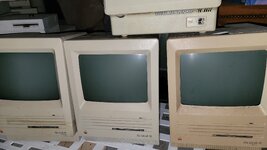
You have three SEs... as long as they are not battery damaged, there's a very good chance they all work, or will only need minimal effort to get working - those are the most robust of the compact Macs (original 9" B&W screen All-in-one formfactor Macs).
 
Well this is fun. Fun for us, perhaps a bit scary for you. :D

The Quadra 700 will be the least of your concerns, the only problems tend to be battery damage (doesn't apply in your case) or power supply issues.

As suggested, a spreadsheet of some kind will help you keep organised and keep track of what state each machine is in. I use Airtable for this.


That's two hard drives and an Apple SuperDrive, which was Apple's floppy drive that could handle 400K/800K/1.4MB disks. Macs used different drives to PCs.


Weigh up how much time you want to spend on this, versus how much you have to. Going through all this will take up a lot of your time. Just because this has landed in your lap, doesn't mean you have to go through with it all. You can make decisions right now that would cut your workload down significantly.

Personally, if this was my problem to handle, I would probably be starting with making a decision about the CRTs - the prospect of owning 30 monitors would frustrate me, so I'd be looking at how many of those you want to keep, if any go to specific machines/cards, etc. If some of those monitors are just generic or whatever, they are probably ready to be moved on to become someone else's problem.

In terms of deciding which Macs to look at first... the IIsi in particular always seemed to be battery damaged, so if yours isn't, absolutely get the battery out as soon as possible! Your stack of pizza box-style Macs (IIsi, LC, etc) should be easy to get through for removing batteries because those machines are toolless, you can remove the covers and components inside without a screwdriver.

You have three SEs... as long as they are not battery damaged, there's a very good chance they all work, or will only need minimal effort to get working - those are the most robust of the compact Macs (original 9" B&W screen All-in-one formfactor Macs).
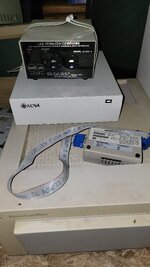
Thanks for all the input. I think theres a couple IIsi's i will put those next in the Q followed by the SE's. I am not sure what that one on top of the SE's is it just says model 0001, i had that one open already and didn't see a battery so i figured it was older and didnt have one, is that so?

Also I noticed all 3 of the SEs are different, one says just SE, one says SuperDrive under SE, and the other says FD/HD or something like that. Is that significant at all?

And this is very fun for me, I certainly wouldnt mind dedicating at least an hour or more a day playing around with these. I have an extra house im in the process of fixing up so for at least the near future I have no issue with space for storing this stuff.

The computers are all here and the monitors are all at that other place so the next time i go there I will get a picture of that stuff and post in the thread. There were a bunch of Apple Color and Apple RGB and other apple monitors. Notably an AudioVision 14 and my personal favorite a mint non yellowed Apple Multiple Scan 20" Theres a couple multiple scan 17s as well.

I figured it would be fun to kind of document it as I go in the thread with pictures etc.
 
Thanks for all the input. I think theres a couple IIsi's i will put those next in the Q followed by the SE's. I am not sure what that one on top of the SE's is it just says model 0001, i had that one open already and didn't see a battery so i figured it was older and didnt have one, is that so?

The battery is under a cover on the back above the power switch…
 
why are there seemingly 3 hard drives.
The one attached to the NuBus card appears to be used for data acquisition - a better shot of the card would help determine its use for sure, and hopefully the drives still work, since they would most likely have drivers for the cards. In fact, quite a bit of software might exist on these drives (in your haul) that is not available elsewhere. I am a bit worried about their extended stay in the trailer, since it would get very hot in the midwest.

We will likely prioritize various Macs (I would suggest taking care of the Duos and their Duodocks ahead of some of the others) but there are so many other great items here as well.

Triage is going to be essential to this and it looks like you are off to a good start, reviewing documenting, and stabilizing. Getting some help would be a great idea if you are near anyone else here and also remember that VCF Midwest is coming up next month and quite a few people from here likely plan to be there in Chicago (I'm still not sure if I am going this year yet).
 
Back
Top