• Hello MLAers! We've re-enabled auto-approval for accounts. If you are still waiting on account approval, please check this thread for more information.

PB100 was working, then it wasn't

JC8080

6502
I recently picked up an in-op PB100. I recapped it today (display, logic board, CPU board) and it started working. This was with no battery installed, I assume the battery I have is completely dead. The HD does not work but the machine comes up to the flashing floppy, so I was happy. I noticed if I moved the screen while it was on, sometimes it would power off or reset. I wasn't too concerned about it for the moment. I realized I left the two small plastic pieces that cover the hinges off, so I took the machine apart, installed those pieces, put it back together, and now the machine shows no signs of life. Pressing keys on the keyboard does not turn it on. I tried with and without the (presumably dead) battery, and tried the battery switch in both positions. I checked the power brick and it is outputting 7.8v, so that seems fine. Does anyone have any ideas what could have failed as a result of disassembling and re-assembling the machine? Any ideas on where to start troubleshooting? This is my first PowerBook so I do not know much about them.
 
Did you connect and reconnect the keyboard? Certain it is all the way seated in the connector? I'd also be concerned about the power cutting out when moving the screen. Sounds like a loose connection that may have come complete out during reassembly.
 
I did re-seat the keyboard ribbon connectors. I'm wondering if there is a broken trace somewhere on the logic board. The cap leakage wasn't bad at all and I did an inspection around the caps, but I might need to take another look.

I haven't looked yet to see if there are any schematics available, that could help with troubleshooting
 
There is a 5A fuse on the logic board (on the right, narrow section. I had to replace it since it broke without any reason. I soldered a 5A automotive fuse in place.
 
There is a 5A fuse on the logic board (on the right, narrow section. I had to replace it since it broke without any reason. I soldered a 5A automotive fuse in place.
I just checked it with my meter, it has not blown. That's unfortunate, it would have been an easy answer.

I haven't done any digging yet, I would like to figure out how the soft power works so I can do a bit of testing and see where things are going wrong. It's odd that there are no signs of life at all. The drive doesn't spin up, the display backlight doesn't turn on.

Edit: I just found a copy of the PB 100 schematics from another post. I'm definitely not an electronics expert, but hopefully this will help me narrow down the point of failure.
 
Last edited:
Double check the power connector on the logic board, ensuring it doesn't have any broken joints?
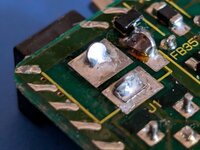
You nailed it, thanks! One of the power connector joints was badly cracked, this also explains why moving the display was causing the machine to reboot previously. I re-flowed both the joints and it works great now.

PXL_20241103_212807030.jpg
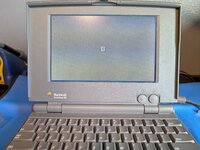
PXL_20241103_214501629.jpg
 
this also explains why moving the display was causing the machine to reboot previously
This is exactly why I thought to suggest it. And it's pretty common. It's nice when it's something simple.
Great looking machine! Display looks great.
 
Nice to see another PB100 saved, many don't survive. I'd recommend putting some little rubber bumpers on the top corners of the LCD bezel so that the LCD doesn't touch or go near the trackball at all when the lid is closed. A design flaw is that when the rubber bumpers around the LCD bezel perish they flatten with the LCD pushing on the trackball causing small fractures in the LCD.
 
Nice to see another PB100 saved, many don't survive. I'd recommend putting some little rubber bumpers on the top corners of the LCD bezel so that the LCD doesn't touch or go near the trackball at all when the lid is closed. A design flaw is that when the rubber bumpers around the LCD bezel perish they flatten with the LCD pushing on the trackball causing small fractures in the LCD.
I really lucked out with the display, it seems displays without trackball damage or leaking cap damage are very rare. I currently have the trackball removed, I will look into rubber bumpers. I definitely want to make sure the screen is not damaged.
 
Back
Top