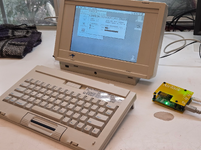
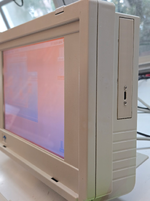
Outbound Laptop repair/reverse engineering

Back off the contrast a bit in the outbound control panel - you'll find it helps notably with the artifacts/ghosts.
I would if my mouse worked 🄲
At this point I can't tell if it's just the mouse itself not working or if there's a problem with the computer. I think when I was trying to run things with just the keyboard alone it would freeze up when opening apps. It also doesn't prompt to initialize the RAM disk which I thought it was supposed to do.
 
I would if my mouse worked 🄲
At this point I can't tell if it's just the mouse itself not working or if there's a problem with the computer. I think when I was trying to run things with just the keyboard alone it would freeze up when opening apps. It also doesn't prompt to initialize the RAM disk which I thought it was supposed to do.

Do you mean the isopoint bar or an external mouse? My isopoint just worked, there's a disassembly guide in the manual that you might check if not. In particular, if you poke the limit switches I'm pretty sure the cursor should move immediately.

If there's simms present it should prompt you to initialize AFAIK. Also, what key combo did you use for NMI? I've found Ctrl+Option+Delete is reset but not found NMI yet. Just so it doesn't alarm anyone else, it's normal behavior for the outbound to hard shut off immediately if the base is pivoted to the closed position. Alarming creaking noises while opening are also normal due to the... interesting hinge design. Sounds terrible, adjusting the hinge brake can help as directed by the user manual.

I've got mine put back together but it's still seeming a bit crashy so I've work to do still....
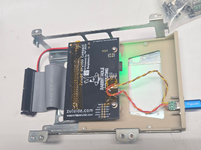
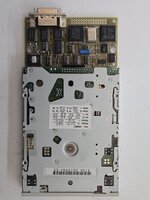
For the floppy, I'm going to attempt to adapt another drive to verify the control electronics before I put any more time into trying to rehabilitate the external drive. Right now it'll try (and fail) to initialize disks unless single sided is picked, which it will finish but don't work on subsequent boots.

1767641480182.png1767641493304.png
1767641510559.png1767641529716.png

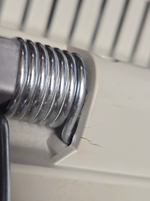
I found the main hinge had some cracking from the spring over time - I've added a metal reinforcement to mitigate that. Some small cracks there and elsewhere I used acetone (where practical) to repair.

1767641590671.png1767641607932.png
 
Do you mean the isopoint bar or an external mouse? My isopoint just worked, there's a disassembly guide in the manual that you might check if not. In particular, if you poke the limit switches I'm pretty sure the cursor should move immediately.
It's the isopoint. None of the switches seem to do anything at all. I haven't been able to find a compatible external mouse yet. Mine is also missing the cover and the white part that holds the roller, not that it would prevent it from working.

Also, what key combo did you use for NMI?
Hold a magnet in the area below the expansion connector on the left to activate NMI.
 
It's the isopoint. None of the switches seem to do anything at all. I haven't been able to find a compatible external mouse yet. Mine is also missing the cover and the white part that holds the roller, not that it would prevent it from working.


Hold a magnet in the area below the expansion connector on the left to activate NMI.
Aha. I wondered what that reed switch was for.

You might try putting a camera in front of the infrared window and working the buttons on first the keyboard then moving the isopoint. You should see infrared activity on both, if you don't see it for the isopoint then it's something in the keyboard for sure.

I've heard the mouse is a microsoft bus mouse, no idea if standard or not.
 
You might try putting a camera in front of the infrared window and working the buttons on first the keyboard then moving the isopoint. You should see infrared activity on both, if you don't see it for the isopoint then it's something in the keyboard for sure.
I do see IR activity from the isopoint, though whether it's sending the right data I'm not sure. It doesn't work connecting it with the cable either.

I've heard the mouse is a microsoft bus mouse, no idea if standard or not.
I tried getting a Microsoft bus mouse, but besides the connector not physically fitting the bus mouse is a 9 pin connector and the connector on the Outbound mouse port is 8 pin.
 
I do see IR activity from the isopoint, though whether it's sending the right data I'm not sure. It doesn't work connecting it with the cable either.


I tried getting a Microsoft bus mouse, but besides the connector not physically fitting the bus mouse is a 9 pin connector and the connector on the Outbound mouse port is 8 pin.

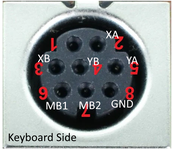
Here's the pinout as I have it so far. I verified by feeding power into an Apple II mouse i had handy and wiring things up. Mouse button 2 is a locate function, highlights the cursor with a black circle. Pin 1 seems to be a NC, but i haven't taken the keyboard apart. All lines are pulled up except 1.

1767659775300.png

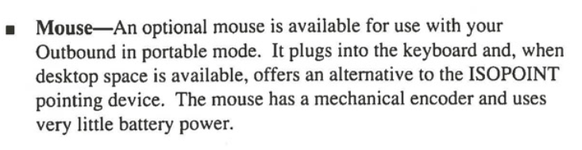
What's odd is this mouse is mechanical only, not the usual optical arrangement. This does make sense because the usual infrared mice would kill the wireless keyboard battery in a few hundred hours tops, so they needed a passive solution.... but it's weird.

1767659644056.png

As far as I know standard Microsoft mice will require power so no go there. Unless you make an adapter that incorporates a power source, anyways, or hack one into the mouse itself. If I can confirm the Microsoft Inport mouse (housing) is what Outbound custom-ordered then I may take that approach.
 
Last edited:
Okay, here's the mouse plan: looks like older Microsoft mice were still using mechanical encoders, including some of the InPort mice. So I guess it wasn't a special order beyond the cable termination.

I found this by checking a Serial mouse I have with FCC ID beginning in C3K5K (Made in US) and found it had mechanical encoders inside, so I've ordered an InPort mouse with a similar FCC ID in the hopes it too has the same inside. I'll either replace the cable or re-terminate it if so. There's a later Made in Japan C3K7PN9937 type also... no idea if it uses mechanical or optical encoders.

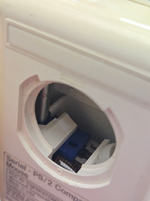
I found it was obvious from looking inside the mouse ball housing that there were mechanical encoders in play - see below.

1767675786498.png

I do see IR activity from the isopoint, though whether it's sending the right data I'm not sure. It doesn't work connecting it with the cable either.
....

I think it's pretty unlikely that it's not sending the correct codes if the keyboard works. You could try updating your eeproms with the images I posted previously (back them up first!). Could be they're corrupt.
 
I do see IR activity from the isopoint, though whether it's sending the right data I'm not sure. It doesn't work connecting it with the cable either.


I tried getting a Microsoft bus mouse, but besides the connector not physically fitting the bus mouse is a 9 pin connector and the connector on the Outbound mouse port is 8 pin.
I just figured out my "something odd".

On my machine, I had a behavior where it would fail to boot or freeze for unclear reasons, but flexing the board or repositioning the hinge would sometimes fix it. When "frozen" all would stop but it would happily resume afterwards if mechanically "stimulated" one way or another. At one point mouse clicks would work but movement wouldn't, but usually it'd be stuck in early boot and, well, can't interact at that point. It'd be fine when out of the casing and resist board flexing but when fully assembled the issue would come back - very annoying given the amount of work it is to (de)assemble it.

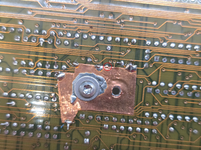
Started poking every damn inch of the logic board while running after dark and trying to figure out exactly what would cause it to "pause". Eventually, I found the below. The copper is some kind of improvised ground.... but the circled via (?) seems to not been filled with mask and got coated with solder. As a result, when pressed, it'd short to ground and seemingly cause the pause effect. Measured ~ 5v when not bridged.

I pulled the copper up slightly and then no amount of flex would interrupt the machine. Aha. And: this is a mounting point for the rear case, so it'd receive some stress as well as being a direct path for vibrations/mechanical manipulations to apply a bit of flex to the board.... seems like a smoking gun to me! I cut a small bit of the copper around the via and so far we're good.

It's a long shot, but you might check it.

1767746959678.png

I also pulled the GAL from the External floppy and dumped it. It was a GAL16V8A 25QJ in PLCC form factor.
 

Attachments

Last edited:
Back
Top