
Does anyone have documentation of the jumper setting for this card? Currently I have a DX4 100 CPU but on startup it says 75mhz CPU clock so I suspect the jumper settings are incorrect. I found references to a site "Andrew's OrangePC 290 page" which had this information however the site no longer exists.

-
 Hello Guest! We're hosting a challenge to welcome vintage Intel macs to the MLA during the month of July! See this thread for more information.
 -
We've made some quality of life improvements to the Trading Post. More info here.
You are using an out of date browser. It may not display this or other websites correctly.
You should upgrade or use an alternative browser.
You should upgrade or use an alternative browser.
OrangePC 290
- Thread starter dc99
- Start date


Too bad the wayback machine didn't catch that one...
Here's the page content including jumper settings:
Here's the page content including jumper settings:
Andrew's OrangePC 290 page
The OrangePC 290 is a PC parasite card that can work inside Nubus equipped Mac computers to give them PC compatibility in dedicated hardware, rather than in emulation software. This results in considerably better operating speed than the emulated processors in my experience so far. Some information on the OrangePC 290 is available from Orange Micro's product archive, in the Links section. Unfortunately, there is no board documentation for the older Orange Micro products available from the company. I had no luck finding other useful information on the Internet, hence this page.
Sections
Jumper Settings
- Jumper Settings
- Cyrix 5x86 Processor Experiment
- Points to Note
- Links
I received all the information in this section from one very generous complete stranger, who was persistent enough to get a manual from Orange Micro. Thanks, Al. So far as I have been able to see it reflected what I saw when experimenting a bit with the board. Please be careful when changing any jumper settings, record what they were before you experimented with them & do not hold me liable if they do not work or cause you any problems. This might be different, of course, if you sign up to shower me with rewards if/when they do work.
The jumper pin assignments for a 486DX4 100 are as follows : Jumper #1 on pins B&C ( for 3.3V CPU ) (Pins A&B are for 5v CPU's like the 486DX2). Jumper #2 on pins B&C ( only for tripled clock speed CPU's like the 486DX4 ) (Pins A&B are for all other CPU's). Jumper #3 on pins A&B. Jumper #4 on ( pins are jumpered). Jumper #5 off ( pins are not jumpered ). Jumper #6 off. Jumper #7 off. Jumper #8 on. Jumper #9 on. Jumper #10 on. Jumpers #11 & 12 set the video either to the OrangePC onboard video or an external VGA video card. External video doesn't mean a Mac Video card but a VGA video card which I don't see any provision to install. Al thought they meant a video card installed in the Mac rather than the Mac built in video but when he set the jumpers for external video the set up menu showed external VGA but the OrangePC card wouldn't boot. He switched them back to onboard video and the card works with either the Mac's built in video or a Nubus video card. The video jumper assignments are Onboard Video Jumper #11 on and Jumper #12 on Pins B&C. External video ( whatever that means as the users manual doesn't explain it ) Jumper #11 off and Jumper #12 on Pins A&B.
The Jumper assignments in general are:
CPU Voltage Options
System Board Clock Speed Options
- Jumper #1 A&B on for 5v CPU. B&C on for 3.3v CPU Tripled Clock Speed Only
- Jumper #2 A&B On is NOT Tripled. B&C On IS Tripled
NOTE: When using a CPU that has been clock doubled or tripled the system board clock speed must be set to the base speed. (e.g. System Board Clock Speed for a 486 DX 2-66 must be set to 33 MHz).
- Mhz - Jumper #3 - Jumper #4 - Jumper #5 - Jumper #6
- 16 - - A&B - - - - - - Off - - - - - - On - - - - - - On
- 20 - - A&B - - - - - - On - - - - - - Off - - - - - - On
- 25 - - A&B - - - - - - Off - - - - - - Off - - - - - - On
- 33 - - A&B - - - - - - On - - - - - - Off - - - - - - Off
- 40 - - A&B - - - - - - On - - - - - - On - - - - - - Off
- 50 - - B&C - - - - - - Off - - - - - - On - - - - - - Off
CPU Configuration
Video Configuration
- CPU - - - Jumper #7 - - -Jumper #8 - - -Jumper #9 - - -Jumper #10
- SX - - - - On - - - - - - - - Off - - - - - - - Off - - - - - - - - Off
- DX - - - - Off - - - - - - - - On - - - - - - - On - - - - - - - - On
NOTE: ON = Place the jumper across the two pins. OFF = Do not place the jumper across the two pins
- Video Mode - - - - Jumper #11 - - - - Jumper #12
- Onboard Video - - - On - - - - - - - - B&C
- External Video - - - Off - - - - - - - - A&B
Cyrix 5x86 Processor Experiment
I found a Cyrix 5x86 chip for sale at a local Mac & PC store here in Calgary (ComputerWurx) and tried it out in the OrangePC 290 card. I had high hopes for it but was unable to get it to work faster than the 486 DX2-50 which was in the card when I received it. At a processor speed of 40 MHz I had reasonable operation but higher processor speeds resulted in scrambled video from the Mac Nubus video card. I ended up pulling & returning the Cyrix 5x86, replacing it with a 486 DX2-66 which has worked well since then.
Points to Note
SIMM Socket
The SIMM socket on the board is at quite a shallow angle. Thick processors with interposer boards or tall heat sinks may block the SIMM from seating properly. This was a concern with the Cyrix chip & would definitely be of concern with a processor with a fan. The socket also has very delicate plastic SIMM retainers; one was broken when I bought my used card and the other broke while I was experimenting with the Cyrix chip. I have used a piece of insulated wire to retain the memory module as an expedient but plan to replace the socket with a regular perpendicular (or close to it) socket in the next months.
Links
To Email me feedback or comments: please include OrangePC in your subject line, to make your message stand out from the junk. Send to me at zafzgibsonz at hotmail dot com. Please substitute q for z and build up the email from the words above. I am hoping this will slow down the spam generators. I would appreciate constructive comments & useful information (anyone have a manual?) which I may add to the site.
Thank you.Too bad the wayback machine didn't catch that one...
Here's the page content including jumper settings:

Thanks @jeremywork that copy of the page with jumper settings brought back my card from the dead!
It would be great if anybody archived the whole site... I have another 290 card that the app says is not functioning correctly, I get an error code 11 and I wonder what it stands for.
It would be great if anybody archived the whole site... I have another 290 card that the app says is not functioning correctly, I get an error code 11 and I wonder what it stands for.

Confirming that mine says 75mhz with a DX-4 100 overdrive. 40Mhz bus overclock doesn’t work, and what Mac are you using yours on?
I’ve only used mine in a IIci however note 320x200 full screen mode is dreadful, wondered if you found it acceptable on other models.
I’ve only used mine in a IIci however note 320x200 full screen mode is dreadful, wondered if you found it acceptable on other models.

@micheledipaola
Attached is a zip with a rar file I had archived on this, also includes the FAQ
| Q: When launching the OrangePC, I get nothing but ``error type 11" and cannot get beyond this point for the installation. |
| Some of the newer Macintosh computers will not run the OrangePC application with earlier MacOS system versions. Install MacOS 7.5.5 or greater. Use Network Software Solution in the Apple Extras folder to switch from Classic Networking to OpenTransport. |
Attached is a zip with a rar file I had archived on this, also includes the FAQ
Attachments

Sorry for digging up an old thread but I have a OrangePC 210(?) which a Cyrix 486 DX2 66. OrangePC gives me error 11 when launching with both the PowerPC card on or off and on both 8.1 and 7.5.3. Don’t suppose anyone has any particular insight into this error?
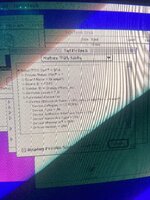
I have this installed in a Quadra 950 that it came with originally.
TattleTech does identify it.
I have this installed in a Quadra 950 that it came with originally.
TattleTech does identify it.
Attachments
Last edited:
I have managed to reverse engineer how the potentially missing features of the 2xx series OrangePC cards work and have put together some DigiKey lists to help others add missing functionality to their non-290 cards:
My journey in making these changes started over on this thread. I wanted to cross-post it here, mostly for SEO purposes to make it easier for others to find in the future (as of the time of this post, this thread is the first search result for "OrangePC 290").
- Cache
- PCMCIA. Additionally, requires a PCMCIA card cage and a CL-PD6710 for Rev01-Rev03 boards or CL-PD6720 for Rev04 boards. The aforementioned components can be found on eBay, AliExpress, or harvested from existing boards. There are some PC/104 PCMCIA boards out there that have a CL-PD6710 and a compatible card cage on them.
- Serial/Parallel. Additionally requires a GoldStar Prime 2C chip. I cannot find the GoldStar on eBay or AliExpress, so harvesting from existing boards may be the only option.
My journey in making these changes started over on this thread. I wanted to cross-post it here, mostly for SEO purposes to make it easier for others to find in the future (as of the time of this post, this thread is the first search result for "OrangePC 290").
I have determined that Serial/Parallel may also require an LT1141A. It looks like DigiKey does have these, but they are quite expensive (for a single IC). Then again, given what these OrangePC cards sell for these days, it is still quite an inexpensive upgrade. If your card is missing all features, it would cost ~$75-100 USD (in 2024) to add everything, depending mostly on eBay deals.
Last edited:
@evanboonie I got my PCMCIA model out and took some photos, it seems it also has cache installed already, if I understand your cache mod correctly; the jumpers are set to host a 486 DX2-50 which is the processor I got with the card. The chip at U94 (with a dissipator below it that I removed to take the pictures) is marked LT1086CT - 9445.
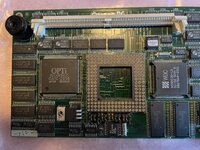
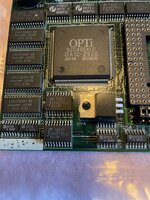
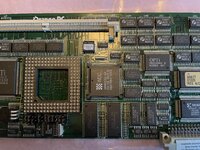
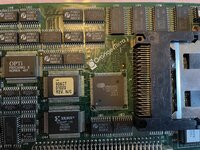
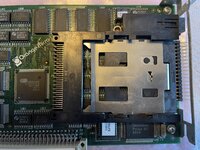

The card is currently recognized by Tattletech, but when I open OrangeMicro software it says that the card has issues and gives me error code 11. Taking pictures of the back, I am afraid I understood what is wrong with it... look at the awful scar it has:
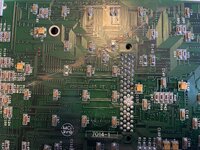
I wonder to what extent it could be possible to fix this... but I am afraid it is beyond my capability anyway
That said, here is the rest of the back in pictures:
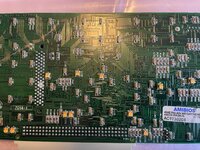
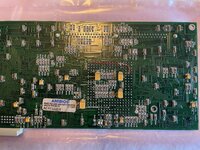
Now that I see it, I wonder if that wire is stock (I doubt it) or if someone else was here before and did some attempts of maintenance. I hope this could be useful, and now I am doing some phone calls to see if I can find someone helping me with that scar cutting across all these traces....
The card is currently recognized by Tattletech, but when I open OrangeMicro software it says that the card has issues and gives me error code 11. Taking pictures of the back, I am afraid I understood what is wrong with it... look at the awful scar it has:
I wonder to what extent it could be possible to fix this... but I am afraid it is beyond my capability anyway
That said, here is the rest of the back in pictures:
Now that I see it, I wonder if that wire is stock (I doubt it) or if someone else was here before and did some attempts of maintenance. I hope this could be useful, and now I am doing some phone calls to see if I can find someone helping me with that scar cutting across all these traces....
Attachments
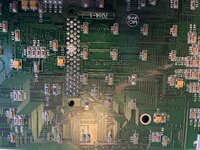


Is this the one from jen[bunchofnumbers] on ebay? If so, they swore left and right on ebay that this board worked 100% fine (without proof) and then started having some sort of meltdown posting names of people who sent "lowball offers" onto a facebook group before getting booted. Wanted something like $2500 for it.

Yes, it's that card, I got it in January for 450 bucks, which is not the crazy amount of money you said they were asking, but still a lot of money considering the condition it is in. That's how you learn lessons about buying vintage stuff online...
@micheledipaola thanks for the photos! You have finally confirmed the value of R22 for me at 220Ohm, which was the last component I hadn't been able to reverse engineer on the cache circuitry. The ICs around the cache are also confirmed to be what I thought they were (which I had assumed at this point, since I got it working, but still a nice record in photos).
That is a real bummer on those cut traces. It also looks like C49 and C79 were knocked off when the damage happened. Oddly, the soldermask being rubbed off and the smooth look to the missing capacitor pads makes it look like someone had started looking at repairing it, then gave up. The capacitors can be replaced with 0.1uf 1206 ceramics. Repairing traces like this does take a fine touch, but my best luck has always been had with fine enameled copper wire. I repaired a Quadra 950 that was damaged in shipping by a NuBus card using some enameled wire that I harvested from a scrap inductor. It looks like there are a lot of cut traces here, but it does look salvageable to me. I'm currently in the process of moving, but if you haven't found anyone to look at repairing it in the next couple of months, I might be able to take a shot at getting it working.
As for the red bodge wire on the CPU socket, I have seen that in every photo of the OrangePC 2 with factory cache. It ties the CLKMUL (2x/3x selection) pin to the WT/WB cache pin. In effect, this would make a 486DX4 with write back cache enable it on 3x, but disable it on 2x. It would also make an AM5x86 enable write back on 3x, but disable it on 4x. My guess is that this was installed at the factory on later boards as a way to actually enable the write back cache on DX4 chips that supported it, as previously the WT/WB pin was NC on that CPU socket. I'm still playing with an AM5x86 in mine, and moving that bodge around is my best chance at getting write back cache working at 4x. I'm not entirely confident of my chances of success yet though, as the OrangePC 2 was made before the AM5x86 even existed and I cannot find any documentation that ever said it was supported. I fear I might run into a similar situation as with the Houdini card, where an AM5x86 works in DOS, but Windows refuses to boot with it. I'll update more as I make progress when I get home from Holiday travel.
That is a real bummer on those cut traces. It also looks like C49 and C79 were knocked off when the damage happened. Oddly, the soldermask being rubbed off and the smooth look to the missing capacitor pads makes it look like someone had started looking at repairing it, then gave up. The capacitors can be replaced with 0.1uf 1206 ceramics. Repairing traces like this does take a fine touch, but my best luck has always been had with fine enameled copper wire. I repaired a Quadra 950 that was damaged in shipping by a NuBus card using some enameled wire that I harvested from a scrap inductor. It looks like there are a lot of cut traces here, but it does look salvageable to me. I'm currently in the process of moving, but if you haven't found anyone to look at repairing it in the next couple of months, I might be able to take a shot at getting it working.
As for the red bodge wire on the CPU socket, I have seen that in every photo of the OrangePC 2 with factory cache. It ties the CLKMUL (2x/3x selection) pin to the WT/WB cache pin. In effect, this would make a 486DX4 with write back cache enable it on 3x, but disable it on 2x. It would also make an AM5x86 enable write back on 3x, but disable it on 4x. My guess is that this was installed at the factory on later boards as a way to actually enable the write back cache on DX4 chips that supported it, as previously the WT/WB pin was NC on that CPU socket. I'm still playing with an AM5x86 in mine, and moving that bodge around is my best chance at getting write back cache working at 4x. I'm not entirely confident of my chances of success yet though, as the OrangePC 2 was made before the AM5x86 even existed and I cannot find any documentation that ever said it was supported. I fear I might run into a similar situation as with the Houdini card, where an AM5x86 works in DOS, but Windows refuses to boot with it. I'll update more as I make progress when I get home from Holiday travel.
@evanboonie glad I could be useful.
Thanks for your offer, being on the other side of the pond I'd rather find someone closer; I have a very skilled repairer I use sometimes, and he did repair traces for me on some logic boards already... so I guess he's the man, I just need to find time (and money!) to have this done, but I am in no rush.
Thanks for your offer, being on the other side of the pond
I'd rather find someone closer; I have a very skilled repairer I use sometimes, and he did repair traces for me on some logic boards already... so I guess he's the man, I just need to find time (and money!) to have this done, but I am in no rush.I have completed all of the upgrades and can confirm that everything is working. The DigiKey lists above are updated to be accurate as to the parts needed for each upgrade. I did run into a fake PCMCIA chip from China. I got one real one on a second order, so your mileage may vary. Harvesting the CL-PD6710 from another board is probably the best bet, as it will also include the needed card cage.
Similar threads


- Replies
- 107
- Views
- 16K

- Replies
- 2
- Views
- 226