• Hello MLAers! We've re-enabled auto-approval for accounts. If you are still waiting on account approval, please check this thread for more information.

OpenTransport manual install or better source?

Sadly, that's the driver I used as well. Unless someone is in my same boat with the same hardware combination, it's safe to presume it's not compatible...

Without the Turbo 040 installed it's smooth sailing, but I've been numbed by automatic PnP hardware for so long I've forgotten everything required to configure all the TCP/IP settings. I also downloaded the wrong Netscape, so I've got to get that as well.

 
Another thought I had that was brought up, but not fully addressed in ants' post regarding his accelerator+maccon woes:

The riser, meant specifically for the IIsi, has no fpu on it (traces, but no plcc socket), the IIsi also having no FPU unlike the IIci or se/30. The 040 has an integrated fpu on the accelerator.

The MacCon, however, has an FPU (rated at 25MHz interestingly, as the IIsi is 20MHz and the se/30— both marked on the card—is 16MHz), as it was originally designed to most likely be the only thing plugged into the PDS slot.

The slot on the top of the right angle Daystar adapter is passthrough, but the bottom is meant for the accelerator, and is routed differently. Could the extra FPU on the MacCon be the culprit?

I don't have an IC or PLCC puller, so I can't immediately test this, but thought I'd put it up for consideration.

 
Last edited by a moderator:
Wait, am I reading that right, you have two FPUs? You absolutely cannot do that. You can never have more than one FPU with an 040.

I can't even begin to imagine the trouble that can cause. No wonder you are having so many issues. If the FPU was on the logic board, that would be one thing, the accelerator would just shut it down, like it does the main CPU, but being on the add-on board, there is no telling what might happen. Absolutely remove that second FPU. It's not being used and is likely only causing trouble.

 
Last edited by a moderator:
Yes, no fpu on the logic board, one integrated with the 040 upgrade and one in a plcc socket on the MacCon (which was probably necessary on a bone stock IIsi)

It's odd/funny that it was used in that machine for so long on system 7.1 and nothing cropped up (or so I assume) for the owner. I'll track oner of those pulling tools down and give the bare card a try with the accelerator.

 
System 7.1 and MacOS 7.5.3/7.5.5 were rather different beasties. I have run into errors in 7.1 that never happen in 7.5, and vice versa.

System 7.1.x was the last version of the OS that I think was worthwhile, but you will find that is a minority opinion, except for some limited systems where anything higher isn't really reasonable (Mac Classic II, etc...)

 
Last edited by a moderator:
You mean System 7 Pro? System 7 Pro is a good place to start, just make sure to do a custom install and uncheck all the garbage. You'll still have to throw some crap away from the desktop and stuff once its installed, but that's easy to do. After that, upgrade it to System 7.1.2-68k. Then you'll want to run System Update 3.0. After that your Core OS will be done, then you can start throwing in whatever things you like. I suggest Drag & Drop Support, Thread Manager, Open Transport 1.3 (make sure to use the installer from Mac Garden, all the rest will error out if you are below MacOS 8.1), & AppleScript 1.1 for the basics. The rest is to taste. For your accelerator, installing the latest software for it is a good idea, so you can adjust its settings as needed.

 
Last edited by a moderator:
Cheers! I'll give it a go.
Sounds good. Let me know if you run into any trouble. I should be able to step you through it. I've done this particular install a couple dozen times at this point.

Besides the OT 1.3 from Mac Garden you'll probably want to use the Apple Legacy Software Recovery CD (1999) and Apple Application Software Recovery CD (1999) for the rest of the software, including the Core OS.

 
Last edited by a moderator:
Let me know if you run into any trouble.
So I get as far as the 7.1.2 (all from the Legacy Recovery CD) and even with extensions off I'm getting a frozen mouse. No bombs. I started this whole install series with the Turbo 040 out--plopped it it just to see, but same thing. (haven't been using the MacCon until I get a PLCC puller tool and take that FPU out). Should I just keep the 040 in from go?

Anyway, here's how I got to where I'm at:

I ended up installing 7.0.1 (IIsi system disks) first, because I needed AppleScript to do the net install. Do I need AppleScript actually installed to run those install scripts? It's been too long...
Installed the entirety of System 7.1.1 (Pro) since within the custom install dialog I didn't see the base system as an option... is it just installed by default? Anyway, it installed powertalk extras and crap I don't think I'll ever use.

After installing 7.1.2 (running script from the folder copied from the recovery CD image), like I said, I just get a frozen mouse, with or without extensions... blarg.

Screenshots of the system installs I used. And yes, I made sure to copy the actual files, not the aliases of the folders. Interestingly, the Goodies and Printing & Fonts disk images came from the  7.1.1 Duo 210-280c 2.0 folder (at least that's where the aliases led me to)
Also interesting that System update 3.0 disk images are included in the 7.1.1 Pro install folder. Can I skip 7.1.2 and go straight to that update?  ...or is it automatically installing system update 3.0 as part of that script?? I don't think it would... ANywho, thanks for the help, sir.


r9c7eg1.png.41f72524681460d6990e3c9dfbcdd610.png

onF7XkM.png.01a14cab3c9493761aa26e1e1bf3b479.png


Okay, firstly, you can just install System 7 Pro (7.1.1) directly. I don't believe you need Applescript installed. I've done clean installs without any Applscript installed and not had an issue. If the script doesn't work. just open each .IMG file yourself.

There is an option of "Powertalk for IIsi" that's the one you want. You just need to dejunk it once installed.

For System 7.1.2-68k, use the customization option and pick the following "System For This Macintosh", "Updates System Software For Any Macintosh", "Complete System File". I know, it seems weird, but it won't work unless you do it this way.

As far as locking up with the accelerator in place, are the HDD drivers up to date? Apparently if the HDD drivers are not up to date, it will cause failure.

If 7.1.2 fails, stick to System 7 Pro (7.1.1) and just run the System Update 3.0. If the System Update 3.0 causes problems. You'll just need to stick with vanilla System 7 Pro (7.1.1).

You can still use Open Transport 1.3 with System 7 Pro (7.1.1).

The Finder for System 7 Pro is either 7.1.1 or 7.1.2. You'll want to install AppleScript 1.1 so the Finder is updated to 7.1.3, that's the first version of the scriptable finder, and many pieces of software want the scriptable finder, even if they aren't using AppleScript

 
Last edited by a moderator:
Never mind about the Finder version, with System 7 Pro, it's already 7.1.3. I just checked with a virtual machine install.

If you try re-installing using the above modifications and you still lock-up at that point, with extensions off, you will likely need to stick with System 7 Pro as your Base OS. However, if you get to the point of seeing the "Welcome to Macintosh Screen" and its booting extensions, then locks-up, there is a fix for that. You need to boot with extensions off and then trash the extension "Video Startup" this commonly causes lock-ups on most systems that installed 7.1.2-68k, and it actually doesn't do anything useful, so you can trash it without any concern.

 
Last edited by a moderator:
Can I simply nix PowerTalk altogether? I'm not planning on using its primary features.

Also, earlier you mentioned Drag Manager. I did some searching and it was included on a pricy '94 developer CD. Is that part of 7 Pro? Not finding that particular extension/control panel. It mentions it was an addition proper to 7.5.x do I go through the 7.5 assets I have and find it there?

Thanks

 
Can I simply nix PowerTalk altogether? I'm not planning on using its primary features.

Also, earlier you mentioned Drag Manager. I did some searching and it was included on a pricy '94 developer CD. Is that part of 7 Pro? Not finding that particular extension/control panel. It mentions it was an addition proper to 7.5.x do I go through the 7.5 assets I have and find it there?

Thanks
You have to install System 7 Pro as "Powertalk for IIsi" (they called system 7 pro Powertalk in the installer, its stupid) but once it's installed, throw all the Powertalk garbage in the Trash. Seriously, throw everything you don't think you'll need, in the Trash. I usually strip System 7 Pro down to the bare minimum of what I will want to use. Same with 7.1.2-68k. No point in keeping garbage you will never use. OS's are meant to be lean. But, you do need to use System 7.1 or System 7 Pro as a base for 7.1.2-68k, you can't install 7.1.2-68k as a Base OS, it has to be an upgrade of an existing System 7.1 installation. Why, I have no idea, it's just how Apple designed the installer. Why Apple does many things is a mystery to me.

 
Last edited by a moderator:
7.1 Pro (gold should refer to the fact that it's "release" versus "beta") adds powertalk, which should be fun if you've got a couple machines networked, QuickDraw GX, QuickTime, and a few other things.

So, it's "extra stuff" - most of which was in the default install of 7.5.x, most of it consumes enough resources you may as well run 7.5 or 7.6.

I believe you can install/activate the bits individually. For example, if you want to use QDGX functionality you can install that without installing OpenTransport, QuickTime, or PowerTalk.

 
Seriously, throw everything you don't think you'll need, in the Trash. I usually strip System 7 Pro down to the bare minimum of what I will want to use. Same with 7.1.2-68k. No point in keeping garbage you will never use. OS's are meant to be lean. 
You can strip an awful lot of out of 7.5 and 7.6, or even later versions as well. I usually throw away most printing stuff except on machines where I'm going to use an app that needs it (for example, XPress) or that will actually have a printer connected.

 
Success! Here's what I did: installed from the 7.1.1 pro images, while booted from the 7.0.1 disk tools disk, and no restart was required, then I tested it and boot into my actual drive. Then, instead of restarting after the install of 7.1.2, at the restart dialog, I force-quit the installer, and deleted all the crap before I booted up. Works fine!

All that's left to do is re-cap the motherboard and it'll be mostly perfect. I have VRAM/video artifacts, but not the dreaded "snow" artifacts. on monochrome it's vertical lines, and with 256 colors it's mildly glitchy stuff. None of the caps have that, for lack of a better term, pooling on the board like my previous IIsi had, but I'm going to assume it's cap goo.

 
Wait, am I reading that right, you have two FPUs? You absolutely cannot do that. You can never have more than one FPU with an 040.

I can't even begin to imagine the trouble that can cause. No wonder you are having so many issues. If the FPU was on the logic board, that would be one thing, the accelerator would just shut it down, like it does the main CPU, but being on the add-on board, there is no telling what might happen. Absolutely remove that second FPU. It's not being used and is likely only causing trouble.
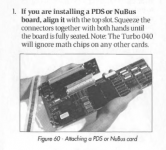
I looked up the DayStar 040 manual on archive out of curiosity, and came across this tidbit:
image.png

page 83: https://archive.org/details/DayStarTurbo040UserManual/page/n83

So even though I'm not using 7.5.x anymore, I thought that was interesting to note.

 
Success! Here's what I did: installed from the 7.1.1 pro images, while booted from the 7.0.1 disk tools disk, and no restart was required, then I tested it and boot into my actual drive. Then, instead of restarting after the install of 7.1.2, at the restart dialog, I force-quit the installer, and deleted all the crap before I booted up. Works fine!

All that's left to do is re-cap the motherboard and it'll be mostly perfect. I have VRAM/video artifacts, but not the dreaded "snow" artifacts. on monochrome it's vertical lines, and with 256 colors it's mildly glitchy stuff. None of the caps have that, for lack of a better term, pooling on the board like my previous IIsi had, but I'm going to assume it's cap goo.
Yay! Congrats!

Were you able to get OT 1.3 and all the bits and pieces installed? If not, let me know, I can link you to them.

What do you think of 7.1.2-68k? Nice and snappy, with a minimal RAM foot print, right?

I looked up the DayStar 040 manual on archive out of curiosity, and came across this tidbit:
View attachment 26976

page 83: https://archive.org/details/DayStarTurbo040UserManual/page/n83

So even though I'm not using 7.5.x anymore, I thought that was interesting to note.
Excellent info, no point in pulling it then. Have fun!

 
Last edited by a moderator:
What do you think of 7.1.2-68k? Nice and snappy, with a minimal RAM foot print, right?


It is. I miss some creature comforts/cosmetics of 7.5+ but I'll be alright.

OT is next on the list. Now I know it should ignore the extra FPU, I have a bit less trepidation installing it. I still don't know what was going on with 7.5.3/5... odd. Now I just need download netscape 3. iCab is far too ram-hungry. Unless the warning that netscape 4 won't work below 7.6, I'll stick with the lower version.

Maybe it's my VRAM situation, but I remember Marathon running better on my Quadra 610...or most likely I'm remembering my iMac DV experience...

In my trading post consolidated thread I noted I'm interested in trade/part-trade for the NuBus Daystar riser, but maybe it's more desirable. I would like a slightly more optimized video out situation, but maybe that can wait. If you hear of one, I'd be interested.
View attachment 26996

 
Back
Top